
You are using an out of date browser. It may not display this or other websites correctly.
You should upgrade or use an alternative browser.
You should upgrade or use an alternative browser.
Using Zip drive as HDD for Macintosh Plus
- Thread starter Jon146
- Start date

Can a driver be provided? My situation is the same as yours, zip drives a × when it starts upHi everyone. I thought I would post an update. It took a while for me to get a compatible Zip drive and proper SCSI cable (amazingly the PC version is male/female and the Mac version is male/male - silly). In short though, it works! The Zip drive driver loaded correctly and I was able to format a Zip disk and install system 6.0.8. Fortunately the PC version Zip drive did not damage my SCSI controller on the motherboard as cheesestraws warned. I guess I got lucky. Thanks again everyone for your help!
You can download it from Macintosh Garden: https://macintoshgarden.org/apps/iomega-zip-install-disk-v42Can a driver be provided? My situation is the same as yours, zip drives a × when it starts up
Also, it's in German, but this is a great YouTube video on how to do it. You should be able to follow along with his steps, he does a good job with video of each step.
Hope this helps!
I also made it according to his steps, it seems that it may be caused by my ZIP250. Are you using the zip100 PC version or the MAC version?You can download it from Macintosh Garden: https://macintoshgarden.org/apps/iomega-zip-install-disk-v42
Also, it's in German, but this is a great YouTube video on how to do it. You should be able to follow along with his steps, he does a good job with video of each step.
Hope this helps!
Yes, I am using the Mac Zip 100 model Z100S2. It's the one that has SCSI termination and ID switches on the back.I also made it according to his steps, it seems that it may be caused by my ZIP250. Are you using the zip100 PC version or the MAC version?
Also a PC Zip drive will not work ... I tried it by mistake.Yes, I am using the Mac Zip 100 model Z100S2. It's the one that has SCSI termination and ID switches on the back.


Zip250 drive will not boot a Mac Plus on System 6.I also made it according to his steps, it seems that it may be caused by my ZIP250. Are you using the zip100 PC version or the MAC version?
mine is this modelAlso a PC Zip drive will not work ... I tried it by mistake.
Attachments
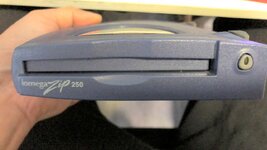
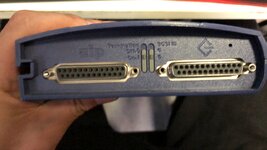
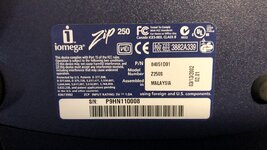
mine is this modelZip250 drive will not boot a Mac Plus on System 6.
Attachments
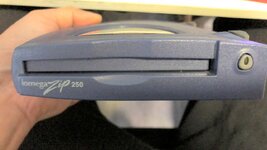
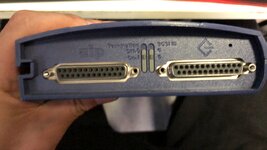
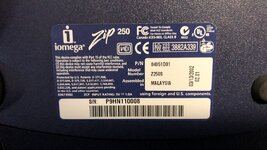
mine is this model
To clarify what I said, the Zip250 requires a driver that is newer than System 6 can support.
You might be able to format a disk using Lido or Silverlining or FWB Hard Disk Toolkit and boot it that way.
This is my situation ~ I installed a 7.1 system on a Macintosh ~ and then put the zip driver into the extension. When starting, the lower right corner shows that the zip drive is an X~ After entering the system, it prompts that the ZIP drive cannot be found.To clarify what I said, the Zip250 requires a driver that is newer than System 6 can support.
You might be able to format a disk using Lido or Silverlining or FWB Hard Disk Toolkit and boot it that way.
This is my situation ~ I installed a 7.1 system on a Macintosh ~ and then put the zip driver into the extension. When starting, the lower right corner shows that the zip drive is an X~ After entering the system, it prompts that the ZIP drive cannot be found.
The Zip250 requires Iomega driver version 5.0 and above. The Macintosh Plus supports Iomega driver 4.x and does not fully support the 5.x and above drivers.
If you format a Zip disk using a third-party tool (like I mentioned above), you don't need the Iomega extension anymore. Lido/SilverLining/FWB HDT become the disk driver and the system no longer sees it as a Zip disk (so to speak) but a regular SCSI drive.
Thank you very much ~ I am going to try the 5x ZIP driver on my SEThe Zip250 requires Iomega driver version 5.0 and above. The Macintosh Plus supports Iomega driver 4.x and does not fully support the 5.x and above drivers.
If you format a Zip disk using a third-party tool (like I mentioned above), you don't need the Iomega extension anymore. Lido/SilverLining/FWB HDT become the disk driver and the system no longer sees it as a Zip disk (so to speak) but a regular SCSI drive.

Here's what's worked for me. Mac Plus, SE, doesn't matter. I use a 100MB Zip drive/disk.
Put the Zip media in the drive, and then turn on the computer, which needs to have Lido/Silverlining/etc. on it.
Use that to format/partition/initialize the Zip disk. You don't need to install any Iomega drivers, etc.
Then you can drag a System folder onto the Zip, or install the OS using an installer, etc.
You can now move the Zip drive to another machine or use on the same machine... Make sure the Zip disk is in the drive before you turn the Mac on, and when you turn on the machine, hold down
Command-Option-Shift-Delete
This will count down from the highest SCSI ID and boot from the first volume it finds. Since the Zip is usually 5 or 6, and the Mac HD is usually 0 or 1, it will boot from the Zip disk. As far as the Mac is concerned, it's a non-removable hard drive. You can also do
Command-Option-Shift-Delete-#, where "#" is the SCSI ID you want to specifically boot.
Using this method, I have bootable Zip disks with System 6, System 7 and even a very basic OS 9 that also have some utilities on them so I can boot from the Zip and initialize hard drives, etc. and then install an OS. Works slick! Now that I have an external BlueSCSI I might switch over to that with multiple images at different SCSI IDs - one for each different version - since the same Command-Option-Shift-Delete-# should work the same, but I'll never totally give up on my Zip disks.
Hope that helps.
Put the Zip media in the drive, and then turn on the computer, which needs to have Lido/Silverlining/etc. on it.
Use that to format/partition/initialize the Zip disk. You don't need to install any Iomega drivers, etc.
Then you can drag a System folder onto the Zip, or install the OS using an installer, etc.
You can now move the Zip drive to another machine or use on the same machine... Make sure the Zip disk is in the drive before you turn the Mac on, and when you turn on the machine, hold down
Command-Option-Shift-Delete
This will count down from the highest SCSI ID and boot from the first volume it finds. Since the Zip is usually 5 or 6, and the Mac HD is usually 0 or 1, it will boot from the Zip disk. As far as the Mac is concerned, it's a non-removable hard drive. You can also do
Command-Option-Shift-Delete-#, where "#" is the SCSI ID you want to specifically boot.
Using this method, I have bootable Zip disks with System 6, System 7 and even a very basic OS 9 that also have some utilities on them so I can boot from the Zip and initialize hard drives, etc. and then install an OS. Works slick! Now that I have an external BlueSCSI I might switch over to that with multiple images at different SCSI IDs - one for each different version - since the same Command-Option-Shift-Delete-# should work the same, but I'll never totally give up on my Zip disks.
Hope that helps.
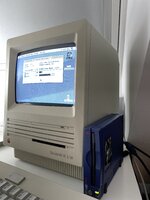
I use the startup disk and want to format the ZIP disk. The driver cannot run correctly. Maybe the reason for the 250 model
Hello world !
I'm a new user and new in old macs stuff, can you help me ?
I bought a mac se with 1 mb ram and 2 800k drives in good general condition but i need to replace disk drives or repair the eject mechanism of both.
I bought also a Iomega Zip 100 Plus as you had and i'd like to use it for boot.
Three questions:
1. How to set the SCSI ID behind the Iomega 100 plus ? The SCSI Switch will autoset? What does the termination Switch presents on the iomega 100 (not plus) ?

2. Have i to follow the following guide explained by @ScutBoy :
Put the Zip media in the drive, and then turn on the computer, which needs to have Lido/Silverlining/etc. on it.
Use that to format/partition/initialize the Zip disk. You don't need to install any Iomega drivers, etc.
Then you can drag a System folder onto the Zip, or install the OS using an installer, etc.
You can now move the Zip drive to another machine or use on the same machine... Make sure the Zip disk is in the drive before you turn the Mac on, and when you turn on the machine, hold down
Command-Option-Shift-Delete
This will count down from the highest SCSI ID and boot from the first volume it finds. Since the Zip is usually 5 or 6, and the Mac HD is usually 0 or 1, it will boot from the Zip disk. As far as the Mac is concerned, it's a non-removable hard drive. You can also do
Command-Option-Shift-Delete-#, where "#" is the SCSI ID you want to specifically boot.
Using this method, I have bootable Zip disks with System 6, System 7 and even a very basic OS 9 that also have some utilities on them so I can boot from the Zip and initialize hard drives, etc. and then install an OS. Works slick! Now that I have an external BlueSCSI I might switch over to that with multiple images at different SCSI IDs - one for each different version - since the same Command-Option-Shift-Delete-# should work the same, but I'll never totally give up on my Zip disks.
3. how can i put application or software or games on the macintosh SE in this configuration ?
Any suggestion ? THANKS for your support !
I'm a new user and new in old macs stuff, can you help me ?
I bought a mac se with 1 mb ram and 2 800k drives in good general condition but i need to replace disk drives or repair the eject mechanism of both.
I bought also a Iomega Zip 100 Plus as you had and i'd like to use it for boot.
Three questions:
1. How to set the SCSI ID behind the Iomega 100 plus ? The SCSI Switch will autoset? What does the termination Switch presents on the iomega 100 (not plus) ?
2. Have i to follow the following guide explained by @ScutBoy :
Put the Zip media in the drive, and then turn on the computer, which needs to have Lido/Silverlining/etc. on it.
Use that to format/partition/initialize the Zip disk. You don't need to install any Iomega drivers, etc.
Then you can drag a System folder onto the Zip, or install the OS using an installer, etc.
You can now move the Zip drive to another machine or use on the same machine... Make sure the Zip disk is in the drive before you turn the Mac on, and when you turn on the machine, hold down
Command-Option-Shift-Delete
This will count down from the highest SCSI ID and boot from the first volume it finds. Since the Zip is usually 5 or 6, and the Mac HD is usually 0 or 1, it will boot from the Zip disk. As far as the Mac is concerned, it's a non-removable hard drive. You can also do
Command-Option-Shift-Delete-#, where "#" is the SCSI ID you want to specifically boot.
Using this method, I have bootable Zip disks with System 6, System 7 and even a very basic OS 9 that also have some utilities on them so I can boot from the Zip and initialize hard drives, etc. and then install an OS. Works slick! Now that I have an external BlueSCSI I might switch over to that with multiple images at different SCSI IDs - one for each different version - since the same Command-Option-Shift-Delete-# should work the same, but I'll never totally give up on my Zip disks.
3. how can i put application or software or games on the macintosh SE in this configuration ?
Any suggestion ? THANKS for your support !

Hi!Hello world !
Sure, but there's quite a lot to unpack here. I'll start with the first and last question:I'm a new user and new in old macs stuff, can you help me ?
The real issue is that modern storage and peripherals aren't the same and don't have vintage interfaces, so it's far trickier than it used to be. Also, we don't yet know what you really have in terms of connectivity. These questions may help us figure it out:I bought a mac se with 1 mb ram and 2 800k drives in good general condition but i need to replace disk drives or repair the eject mechanism of both.
3. how can i put application or software or games on the macintosh SE in this configuration ?
Any suggestion ? THANKS for your support !
- You have 2x 800kB drives, but it's not clear if they work. In any case, 800kB drives aren't compatible with 720kB PC formatted Floppy disks. Do you have any 720kB/800kB disks? 720kB disks are OK, if they're formatted as 800kB disks on the Mac, but then you can't use them in a normal PC with a floppy drive. Possible workarounds if you have a Raspberry PI:
- Remove a 800kB drive; find some Raspberry PI software to talk to a Macintosh 800kB drive, then you can store HFS data on the drive (e.g. System 6 + Zip disk guest, which fits on a Mac formatted 720kB disk as 800kB). You'll have to hook up the drive's signals and find a powerful enough power supply for the disk drive. Then use the PI software to format it in a Mac format at 800kB. This will require some real hardware expertise.
- More simply, if you have the expertise, there may be some other Raspberry PI software that emulates a floppy disk (FloppyEmu?), then you just connect the cable to the PI; tell the PI software what signals emulate the disk and what disk image to use and when you boot the Mac, it'll boot. Again you'll want a disk image on the PI containing System 6 + Zip disk guest driver.
- You have a BlueSCSI or ZuluSCSI: if you have one of these, then you wouldn't be worried about Zip drives, you'd use it directly. Otherwise, you might want to buy one (I don't have one though).
- You have a USB Zip drive and a Linux computer (e.g. Raspberry PI or Linux PC or Mac booting into Linux). Then it's easy: use HfsUtils on the PI to create an Hfs image with the Iomega drivers in a driver partition. Check you can boot the image using e.g. miniVMac. Then you can place System 7.0 or System 6.0.7 (or 6.0.8) on the disk image. Then when you're happy you can dd the entire image to a real Zip disk in your USB Zip drive. This is the method I've used.
- Again, if you have the expertise there's probably some Raspberry PI software which can emulate a SCSI host. Then you can connect the SCSI Zip drive to the PI; and follow a similar procedure as for option (3).
- You have a local friend with a vintage Mac (at least one with a SCSI port, or USB Zip drive or any of (1), (2), (3) ), borrow their Mac or Zip drive and follow (3).
- You find another relatively close-by European 68KMLA member. They will have enough equipment to put System 6 + some apps on floppy disks or System 6 or 7 on the Zip disk + some apps (make sure they add a comms app, e.g. even ClarisWorks will do). Either meet half-way or post your precious Zip disk to them in an antistatic bag and wrap lots of padding around.
I presume the termination switch on both means the same thing. If it has a SCSI termination switch on it, then you'll want to set it on because for you it'll be the last (and only) SCSI device in the chain. (Termination means a bunch of resistors at the end, preventing the unwanted reflection of signals that could mess up the data stream).1. How to set the SCSI ID behind the Iomega 100 plus ? The SCSI Switch will autoset? What does the termination Switch presents on the iomega 100 (not plus) ?

I doubt the instructions from @Snial will be of great help for you. (or even correct; I never heard of a Raspberry Pi communicating with a Mac floppy drive etc..). Your Zip drive appears to be a hybrid which supports both parallel port and SCSI. It maybe even requires a special cable to work.
To be honest, I would simply buy an external BlueSCSI and load a pre-made disk image to it. From there, you can still work towards a working bootable Zip drive if you still want/need this then. Especially if you are inexperienced with vintage Macs, I would strongly suggest this approach. The BlueSCSI will also bring you additional benefits like reliability and WiFi networking (certain models only).
You can get pre-made disk images for BlueSCSI (and PiSCSI, ZuluSCSI, they are all compatible) at macintoshgarden.org or even from forum members here if you ask
To be honest, I would simply buy an external BlueSCSI and load a pre-made disk image to it. From there, you can still work towards a working bootable Zip drive if you still want/need this then. Especially if you are inexperienced with vintage Macs, I would strongly suggest this approach. The BlueSCSI will also bring you additional benefits like reliability and WiFi networking (certain models only).
You can get pre-made disk images for BlueSCSI (and PiSCSI, ZuluSCSI, they are all compatible) at macintoshgarden.org or even from forum members here if you ask


Similar threads
- Replies
- 6
- Views
- 430


- Replies
- 10
- Views
- 1K


