• Hello MLAers! We've re-enabled auto-approval for accounts. If you are still waiting on account approval, please check this thread for more information.

Problem with DaynaPORT E/si30 network card

I recently acquired an SE/30 with a DaynaPORT E/si30 network card.  I've found the drivers and installed them ok but I can't get the machine onto a network.   The diagnostics utility reports the card is installed ok and the green light on the card starts to flash when I plug the network cable in.  However at the hub end, there's no activity on the connected port.  Does this sound like a hardware problem with the Daynaport card or do you need the correct driver to get the activity light on the hub?

I have two other Macs with pds networks cards, an LC475 and a Colour Classic, both these machines connect to the network fine when I plug them into the same cable.  Any ideas?

 
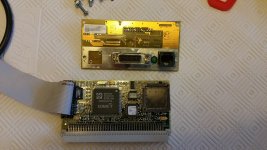
20160323_185047.jpg

20160326_173123.jpg

 
Last edited by a moderator:
depends on how new your switch/hub is. newer ones dont work with older cards. 

When in doubt, stick with a WRT54G. They all work... 

 
Good point, I never considered that it might be the hub.  I've got a few different hubs I can test with, I'll try them out.  Most of the hubs that I have are fairly new, I have an older Netgear that's about 8 years old, it might work with that.  Would using an ethernet transceiver on the 15 pin output help with using this card on newer hubs?

 
Last edited by a moderator:
My first guess would be the hub/switch isn't properly switching to 10BASE-T, which is related to what Techknight said.

 
I keep a 10 base T just so I can do this sort of thing, even better I know it works plugged into my airport extreme base station.

 
I have an older version of your DaynaPORT card (full size, really tall one that actually screws into the bracket. ... has some sort of expansion port on it.)  I found that it refused to work until I installed the drivers.  However, since you already installed your drivers, I'd have to agree with possibility that it's your switch.

 
Thanks for the responses regarding the switch/hub.  After doing some reading I found that these old network cards don't broadcast their speed and duplex to the router.  Apparently back in those days 10mbsp was enough for everyone, so they assumed a 10mbps connection.  Therefore modern switches/hubs won't recognize them as they require the connecting device to broadcast speed and duplex.  The symptoms of what I'm experiencing support this, i.e. the activity light comes on at the Mac end but not the switch/hub end.

 
Last edited by a moderator:
When in doubt, stick with a WRT54G. They all work... 
Are you referring to a Linksys WRT54G?

I got my hands on one, it has DD-WRT firmware installed, but still no go, SE/30 doesn't show up on the port.  Is there anything special you need to do to get it to recognize a 10mbit nic?

 
You'll have to force the port on the Linksys to 10mbit/half duplex. Go to Setup and VLAN. Uncheck autonegotiate, full duplex, and 100 Mbit for the appropriate port. Sometimes this doesn't work due to a bug in the switch driver. The interface will show you've done the above, but the setting is ignored. If you don't get a link light after trying that,

you may be able to install a command line utility that will work. At this point if you want a simple solution, just get a 10mbit hub. I was unable to install any of the utilities I needed on my WRT54GL routers as the particular revision doesn't have enough flash memory. I ended up using OpenWRT and going down the rabbit hole that is configuring it via command line.

 
my WRT54G is bone stock, and its worked with everything I have plugged into it. old 8-bit ISA NICs up to the newest Killer series. 

 
You'll have to force the port on the Linksys to 10mbit/half duplex. Go to Setup and VLAN. Uncheck autonegotiate, full duplex, and 100 Mbit for the appropriate port. Sometimes this doesn't work due to a bug in the switch driver. The interface will show you've done the above, but the setting is ignored. If you don't get a link light after trying that,

you may be able to install a command line utility that will work. At this point if you want a simple solution, just get a 10mbit hub. I was unable to install any of the utilities I needed on my WRT54GL routers as the particular revision doesn't have enough flash memory. I ended up using OpenWRT and going down the rabbit hole that is configuring it via command line.
Thanks, this worked!  I went into VLAN and set port 4 with those options, port light now lights up on router.  I can now connect to my local FTP server using Fetch on the SE/30.  I managed to buy two Linksys WRT54G's for $10 each.  So a great solution.

Just for the record I did switch to the factory Linksys firmware and I couldn't get it to work with the SE/30 although I didn't muck around with any VLAN setting on the factory firmware.  I have configured both WRT54G's as switches using DD-WRT.  DD-WRT allows you to  use the Internet port on the router as an additional switch port so you have five in total.  Factory firmware only allows for use of four ports as a switch.

 
Last edited by a moderator:
thats really strange. I use factory, and I dont do anything special, VLAN or anything. it just works. 

Go figure. 
What version of the WRT54G do you have?  The one I got to work with the SE/30 and DD-WRT was a WRT54G v1.1.  The other one that I got off the same guy was a WRT54GL, not sure about the version on that one.

 
Nice! The GL is basically a later reissue of the G v4. The WRT54G v5 switched to a proprietary OS and is not compatible with DD-WRT/OpenWRT, etc. The GL has a slightly different switch and I suspect that's why the speed and duplex settings don't work in DD-WRT. I'm glad to hear the V5 works out of the box- they're usually super cheap since they can't do DD-WRT.

 
So... the Linksys worked?
Yes the Linksys worked but my version required DD-WRT to be installed.  DD-WRT allows for the configuration on one or more ports to 10mbps and half-duplex.  Just used it on the SE/30 today to install some stuff, It's been working perfectly.

Just for the record if you want to flash the WRT54G with DD-WRT use the minimal version.

 
Last edited by a moderator:
Hi! I'm a long-time lurker, first-time poster. I have a number of old Macs, and got a working SE/30 a couple of months ago. I, too, have been looking around for a network card, and have ended up with three of them! I have two Shiva Etherport II cards (one branded Novell), both with the 'Kinetics SE' back panel board, with only AUI and 10base/2 outputs. I may start another thread about building an RJ45 panel for these, as I don't have any means of connecting these to a standard router at present, and would rather not use a AUI to RJ45 transceiver.

However, I have recently found a Daynaport E/Si30 board, but without the back panel board (with the AUI/BNC/RJ45 connections). I don't fancy my chances of finding the back panel board on it's own online, so I'd like to try and build one. Also, I've seen these boards come up on their own before (ie without the back panel), or with an AUI/BNC version, so I think it's worth trying to reverse engineer a board with an RJ45 connection. I've seen a few other pictures of these boards, but yours (kingchops) is the first I've seen with an RJ45 10base/T port. The BNC/AUI version has a few passives on the back, but I think these are for the BNC connection; see http://www.recycledgoods.com/dayna-e-si30-ethernet-card-w-daughter-board-ribbon-cable.html. There's also an area on that board for the RJ45, with space for a bunch of passives. I've got another ethernet adaptor which has the same SONIC-T chip as the E/Si30 (it's an Apple Comm slot 1 ethernet board), and there appears to be very few additional passives and connections to the RJ45 port, and roughly equivalent board components. This makes me think it should be a relatively simple connection... I hope.

What I really need is a good picture of both sides of your back panel board, as clear and zoomed in as possible, ideally so I can read the values of any surface mount resistors. This will hopefully make it clear what connections need to be made. Ideally, tracing the pins of the RJ45 back to the ribbon cable connector would be perfect, but I don't expect someone to do that for me! Any help would be greatly appreciated.

 
Back
Top