• Hello MLAers! We've re-enabled auto-approval for accounts. If you are still waiting on account approval, please check this thread for more information.

Performa 6220CD Rebuild Problem

Hi everyone,

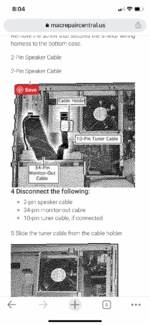
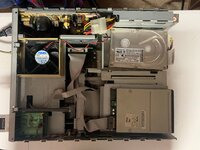
I got an absolutely filthy 6220CD. I stripped it down, cleaned it up, and am in reassembly mode. I plugged everything back in to what I thought was the correct slots, but I couldn't get the machine to spin up. Then I tried taking the 34 pin monitor cable and plugging it in a 34 pin port on the motherboard (see pic). The machine spins up when I do this, but there's no way to get video out to the monitor. What am I missing here?
 

Attachments

  • performa.jpg
    performa.jpg
    1.4 MB · Views: 19
The 34-pin port used in the picture is for DAV on the video-in board, which won't help with video output (hopefully it didn't damage anything...)

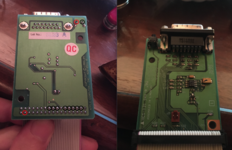
On the monitor-out board in the bottom left there is also a power button. I’d assume something is going on with that circuit since the behavior changes without it plugged in.
 
Ok, that makes sense, but I don’t have any more 34 pin cables on the wiring harness to connect the video out board.
 

Attachments

  • CE40868D-68A7-4AC6-8CCE-024D049503FE.png
    CE40868D-68A7-4AC6-8CCE-024D049503FE.png
    1.1 MB · Views: 8
The 34-pin DAV connector is usually left open, unless you have a specific add-in card which requires it. The ribbon you have plugged into it should definitely go into the video out board.

I tested a spare I have and found the pins which connect to the power button, which is normally open:
Screen Shot 2022-02-13 at 5.50.15 PM.png
 
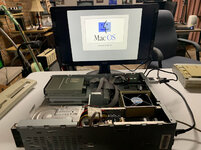
Success! Thank you @jeremywork. I used the rear power button and it fired right up. I wondered why the keyboard power on wasn't working and it turned out I had it plugged into the wrong port.

So yeah, time to go with this thing! A few more questions:

1. Should I be able to replace the fan with a modern quieter one easily?
2. What is the optimal OS for this machine?
3. I have read several posts from various places saying SD-IDE adapters will not work with pre-OSX Macs. Is that true, and if so, why?
4. Following up to question 2, if SD-IDE isn't the way to go, what is in terms of replacing the spinning hard drive with a flash solution?
 

Attachments

  • IMG_7043.jpg
    IMG_7043.jpg
    107.2 KB · Views: 10
1. Yes a modern fan will work.
2. Optimal OS is 7.5.5 or 7.6/7.6.1.
3. CF-IDE adapters will work but you have to find the right one, a lot of them don't work.
4. Replace spinning drive with a more modern IDE drive tends to be what I do with these machines.

Good luck!
 
3-4. That sounds like a winning idea. Do you have any recommendations for a modern IDE spinning drive? I need to replace the one in my Quicksilver too.

In the past I've used various Maxtor, IBM or Apple labelled drives - anything should do really as long as its an older drive. Stuff pulled from G3s/G4s tends to still work and I haven't had any issues with those in a 6200. You'll just need to use smaller partitions to keep System 7 happy, I tend to use 2GB partitions.

7.6 comes with extra stuff, so it depends if you want the extra bloatware. 7.5.5 will probably be fine.

I can't remember exactly what spec the fan in the 6200 is, but yeah most fans will work fine as long as you can hook it up in some way. The fan in the 6200 doesn't really do a whole lot, especially if you put anything on top of the machine.
 
So I need to use an older IDE drive rather than buy a new one? I was hoping to get better performance by buying a newer IDE drive. Is that not a good idea?
 
You won't get better performance because the bus on these machines is slow. I've never had a problem with disk performance on these machines though, afterall the 6200 is a slow Mac. But yeah I don't think you'd have much luck a new drive, the IDE bus probably won't recognise it.
 
Good to know--you just saved me a bunch of money :D So if I want to do a fresh install of 7.5.5 with the drive that's already in there, it's as easy as burning an ISO of this and popping it in the CD-ROM?
 
Back
Top