

• Hello MLAers! We've re-enabled auto-approval for accounts. If you are still waiting on account approval, please check this thread for more information.

System 7.5.3 fail on Macintosh SE

mloret

6502
Hello! I am having some trouble getting my system 7.5.3 HD image to work on my Macintosh SE. It's a hard disk image on my floppy emu. When I try to boot from it I get the startup error shown in the picture. When I reboot holding down shift (extensions off) it works fine. However, when I go in and manually turn off ALL extensions and boot without holding down shift, I get the same error. The only way to avoid that error is to hold down the shift when I boot. Any ideas to remedy this?
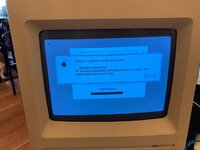

IMG_3410.JPG
 
Did you disable all of your control panels as well? My recollection is that holding the shift key disables control panels that contain boot-time code as well as disabling extensions.

Do you have any other types of extensions installed? For example, the MacsBug debugger loads at startup, but it lives in the System Folder, not in the Extensions folder.
 
Did you disable all of your control panels as well? My recollection is that holding the shift key disables control panels that contain boot-time code as well as disabling extensions.

Do you have any other types of extensions installed? For example, the MacsBug debugger loads at startup, but it lives in the System Folder, not in the Extensions folder.
I disabled everything including control panels and tried to boot, no luck. Don't know about other types of extensions. How would I check?
 
So 7.5 worked, but 7.5.3 doesn’t? Are these both clean OS installs, or have they been used/customized?

You probably don’t have any other types of extensions, but I mentioned it just in case.

Holding down shift also disables any Startup Items from being launched. It doesn’t look like it’s making it that far, so that’s probably not it.

I’d be tempted to do a clean install of 7.5, then upgrade that clean System Folder to 7.5.3 (or more likely 7.5.5). I can’t remember if you can go straight from 7.5 to 7.5.5.

Alternatively, Macintosh Garden has floppy and CD images for 7.5.3, so you could do a clean install of 7.5.3 (and then upgrade that to 7.5.5 if you’d like).

 
I have an install of 7.5 that works. Okay, how would I upgrade from 7.5 to 7.5.3? I see a System 7.5.3 update 2.0 zip file. Is that it?
 
I think the full 7.5.3 installer can probably upgrade a 7.5 install, but I’m not positive. I’d try one of these:


MacOS_7.5.3.zip: Mac OS 7.5 v7.5.3 mountable floppy images

MacOS753CD.zip: Mac OS 7.5 v7.5.3 CD-ROM disc image.
 
How much RAM do you have in your SE? Do you have a need to run 7.5 or later (7.5.5 is the latest the SE supports)?

7.5 is going to be very tight on RAM for an SE, even if it’s maxed out at 4 MB. You may be running out of RAM when you boot normally - I’m not sure what the failure mode would be in that case.

For an SE, I’d probably recommend 6.0.8 (with or without MultiFinder), or 7.1, assuming you don’t have a specific need for 7.5.
 
Thanks for the feedback. It's very slow with 7.5 so I'm going to cut my losses and try to get 7 on this thing. I already have 6.0.8 which I'm not crazy about.
 
7.1 works well on the Plus and SE, if System 7 is desired. Has the smaller footprint of 7.0, but some of the updates that 7.5.x has. I have run a Plus under 7.5.5. It's doable, but pokey. Mainly did it just to prove to myself that it'd run 7.5.5. My current Plus will probably get an external 800K floppy and just run 6.0.8. That way, the only noise heard when the computer isn't accessing the floppy drives is the slight hum of the power supply, unless I add a Kensington System Saver to it.
 
Back
Top
