

• Hello MLAers! We've re-enabled auto-approval for accounts. If you are still waiting on account approval, please check this thread for more information.

Powerbook 100 display issue

Hi,

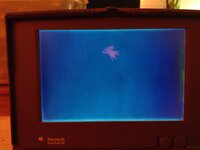
My powerbook 100 has an issue where it only shows a dark screen, with a snowflake like glitch in the middle (picture included). The PSU is a known good one, as it powers my Powerbook 150 just fine, so it's probably dead caps. Which part of the machine should I have a look at first?
 

Attachments

  • IMAG0953.jpg
    IMAG0953.jpg
    2.1 MB · Views: 32
Awww that's a shame. What display would I need and where could I get one?
I don't know which one you need offhand, but if you take it apart and look at the display, try searching the brand and model number of the display on eBay, that's what Colin from This Does Not Compute did with his Powerbook duos
 
Pretty sure that's TrackBall damage from too rough handling in times past. The rest of the screen should be good?

edit: I've got one like that I'm hoping to use in a test setup for re-capping several boards without killing a known good display/cable.
 
Last edited:
Pretty sure that's TrackBall damage from too rough handling in times past. The rest of the screen should be good?
I don't know. It has been stored in a sunny place I think, judging from how greenish it looks and how all rubber parts feel like snot. I picked it up from a house clearer, but he didn't really seem like a guy who was very careful with sensitive electronics. The PSU it came with is absolutely dead(but I luckly had a spare one as I mentioned), and the laptop itself was filled with cat hairs of all things. Still though, the case seems in good shape and the laptop seems salvageable with a bit of retrobrighting and recapping I think. Are there any specific caps on this model I should look out for?
 
All the electrolytics we all know and hate on both the logic board and the display need to be replaced. The screen you're seeing is the backlight being on but the display itself being off (I think so, anyway). The computer doesn't start because of the bad caps, and how easy of a fix it will be will be up to how bad they've leaked. There display needs caps replaced as well. They look like tantalums, but they're actually electrolytics and disguise, and you bet they leak. The display inverter board also has leaky electrolytics.

The pink splotch is unrepairable LCD damage from the trackball pressing against the screen for a long time. The rubber strips at the top of the screen that keep the trackball from touching the display will break down and melt, causing it to start pressing against the screen, and then you get that damage.
 
@Cedsrepairs recently recapped a PB100:

 
@Cedsrepairs recently recapped a PB100:

Thanks for the link! I think I might leave this one for a professional though, because I don't think my soldering skills are up to par to actually be able to recap it.
 
Understandable! Hopefully you have someone locally who can do it (just to minimize shipping).

Or, it's a project you work up to...
 
Search for PB100 and black screen on here, it's not just a recap job the black screen is also related to an motherboard issue that's yet to be determined. In short, don't buy a PB100 with black screen of death.
 
First I've heard of that one? YOWCH! :oops:

Back in the day there was an unannounced extended warranty for blown boards due to chips at the ends of the Gray Ring(?) AC adapter blowing up the system. It required a logic board replacement and a new AC Adapter IIRC.

I wonder if that's why so many boards indicate significant factory rework having been done to them?
 
logic board capacitors (including the one in the CPU board) and display ones, but unfortunately that glitch will be present ( i agree, this is due to the trackball)

The powerbook 100 is a fragile unit, a Macintosh Portable in disguise
 
Search for PB100 and black screen on here, it's not just a recap job the black screen is also related to an motherboard issue that's yet to be determined. In short, don't buy a PB100 with black screen of death.
I’ve seen threads where recapping fixed this. Are the blue backlight and the infamous black screen of death one in the same, or 2 different issues?
Edit: I found an old thread from 2011 that shows the black screen of death and it does look different, but it might just be the photo lighting
 
Search for PB100 and black screen on here, it's not just a recap job the black screen is also related to an motherboard issue that's yet to be determined. In short, don't buy a PB100 with black screen of death.

I helped a guy on Discord figure this out. there is an inductor that gets eaten away from cap goo and its impossible to see the failure, but its there.
 
Great work solving this! (hopefully it’s the same issue for them all), which component exactly is it? I’m hoping to get a 100 some day, it would be useful to know just in case.
 
I will have to get pics with the details, but here is the root cause:

You are missing the twist voltage that drives the panel. its a 20 to 30v supply and its generated by the converter on the logic board. This voltage goes missing and that causes the black screen when the computer seemingly boots. Why? this boost converter sits right next to big ass leaker tank farms that need replaced and the electrolyte eats away the nearby components stopping the DC-DC boost converter from running.
 
I will have to get pics with the details, but here is the root cause:

You are missing the twist voltage that drives the panel. its a 20 to 30v supply and its generated by the converter on the logic board. This voltage goes missing and that causes the black screen when the computer seemingly boots. Why? this boost converter sits right next to big ass leaker tank farms that need replaced and the electrolyte eats away the nearby components stopping the DC-DC boost converter from running.
I've seen this once and fixed it by replacing the full display, maybe its the cable or something?
 
Back
Top




