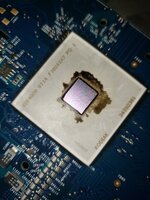
i'm at a loss of words and mourn the death of my dual core 2.3GHz G5. i wonder if someone else has experienced an issue like this? this computer was stressed to the bone it seems... it had the checkstop LED come on too
I guess those are chipset controllers with small heatsinks needing proper airflow to stay cool. On PC motherboards they would have a large heatsink and a cooling fan or heat pipe.
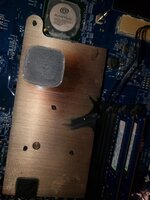
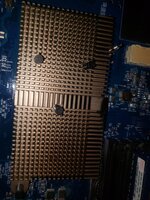
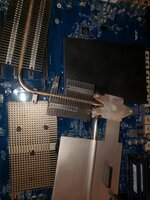
the black mark is the only remains of the heatsink's original black color. the heatsink is aluminum and it had discolored. the copper heatsink where the chipset looks very worn out and is discolored too.
i'm not sure what it is either, but looking at ONE other photo i found of this chip on house of moth, it appears to look very worn out. there are small "bubbles" on the die of my chip. what i can say is that the epoxy is NOT looking good.
I guess those are chipset controllers with small heatsinks needing proper airflow to stay cool. On PC motherboards they would have a large heatsink and a cooling fan or heat pipe.
the northbridge uses that large heatsink and the southbridge uses the small aluminum one. my question is how did the southbridge run so hot to the point it managed to discolor the heatsink??
could have. all i can say is that the board is toast and the CPU might be too. i just want to reach out to ensure that i'm not alone and find out if someone else had this same issue too. some people did report CHECKSTOP lights but they said their CPU had simply overheated and i've only seen posts about the light coming on in the G5 quad, which i do NOT have.
seeing as how these get hot and use some crappy lead-free solder, i'm sure somehow those connections cracked and caused the chip to fail. i'll get a new motherboard when i have money to do so.
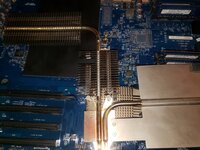
This seems to short-circuit an awful lot of the potential steps in the troubleshooting process just because you don't like lead-free solder . Please look carefully at the heat pipe, as @ymk suggests, and in fact the whole rest of the cooling system—a cheap non-contact thermometer might be a good thing to get here if you don't already have one.
i'm just going to end up buying a new board for this computer, and maybe even a new CPU. i don't really trust the board and the CPU may have issues too. i will buy a new motherboard, and then buy a new CPU if my existing one doesn't work.
Have you checked your backside fan? It's the radial fan located behind the HDD cage fan - quite hard to access. The backside fan cools the chips on the back of the board and is absolutely vital to the operation of the G5. The machines quickly die if the fan dies. If your fan is dead then your replacement board will die a quick death shortly after you install it.
Similarly, the heatpipes on the backside of the board can lose contact with the chips they're supposed to cool and lead to fatal overheating. A replacement logic board will also need new thermal paste and pads.
You absolutely must check the functionality of the backside fan. You can do this easily if you have already removed the logic board. You just need to power it up with a battery or bench supply and see if it still spins.
This site uses cookies to help personalise content, tailor your experience and to keep you logged in if you register.
By continuing to use this site, you are consenting to our use of cookies.










 . Please look carefully at the heat pipe, as
