• Hello MLAers! We've re-enabled auto-approval for accounts. If you are still waiting on account approval, please check this thread for more information.

PowerBook 2400 External Monitor

I have a PowerBook 2400 that has a bad screen if I shine a light on it I can barely tell what’s happening. I hoping I could use an external monitor while I try to find a screen but when I plug in a monitor to it nothing seems to happen. Is there something that you need to toggle to get the external monitor to kick in?
 
I did discover that if press the power button when it's in sleep the external display will flash an image for a couple seconds then goes back off. Not sure what the deal is with it. I'm wondering if the inverters are repairable on these? Or am I just screwed?
 
Shine a torch on the 2400c, access your Monitors Control Panel and see if you can shift the primary display over to external (move the menu bar over).

Re: sourcing the screen, being IBM made ThinkPads from a comparable era might run the same model 10.4" panel; hard to say if backlight gone or inverter without cracking open the LCD enclosure.
 
Shine a torch on the 2400c, access your Monitors Control Panel and see if you can shift the primary display over to external (move the menu bar over).

Re: sourcing the screen, being IBM made ThinkPads from a comparable era might run the same model 10.4" panel; hard to say if backlight gone or inverter without cracking open the LCD enclosure.
I'll try that next time it's in one piece I kinda took it apart into a million pieces to see if I could sort out the issue lol.
 
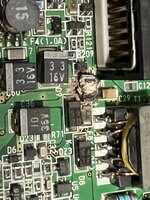
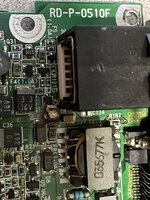
A19DFC49-AAE0-4753-98B0-FFB1D0A99B40.jpeg76720C2C-06B0-449D-BA22-8EFBE6F66F39.jpeg
We’ll after closer inspection I did find at least one problem, any idea what that part is that has disintegrated into nothing? Guess I need to take apart another 2400 to compare.

Also I posted this in the wrong section by mistake can an admin move me to the PPC section?

thanks!
 
Back
Top