• Hello MLAers! We've re-enabled auto-approval for accounts. If you are still waiting on account approval, please check this thread for more information.

Zip drive and Mac Plus

SBL

6502
I recently got a ZIP drive 100, and I cannot get it to mount. Here is the setup. Mac Plus SCSI connector to Zip drive. Set to ID 6, and termination switch turned ON (also tried it with termination switch OFF). Second connector on Zip to my external SCSI HDD (a POWERDrive 40 MB drive). Note that this HDD does not have a termination switch, and does have a second Centronics socket. I have used this HDD without any sort of termination on this Mac Plus without any problems. The Zip drive is connected to its power supply.

I have placed the Iomega 4.2 driver in the System Folder. The Zip disk that I have says that it is Mac formatted.

When I power on, the HDD boots the System Software (6.0.8). So, we know that the Zip is allowing a passthrough to the HDD. But I do not see the drive, regardless of whether the disk is in or out. When I run SCSIProbe, it detects the HDD (ID=4), the Mac CPU (ID = 7) and the Zip (ID = 6). So all good. But just no Zip drive on the desktop. I have tried using ID=5, and with and without the termination switch on, and no change. I have also swapped the 2 plugs at the 2 connectors on the Zip drive, but no change.

I booted with the Zip disk inserted, and I could tell that the Mac was trying to boot from the Zip, but it did not (as expected) and the screen eventually just turned black. Never got the sad face. I am suspecting that I have a driver problem. Other than being in the System Folder, is there something else I am supposed to do? My goal here is to just get it to work so I can make some backups.


 
What machine did you make the Zip disk on? If that machine runs with an Iomega Driver greater than 4.2, this won't work (it updates something on the actual disk that won't allow it to start on a Plus).

 
I purchased the disks on eBay. And of course since the drive does not show up on my desktop, I cannot reformat the disks. With the disk out, should the Zip drive icon show up on the desktop?

 
And of course since the drive does not show up on my desktop, I cannot reformat the disks
If you use something like Lido, it will allow you to format discs that don't appear on the desktop.  This may also apply to Zip discs too (but I haven't tried it).

With the disk out, should the Zip drive icon show up on the desktop? 
Nope, it will behave like the floppy drive; an icon appears for the disc, not the drive.

 
Just read this more closely, you have a working hard drive and the scsi chain is mac plus -> zip drive -> hard drive, and scsi probe is seeing everything.  Do you have anyway of getting files to your plus?

 
Yes. I can use the 3.5" floppy disk drive, or, can send files from my Powerbook G3 via the serial port to the Mac Plus. The latter is how I got the 4.2 driver and put it in the System Folder of the Plus.

steve

 
Hi SBL, sorry, I've been busy with work.  I deal with cyber security and business continuity planning, so as you can guess things can be a bit busy for me.

Reading through the thread I see you have both an external hard drive and a zip drive, and you can get files to your plus using a serial connector.

So let's try a few things.

Since you're running 6.0.8, the version of Lido on the garden won't work for you.   I have an older version somewhere but first.

Download the patched version of Apple HD SC if you don't have it.  http://www.savagetaylor.com/wp-content/uploads/68k_Macintosh/Utilities/HD_SC_Setup_7.3.5_Patched.bin

Copy this to you MacPlus

With everything off:

  • Turn on your hard drive
  • Turn on your zip drive (with the disk inserted)
  • Turn on your Macintosh
  • Run Apple HD SC, select switch disk until your zip drive is selected (SCSI ID 6 from what you wrote)
  • Use Apple HD SC to initialize the disk.   I know that you wrote that your disk was Macintosh formatted, but it may use one of iomega's newer boot drivers that don't work on the plus.  Using Apple HD SC will give you a clean slate we can trouble shoot from.
  • Assuming that Apple HD SC let you initialize the disk, you should now see the disk on your desktop.   If you don't, try turning everything off and on again.   If that still doesn't work there is something else going on, e.g. a scsi termination issue.

If you've already tried all of the above, then the next step would be trying to do this without your hard drive in the mix.

I can make an image of a 800k boot disk for you with the patched version of the Apple HD SC so you'd be able to try that.   Something I've been meaning to add to my site.

There also might be a trick we can do using a RamDisk if you don't have a floppy, but I'd have to test that first.

Steve.

 
Last edited by a moderator:
Steve,

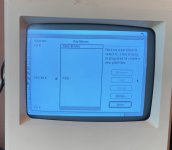
Great instructions. Everything went well until I tried to initialize the disk. The program sees the drive, but I get this message prior to trying to initialize: "The disk is uninitialized, or, its partician map has become invalid". When I go ahead and try to initialize, I get this message: "The disk could not be initialized". Interestingly, when I ran the Test, it said that the disk tested successfully. This was true of 3 fo 5 disks that I purchased on eBay. Now, with one of the disks, the program gave me the disk name (#93), but also could not be initialized. I went into the Partition part, and saw it was locked. I unlocked it, but still could not initialize it. I then partitioned it 100% Mac, and after a minute the disk showed up on the desktop.

I can write and read to this disk. I have attached the partition map. However, when ejected and reinserted, the disk does not show up. If I go to the control panel , SCSI probe, it sees the drive and if I click mount, the Zip disk then shows up. However, it does not mount automatically when inserted.

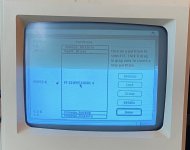
I then took a look at the other disk from the group, which the program at least gave me the disk name, but would not initialize. In the custom partition option, you can see (second picture) that there are some other things on this drive which are Iomega files. I did not try to partition this disk. It does not mount or initialize.

I think I have made some progress, but not sure where to go from here.

IMG_2080.jpeg

IMG_2079.jpeg

 
Is the Iomega driver extension in the extensions folder of the disk you are using to start the computer? The disk won’t mount when inserted without that.

 
Well it is in the System Folder of the Mac Plus. Not sure how to tell if it is "working". Does an icon show up when you boot of something?

 
So, from what I read it sounds like you have at least 1 disk working that you were able to initialize with the Apple HD SC app.

Currently your Mac Plus thinks that disk is a regular SCSI hard drive, so you'd be able to boot with it etc.  But you will not be able to eject it/reinsert it with your Macintosh turned on.

You now need to tell your Mac Plus that the disk is actually a zip disk.

You'll need to get the 4.2 zip tools on to your mac https://www.macintoshrepository.org/1296-iomega-zip-install-disk-v4-21

I wasn't sure if you just had the driver installed, or the full set of tools.

Using the 4.2 tools you can re-initialize the working disk as a zipdisk.   That should put the 4.2 boot driver on to the disk that is boot-able under a MacPlus and allow you to eject and re-insert the disk.

Note, if you use the zipdisk as your boot disk you will not be able to eject it, you'll need to keep booting from your old hard drive (or set up a ram disk that you move you system files on to after booting from the zipdisk)

Your 2nd disk looks like it was initialized with a version of Zip tools, but it might be a newer version that is incompatible with the Plus or that disk was formatted HFS+ and system 6.0.8 can only read HFS.

I also have a Mac Plus and zipdrive, it's been years since I first figured all of this out, so if this doesn't work let me know and I'll walk through the steps on my own system and create a blog entry of what I did.

 
Last edited by a moderator:
Actually, no disk could be initialized. I partitioned one at 100% MAC and that at least made it so I could read and write to it.

The link you sent has two files. Do I need both?

steve

 
Well, I tried to install 4.2 Zip Tools but it could not be installed on 6.0.8, apparently. However, I noted that there was a newer version of Iomega Driver in the Systems Folder, so I replaced it with the one that came bundled with the Installer. That appears to have worked. The 2 disks I referred to above came right up when inserted. The other 3 were not formatted correctly, I assume. I reformatted them, and now they work as well.

Thank you everyone.

Now, I want to make one of these disks a substitute HD, as this SCSI drive is so loud I can't stand it. And I know one day it will quit on me. First thing is backups.

 
Did you think about installing an external SCSI2SD? I have one that boots my plus. It is not easy to get a plus to boot with a SCSI2SD but it is possible. You need a power supply for the SCSI2SD. I installed mine in a HD20SC case or in 3D printed housing.

 
Now, I want to make one of these disks a substitute HD, as this SCSI drive is so loud I can't stand it. And I know one day it will quit on me. First thing is backups.


Glad to hear you got it all working.  As dochilli mentioned you should consider a SCSI2SD if your zipdrive ever dies.

 
Well, I spoke too soon. After a full shutdown and restart, I am not much further along. I can run Iomega Guest, and that will let me see the Iomega disk, or SCSI probe--mount. But, after normal start-up, and then insertion of the Zip disk, it is not mounted. Zip tools cannot be installed with SSW 6.0.8. The Guest and Iomega driver can be dropped into the Systems Folder, but clearly the driver is not working. I have installed the driver (or attempted to install the Tools) from 4 different sources on the net, and get a fatal error when trying to install Tools, and, the driver apparently is not being taken up. I also tried installing from a floppy, and get the same result. From the floppy, the error message says "co-processor not installed". 

I can see that people have installed a SCSI ZIP drive to a Mac Plus, but, I cannot seem to get over that final hurdle. It seems wrong to have to run Guest every time I want to mount a ZIP.

Realitystorm?

steve

 
Back
Top