
I need a replacement 520c keyboard, and somebody else has offered me a 520 keyboard, but I don’t know if they’re interchangeable. Can someone confirm this for me?

-
 Hello Guest! The forum software will be upgraded weekend of 06/26. See this announcement thread for more information.
You are using an out of date browser. It may not display this or other websites correctly.
You should upgrade or use an alternative browser.
You should upgrade or use an alternative browser.
PowerBook 520c keyboard
- Thread starter Display Name
- Start date

Thank you!The keyboards are interchangeable between all 500 series PowerBooks.
c



That's true. I wanted the option for a JIS keyboard instead of US. Since my last post, I found exactly what I needed for the time being - a 520c on eBay with a missing trackpad and not in the best of conditions, BUT a kana/Kanji*** keyboard and replacement LCD to donate to the 550c.
I don't mean to hijack the thread but at the end of the day, I want to have the correct original Japanese keyboard on the 550 - one in black and one in gray (from the 520)
*** @JDWcan set me straight because I know JIS is the industrial standard which includes writing systems but, aside from Kanji/Chinese written, I'm afraid I'm still foggy on the other systems.
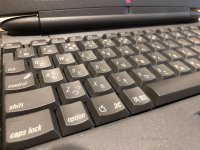
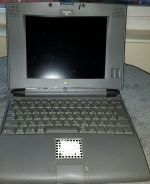
First pic is not my 550c as it has the original keyboard. Second pic is the 520c I got on eBay this morning.
Shouldn't 1 be represented as " – " ?
I don't mean to hijack the thread but at the end of the day, I want to have the correct original Japanese keyboard on the 550 - one in black and one in gray (from the 520)
*** @JDWcan set me straight because I know JIS is the industrial standard which includes writing systems but, aside from Kanji/Chinese written, I'm afraid I'm still foggy on the other systems.
First pic is not my 550c as it has the original keyboard. Second pic is the 520c I got on eBay this morning.
Shouldn't 1 be represented as " – " ?



The most fascinating part is you actually WANT one of these keyboards!That's true. I wanted the option for a JIS keyboard instead of US...
*** @JDWcan set me straight because I know JIS is the industrial standard which includes writing systems but, aside from Kanji/Chinese written, I'm afraid I'm still foggy on the other systems.
Shouldn't 1 be represented as " – " ?
 It's fascinating because even many Japanese here in Japan don't. Even the people who do want one don't use it as a JIS keyboard! Apple Japan has therefore long offered both the JIS and the US keyboards. The only reason to have a JIS keyboard is if you lack the knowledge of Roman entry. Meaning, to generate the character か with the Roman entry method you must type "ka" while Kotoeri is active and in the Hiragana entry mode. It's drop dead easy and most Japanese know it, and it's actually faster than trying to type the actual か character on a JIS keyboard by pressing the key with か printed on it. If you use the Roman entry method for Japanese, there is no meaning whatsoever to have all those Hiragana characters showing on the keys. It only clutters up the keyboard. Some people like it for sentimental reasons, perhaps. But I personally loath them because I want a clean look and because I type Japanese using the Roman entry method.
Yes, 一 is pronounced "ichi" and stands for number 1. It is not on the JIS keyboard only because there's no space to print it on the keys. Again, if you look at the JIS keyboards, there's just too much going on. There's too much white silkscreen on each key. Simple is best. The US keyboard keeps it simple and even most Japanese like that.
My wife is Japanese. Years ago I asked her why she doesn't use the JIS keyboard entry method even though most Japanese PCs have hiragana on the keyboards and she told me exactly what I just described to you. Keep in mind there are only 26 letters in English, but 46 Hiragana. It's all about entry speed and productivity.
Another interesting point is that programming is done in English -- Roman characters. Nobody programs a computer in Japanese Hiragana, Kanji or Katakana. So programmers here in Japan have no need of a JIS keyboard either.
Lastly, one of the biggest improvements to the overall Mac experience for us dual-language users was MacOS X. In MacOS 9 and earlier, your UI language was locked. You couldn't switch on the fly between a Japanese and English UI. Some programs like Quark Xpress (DTP app) and Softpress Freeway 3 (web design app) had a UI language switcher built in for OS 9. Freeway didn't have it, but I thought the concept in Quark was great so I worked with Softpress to get it implemented in Freeway 3. It's a forgotten gem now that we all use OS X, but it was groundbreaking back in the OS 9 days. I still remember a Tokyo Macworld where I offered a passer-by a demo. He tried to brush me off by saying he couldn't understand Japanese, and then I told him I had something special to show. I remember the look on his face when I switched the UI to English! He apparently was a journalist because he wrote up his story on tidbits, which is still found on the web today here:
https://tidbits.com/2001/03/05/impressions-of-macworld-tokyo-2001/
Keyword search that Tidbits article for "smooth operators" to jump to the right spot.
Thanks, @JDW - I knew you would be able to weigh in
I asked about 一 because my 145B keyboard has it screened onto the 1 key - but I understand sensibilities change over time and someone obviously decided, as you say, that the JIS layout was just too cluttered.
As to why? Well, the 550c was only sold in Japan so it makes sense to have a JIS keyboard... so if I can't find the original 550c model in black, the next best thing is to steal a gray one from a 520c.
Thanks for the great Macworld story!
I asked about 一 because my 145B keyboard has it screened onto the 1 key - but I understand sensibilities change over time and someone obviously decided, as you say, that the JIS layout was just too cluttered.
As to why? Well, the 550c was only sold in Japan so it makes sense to have a JIS keyboard... so if I can't find the original 550c model in black, the next best thing is to steal a gray one from a 520c.
Thanks for the great Macworld story!
I'd like to see a photo of yours if different from the one below......my 145B keyboard has it screened onto the 1 key

Similar threads


- Replies
- 2
- Views
- 880

