


• Hello MLAers! We've re-enabled auto-approval for accounts. If you are still waiting on account approval, please check this thread for more information.

Zip Drive

In my eternal quest to find the easiest way to transfer files between the cloud and my vintage macs, I recently purchased two Zip100 Iomega drives. One has the SCSI interface and connects to the Classics, and one that has a USB interface that I connect to my Macbook. So I can copy files from the Classics to a modern Mac and onto the cloud seamlessly. But I cannot seem to be able to do the reverse. Namely, I cannot write to the USB Zip drive when it's connected to my Macbook. I checked that Mac OS High Sierra can handle HFS partitions (created on the Zip floppy by the Classic), both for Read and Write, but High Sierra only gives me read access. Interestingly, the drive info says I have Read&Write privilege, but it also says that I "can only read" (see screen copy below). Any help would be welcome !  
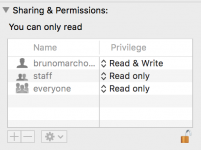
Screen Shot 2018-12-01 at 11.28.21 AM.png

 
Last edited by a moderator:
Assuming that your problem is what I think it is, HFS is not the same as HFS Extended, aka HFS+. HFS Extended was introduced in Mac OS 8.1.

I'm a little surprised that you can read HFS at all from High Sierra, because I remember it being deprecated earlier than that.

EDIT: The sharing and permissions looks fine. I don't think that has anything to do with the issues you're seeing. You mounted as the user "brunomarcho..." and some other characters after that. That user has read and write access to the device. Everybody else has read only access. Don't worry about that.

 
Last edited by a moderator:
As far as HFS is concerned, the last version of Mac OS X that could read and write to HFS-not-extended was definitely Leopard (10.5).

I think they started making HFS support read only with Snow Leopard (10.6) or Lion (10.7). I'm uncertain because 10.7 redid the driver interface for storage devices, and 10.6 was when they started deprecating support for 32 bit drivers in general.

Snow Leopard was definitely when I started having problems with having OS X talk to my older Macs, but I don't recall exactly what problems they were. I just remember making a mental note to only use Leopard for old Macs. :)

 
I wonder if you'd have the same problems with a PC formatted disk. I use a mix of the two, but I'm only going between Macs ranging from 7.1 to 9.2.2 and the  Win7/Win10 Notebooks. Dunno how far back Iomega Guest will get you with a PC formatted disk, but it doesn't surprise me at all that current Macs might have problems so simple with legacy hardware they no longer deign to support.

 
Thanks.

Yeah, I'm pretty sure I read somewhere that High Sierra still had full HFS legacy R/W support, but I also read otherwise, including in this forum. It clearly still offers read access tough. And yes, I'm talking about HFS, not HFS+

Has anyone have any luck with FuseHFS ?

 
The way I get around this is to use Mac OS X Leopard Server on VMware Fusion and hand the USB device over to Fusion. Parallels works, too. Unfortunately, my source for cheap copies of Leopard Server on eBay seems to have run out.

I don't know the status of Fuse on High Sierra. I'm aware that it can be patched for High Sierra, but I don't recall if the open source version of Fuse for Mac OS X has those changes out of the box.

EDIT: Looks like FUSE for macOS is still actively supported; https://osxfuse.github.io/ . I assume FuseHFS can work, though be cautious and don't expect perfection! :)

 
Last edited by a moderator:
As far as HFS is concerned, the last version of Mac OS X that could read and write to HFS-not-extended was definitely Leopard (10.5).

I think they started making HFS support read only with Snow Leopard (10.6)
Correct. 10.5.x was last with full HFS support. 10.6 cut it to read-only. Which is why I have never upgraded my Mac past 10.5.8.

I also have MFS read capability on 10.5.8 with MFS Lives!

 
Just bought a G4 iBook from Craigslist for $25, running 10.4.11, Will pick it up tomorrow. So I should be all set.

Thanks all. 

 
I use BasiliskII to mount my HFS formatted scsi2sd drive on Mojave. Should work the same with the zip drive:

First I unmount the drive, then give my user account root access to the drive partition eg: sudo chown chu-oh /dev/disk2s2 then I add that drive as a volume in BasiliskII. BasiliskII allows you to mount folders on your mac as drives so you can drag and drop files to the HFS drive. 

 
Back
Top
