• Hello MLAers! We've re-enabled auto-approval for accounts. If you are still waiting on account approval, please check this thread for more information.

SE/30 no video - run out of things to try to fix it!

JonP

6502
I'm restoring a very dirty and tired SE/30 which refuses to display video, despite trying out all the options I could find! The machine boots with the 'happy' startup sound, accesses the HDD but no video output can be seen at all. 

I have:

Recapped the motherboard

Recapped the analogue board (and re-flowed dry solder joints etc.)

Replaced U1 (SN74LS38N as per dead mac scrolls) on the analogue board

Replaced Q1 (2N 3904 as per dead mac scrolls) on the CRT socket board

With the screen brightness right towards maximum, raster lines can bee seen:
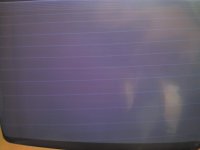
IMG_20181014_185644.jpg

, but at lower levels the lines aren't visible.

I don't have a scope (though this could be a good excuse to get one!) to check the video signal from the motherboard to the analogue board, but checking the levels with a DMM gives:

VIDEO - 3.12vDC

HSYNC - 2.2 vDC

VSYNC - 2.2vDC

So, any ideas as to what should I look / check at next?

Cheers,

Jon.

 
did you change UE8 on the logic board? 

As much as I like Dead Mac Scrolls, its 25 years + out of date and doesnt help with modern day failures due to simply age and cap leakage. 

 
did you change UE8 on the logic board? 

As much as I like Dead Mac Scrolls, its 25 years + out of date and doesnt help with modern day failures due to simply age and cap leakage. 
Thanks for the pointer @techknight, I had a detailed look at UE8 (some dry looking joints)) and re-flowed it.  This caused the video to awaken, though it was extremely noisy.  Re-re-flowing seems to have finally killed off UE8 :-(  I'll get ordering tomorrow.  Would you recommend the replacement of any others in that area whilst I'm at it?

Cheers!

 
The other U*8 chips can go bad as well, UE8 is the only one you need to replace though most of the time.

I like to remove them all and run them through a tester. Saves me time in the end poking at every chip for itself and replacing them step by step if UE8 wasn’t the only one.

 
The other U*8 chips can go bad as well, UE8 is the only one you need to replace though most of the time.

I like to remove them all and run them through a tester. Saves me time in the end poking at every chip for itself and replacing them step by step if UE8 wasn’t the only one.


I love the initiative, But, in my world I have learned that if I have to go through all the effort/labor of removing the ICs, I just change them. 

 
The other U*8 chips can go bad as well, UE8 is the only one you need to replace though most of the time.

I like to remove them all and run them through a tester. Saves me time in the end poking at every chip for itself and replacing them step by step if UE8 wasn’t the only one.
Many thanks for the pointers @techknight and @Bolle.

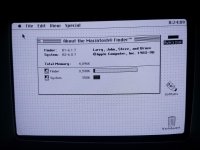
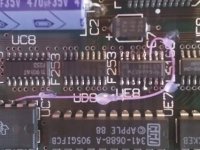
UE8 was unhappy and legacy electrolyte leakage from the adjacent capacitor had messed up some of the fine traces than run under it.  A new IC and a couple of jumper wires (in a tasteful purple colour scheme of course) have brought it back to life, nice and clear - yay!  Just have to have a play with the horizontal alignment / vertical sizing to get the screen to fit a little better next.

IMG_20181028_232618.jpg

 
JonP: any chance you could show the picture of this mobo fix? 
Sure!

I'd lost the VID(1) connection from UE8 pin 3 to UC7 pin 3 and lifted the pad on UE8 pin 13 when removing the original IC.  30AWG wire-wrap wire used to re-connect the chips.  Used hot-melt glue to secure to the board but wasn't as nice as I'd have liked - will go back to using cyanoacrylate (Super Glue) again, but I'd run out (i.e. left the top off of the bottle ...) when I was doing the fix and probably re-do if I take the mb out in the future.

BR

Jon.

IMG_20181104_121935.jpg

 
Back
Top