
All the original files from Apple are 800k Disk Copy 4.2 images in self extracting archives. To install on a HD you need all 6 disks. Disk 7 is used for AppleShare servers only. Disk 2 is a basic boot disk, so try and get that one on an actual disk. Its really bare bones install though, System 6.0.1 ideally needs a hard drive or one of those exotic (for the Apple II anyway!) 1.4MB floppies.

-
 Hello Guest! We're hosting a challenge to welcome vintage Intel macs to the MLA during the month of July! See this thread for more information.
 -
We've made some quality of life improvements to the Trading Post. More info here.
You are using an out of date browser. It may not display this or other websites correctly.
You should upgrade or use an alternative browser.
You should upgrade or use an alternative browser.
First boot of a new IIgs - help!
- Thread starter bigmessowires
- Start date

Thanks. So I'm thinking I need to do this:
1. Install a IIgs emulator
2. Import the Apple SEA archive into the IIgs emulator
3. Run the SEA to uncompress it into an uncompressed Disk Copy 4.2 file
4. Export the DC42 file from the IIgs emulator
5. Copy the DC42 file to a vintage Mac somehow (Floppy Emu, network, etc)
6. Use Disk Copy 4.2 on the Mac to create an actual 800K disk from the DC42 file
Then I should be able to boot the real IIgs with that 800K floppy.
Neither of the two sources I linked has any version of GS/OS older than 6.0.1. So is GS/OS basically not really usable on a IIgs without a hard drive? Rats.
1. Install a IIgs emulator
2. Import the Apple SEA archive into the IIgs emulator
3. Run the SEA to uncompress it into an uncompressed Disk Copy 4.2 file
4. Export the DC42 file from the IIgs emulator
5. Copy the DC42 file to a vintage Mac somehow (Floppy Emu, network, etc)
6. Use Disk Copy 4.2 on the Mac to create an actual 800K disk from the DC42 file
Then I should be able to boot the real IIgs with that 800K floppy.
Neither of the two sources I linked has any version of GS/OS older than 6.0.1. So is GS/OS basically not really usable on a IIgs without a hard drive? Rats.
Last edited by a moderator:

Possibly a long shot, but do you happen to have lying around from your Mac-hacking a Localtalk-to-Ethernet bridge? If you can lay your hands on one you can use the project files for "A2SERVER", a custom server package built around Netatalk for Linux to boot GS/OS over the network. I happen to have one and it's is why I've never gotten around to building an ADTpro cable. (The A2SERVER distribution includes a program able to write disk images hosted on a network share to a drive connected to your IIgs after you've booted it from the network.) AppleTalk is *somewhat* slow compared to a dedicated hard disk (although it's honestly in about the same ballpark as a SmartPort-based device) but from what I can tell it's a pretty workable solution and LocalTalk bridges tend to be cheaper than any IIgs hard disk unless you already have a SCSI card.
Last edited by a moderator:


No LocalTalk-to-Ethernet bridge, unfortunately. Thanks for the offer of the CFFA, but I don't think I'll need it. Hopefully I can use the chain of tools I described above to make a GS/OS boot disk on the Mac. If that fails, I'll finish building the ADTPro serial cable that I started but never finished.
For a IIgs with no hard disk, would I be better off using an older version of GS/OS? Which version would you recommend?
For a IIgs with no hard disk, would I be better off using an older version of GS/OS? Which version would you recommend?
Progress - almost there! I used CiderPress to convert GS/OS 6.0.1 Disk 2 from 2MG format to DiskCopy 4.2 format. I then copied the the DC42 file over to a Mac SE and made an 800K disk. The IIgs boots from this disk - I get the "Welcome to the IIgs" screen and the progress bar fills all the way, but then I get a system error $0201. If I tell the IIgs to return from the error, then it continues to a dialog box asking "select the application you'd like to use". The only choice I can make from this list is BASIC.SYSTEM, but when I choose that I get system error $1104.
Error $0201 appears to be "could not allocate enough memory". I think this IIgs has 512K, is that not enough? $1104 is "file is not a load file", which is some kind of segment loader error.
The appearance of the GS/OS desktop with the composite video input on my Dell 2001FP LCD is really bad. If my only goal is to work on floppy emulation then I guess it's OK, but it would be nice to have something better. I'd really rather not get a CRT, though. Someone mentioned that a CGA to VGA adapter might work - have a link to any specific ones? Or any other recommended way of viewing the IIgs video without having a CRT?
Error $0201 appears to be "could not allocate enough memory". I think this IIgs has 512K, is that not enough? $1104 is "file is not a load file", which is some kind of segment loader error.
The appearance of the GS/OS desktop with the composite video input on my Dell 2001FP LCD is really bad. If my only goal is to work on floppy emulation then I guess it's OK, but it would be nice to have something better. I'd really rather not get a CRT, though. Someone mentioned that a CGA to VGA adapter might work - have a link to any specific ones? Or any other recommended way of viewing the IIgs video without having a CRT?


I plug my Apple II / Amiga stuff into my PM7500 composite in, using apple video player, always seems to work nice for me.
The 7500 has a Dell 19" LCD hooked up to it.
I think the only way to get a proper video out is to get a Monitor for your IIgs.
I have one that matches your IIgs, plugs into the RGB port. if you pay the shipping you can have er.
its a little yellow but works.
The 7500 has a Dell 19" LCD hooked up to it.
I think the only way to get a proper video out is to get a Monitor for your IIgs.
I have one that matches your IIgs, plugs into the RGB port. if you pay the shipping you can have er.
its a little yellow but works.
I assume your IIgs is a ROM01 with the standard 1MB-capacity card? (And it's only partially-populated?) It's possible you have some bad RAM. I don't remember what error number I was getting, but when I first got my *second* free Apple IIgs (the first had a bad keyboard controller) I had trouble doing the network boot thing into GS/OS, with the machine bombing out during the second phase of the boot. Swapping the RAM card from the dead-keyboard GS made the issue going away.
If your machine really is only 512k, well... this has two conflicting numbers in it but it sort of implies that you need at least 1MB to run 6.0. Can you make a plain ProDos disk with no GUI and see if the machine behaves? It should be able to run that even if you yank the RAM card out.
Re: the bad-looking desktop, well... I have one of those cheap "CGA to VGA" (note, they're not really according-to-Hoyle "CGA") scaler boards and it works "Okay"; it's certainly miles better than composite, but the GS desktop honestly looks pretty terrible under the best of circumstances. The guy I got it from packaged the board inside an old modem so I'd have to take it apart to get a model number off it, but I'm sure all those ones you see on TehBay are all based on the same guts.
If your machine really is only 512k, well... this has two conflicting numbers in it but it sort of implies that you need at least 1MB to run 6.0. Can you make a plain ProDos disk with no GUI and see if the machine behaves? It should be able to run that even if you yank the RAM card out.
Re: the bad-looking desktop, well... I have one of those cheap "CGA to VGA" (note, they're not really according-to-Hoyle "CGA") scaler boards and it works "Okay"; it's certainly miles better than composite, but the GS desktop honestly looks pretty terrible under the best of circumstances. The guy I got it from packaged the board inside an old modem so I'd have to take it apart to get a model number off it, but I'm sure all those ones you see on TehBay are all based on the same guts.
Last edited by a moderator:
yep, pretty sure it only has 256k on the ram card, lots of sockets for more ram chips though.
So pretty sure it has 512k ram total right now.
Once Steve gets this all figured out ... I am going to definitely buy the loaded SD card option
Then (one) won't have to go through all this... haha The floppy emu will save the day.
Pretty sure Steve is due for another interview at RMC!!
So pretty sure it has 512k ram total right now.
Once Steve gets this all figured out ... I am going to definitely buy the loaded SD card option
Then (one) won't have to go through all this... haha The floppy emu will save the day.
Pretty sure Steve is due for another interview at RMC!!
haha
Makes you keep love for the Mac GUI, even @ 1bit B&W
At least that is how i feel
Last edited by a moderator:
I tried again with GS/OS 5.0.4 and it works! So yes, it seems 6.0.1 requires at least 1 MB. This is a ROM01 GS, and it appears to have 256K on the logic board and another 256K on a memory expansion card. Is that normal? I have no idea.
I guess the composite video input on the Dell 2001FP is usable, even if it is ugly. I wish it looked anywhere near as nice as those screenshots you linked! Here's what I'm seeing:
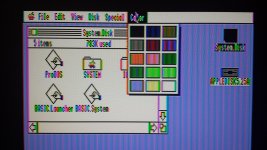
One thing I can't figure out is how to format another disk from within the GS. I'm guessing it requires some kind of disk utility program, which is probably on 5.0.4 disk #2 that I didn't make.
Now to figure out this disk emulation business...
I guess the composite video input on the Dell 2001FP is usable, even if it is ugly. I wish it looked anywhere near as nice as those screenshots you linked!
Here's what I'm seeing:One thing I can't figure out is how to format another disk from within the GS. I'm guessing it requires some kind of disk utility program, which is probably on 5.0.4 disk #2 that I didn't make.
Now to figure out this disk emulation business...
I'm pretty sure the images on the website were actually from an emulator. 
I'm not sure I'm motivated enough to actually go through dragging out the IIgs and all the netboot bits (its all cocooned up in the garage at the moment) to take a picture, but what I'll say about using it with the scaler board paired to a 17" 1280x1024 monitor is it's certainly far better than composite in terms of color clarity (the full-color resolution of NTSC composite is really only about 120-ish pixels horizontal, which is why you have that color fringing) but the combination ends up rendering the IIgs screen with a non-integer relationship between the input pixels and the output display grid so it looks a little, well, scaled. Games and whatnot look fine but that horrible blue pinstripe theme that Apple chose for the desktop background is pretty much the worst case scenario.
Of course, the original RGB monitors used for the IIgs weren't exactly the finest things in the world (fairly large dot pitch, etc) so I'm sure if you messed with the (limited) controls on the scaler board enough and matched it with the right monitor you might manage better than the original. It's just, well, you are sort of dealing with trying to make a silk purse out of a sow's ear, here. It's only 640x200 after all. (Apple should have probably included a 640x400 mono mode like that on the Atari ST.)
I'm not sure I'm motivated enough to actually go through dragging out the IIgs and all the netboot bits (its all cocooned up in the garage at the moment) to take a picture, but what I'll say about using it with the scaler board paired to a 17" 1280x1024 monitor is it's certainly far better than composite in terms of color clarity (the full-color resolution of NTSC composite is really only about 120-ish pixels horizontal, which is why you have that color fringing) but the combination ends up rendering the IIgs screen with a non-integer relationship between the input pixels and the output display grid so it looks a little, well, scaled. Games and whatnot look fine but that horrible blue pinstripe theme that Apple chose for the desktop background is pretty much the worst case scenario.
Of course, the original RGB monitors used for the IIgs weren't exactly the finest things in the world (fairly large dot pitch, etc) so I'm sure if you messed with the (limited) controls on the scaler board enough and matched it with the right monitor you might manage better than the original. It's just, well, you are sort of dealing with trying to make a silk purse out of a sow's ear, here. It's only 640x200 after all. (Apple should have probably included a 640x400 mono mode like that on the Atari ST.)
Under the hood, GS/OS is actually superior to MacOS of the same time period, it wasn't until System 7 that it surpassed the lowly Apple IIhaha
Makes you keep love for the Mac GUI, even @ 1bit B&W
At least that is how i feel
. The lack of RAM is why System 6.0.1 won't boot. Its fairly tight with only 1.25MB of RAM, but stuff will run. Net booting a IIgs is a good option if you don't have a HD, you can load up a fully equipped system with that sssssslllllooowwwlly over the network. Heck, Apple was forced to ship the machine with 512k of RAM shortly after release because 256k wasn't enough to actually run any 16bit software.Also the GS/OS disk images on Apple's site are self extracting Macintosh archives, not Apple II (those would have a .SDK extension).
That lack of quality helped, it smeared the dithered 16-colors together in a convincing fashion. You can see the real monitor in action on my YouTube channel.Of course, the original RGB monitors used for the IIgs weren't exactly the finest things in the world (fairly large dot pitch, etc) so I'm sure if you messed with the (limited) controls on the scaler board enough and matched it with the right monitor you might manage better than the original. It's just, well, you are sort of dealing with trying to make a silk purse out of a sow's ear, here. It's only 640x200 after all. (Apple should have probably included a 640x400 mono mode like that on the Atari ST.)
https://www.youtube.com/watch?v=0bIpn9Dao1M
Along with some addons: https://www.youtube.com/watch?v=MYCb9JdMT4w
Lots of software and hardware info here (hint, FloppyEmu support for direct 2IMG loading would be nice): http://www.whatisthe2gs.apple2.org.za/


I tried again with GS/OS 5.0.4 and it works! So yes, it seems 6.0.1 requires at least 1 MB. This is a ROM01 GS, and it appears to have 256K on the logic board and another 256K on a memory expansion card. Is that normal? I have no idea.
As you noticed, 6.0.1 requires at least 1 MB RAM. And actually, unless you have a hard drive, 6.0.1 is pretty useless loaded from a floppy disk. 5.0.4 is much more complete from a floppy
One thing I can't figure out is how to format another disk from within the GS. I'm guessing it requires some kind of disk utility program, which is probably on 5.0.4 disk #2 that I didn't make.
Under | Disk | on the Menu Bar you can do limited disk maintenance. A program like Copy II + will give you more to work with
On a real monitor, the GS/OS desktop actually looks pretty good! Too bad there's no simple way to get similar quality on a modern LCD. As much as I love vintage computers, I draw the line at bringing 100-pound CRTs into my home.
I poked around some more, and got things into a pretty good state. GS/OS 5.0.4 Disk #2 did have a disk utility, as I expected. I also found an 800K disk image of ProDOS 8, with which I was able to boot the machine, and then create a bootable 5.25 inch ProDOS 8 disk. So now I think I have an example of every kind of disk I need.
So there are three kinds of Apple II disk emulation I hope to do with the Floppy Emu hardware. Some of these may end up requiring an external adapter of some kind.
1. 140K 5.25 floppy emulation (Disk II and similar)
2. 800K 3.5 floppy emulation (Apple 3.5 drive)
3. SmartPort disk emulation of any size up to 32MB
I'm not sure which one I'll start with, but maybe #2.
Direct support for 2MG disk images should almost certainly be possible, but I need to look into the details. Also .PO and .DSK (?) for 140K disks.
I poked around some more, and got things into a pretty good state. GS/OS 5.0.4 Disk #2 did have a disk utility, as I expected. I also found an 800K disk image of ProDOS 8, with which I was able to boot the machine, and then create a bootable 5.25 inch ProDOS 8 disk. So now I think I have an example of every kind of disk I need.
So there are three kinds of Apple II disk emulation I hope to do with the Floppy Emu hardware. Some of these may end up requiring an external adapter of some kind.
1. 140K 5.25 floppy emulation (Disk II and similar)
2. 800K 3.5 floppy emulation (Apple 3.5 drive)
3. SmartPort disk emulation of any size up to 32MB
I'm not sure which one I'll start with, but maybe #2.
Direct support for 2MG disk images should almost certainly be possible, but I need to look into the details. Also .PO and .DSK (?) for 140K disks.
Below are the major Apple II image formats, more detailed info is here: http://apple2.info/wiki/?title=Emulators_Part_3
.DSK: "DOS 3.3 Order" 140k 5.25" floppy images
.PO: "ProDOS Order" 140k 5.25" images
.NIB: Nibble data 140k 5.25" images, needed for certain copy protected software. None of the disk hardware replacements seem to support it.
.2MG: This format was created in 1998 or so to address the need for a standardized disk image format for 800k floppies and hard drives. Prior to that, the two major Apple IIgs emulators used their own in-house image format for 800k disks. For the most part its a ProDOS ordered image with a header, but it can contain DOS 3.3 ordered and nibble formatted images as well. Some detailed info here: http://apple2.org.za/gswv/a2zine/Docs/DiskImage_2MG_Info.txt
If you are looking for implementation of reading and writing these formats, Ciderpress' source would be good to look at: https://github.com/fadden/ciderpress/
.DSK: "DOS 3.3 Order" 140k 5.25" floppy images
.PO: "ProDOS Order" 140k 5.25" images
.NIB: Nibble data 140k 5.25" images, needed for certain copy protected software. None of the disk hardware replacements seem to support it.
.2MG: This format was created in 1998 or so to address the need for a standardized disk image format for 800k floppies and hard drives. Prior to that, the two major Apple IIgs emulators used their own in-house image format for 800k disks. For the most part its a ProDOS ordered image with a header, but it can contain DOS 3.3 ordered and nibble formatted images as well. Some detailed info here: http://apple2.org.za/gswv/a2zine/Docs/DiskImage_2MG_Info.txt
If you are looking for implementation of reading and writing these formats, Ciderpress' source would be good to look at: https://github.com/fadden/ciderpress/
I got home from doing some errands this evening, and there was an Apple IIe waiting for me! Unfortunately the shipper sent it with minimal packaging, and a couple of the corners were bent and broken, but it still works. I can power it up without any disks, and have fun in BASIC.
When I connect the 5.25 drive to the IIe, and attempt to boot from the ProDOS 8 5.25" disk that I made earlier with the IIgs, the disk just spins forever but nothing happens. Anything obvious I might be missing here? It makes the expected rattle-rattle sound when it's first powered up, so the computer is obviously trying to do something with the disk, but not succeeding. Maybe the version of ProDOS won't work on the IIe? It was ProDOS v2.0.3 if that matters.
When I connect the 5.25 drive to the IIe, and attempt to boot from the ProDOS 8 5.25" disk that I made earlier with the IIgs, the disk just spins forever but nothing happens. Anything obvious I might be missing here? It makes the expected rattle-rattle sound when it's first powered up, so the computer is obviously trying to do something with the disk, but not succeeding. Maybe the version of ProDOS won't work on the IIe? It was ProDOS v2.0.3 if that matters.
Similar threads
- Replies
- 8
- Views
- 579

- Replies
- 1
- Views
- 795

- Replies
- 16
- Views
- 2K

- Replies
- 1
- Views
- 481
