• Hello MLAers! We've re-enabled auto-approval for accounts. If you are still waiting on account approval, please check this thread for more information.

TOPS FlashBox information

Hello.

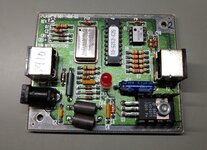
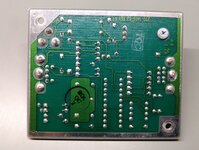
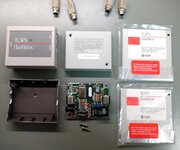
I was able to purchase a pair of the FlashBox LocalTalk boxes, two floppies and two Mac serial port cables. Before seeing these, I had no idea that Sun had something to do with LocalTalk or all things.

http://bitsavers.informatik.uni-stuttgart.de/pdf/sun/TOPS/TOPS_Product_Guide_1990.pdf says: "TOPS FlashBox: Increase your Macintosh's data transfer rate from 230Kb to 770Kb". And there is very little information available on these, couple of mentiones like this and this.

According to the labels the two disks are identical, and they were still sealed... until I opened them as I wanted to get these imaged. Both disks had issues; first would give read errors on my Mac (Centris 610, which I had closest at hand with a floppy drive) and the second had some visible dirt on the surface. However I was able to image the latter disk with my GreaseWeazle, and later read on the Mac and copy the files over and create a StuffIT archive with no read errors.

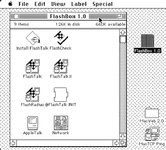
However I am not sure how to use these. The file "Install FlashTalk" gave "divide-by-zero" error (on Centris, and crashed on Mini vMac). FlashCheck gave error that the extension was not loaded (understandable as I didn't attempt that yet).

I tried using Disk Copy to create additional image, but that bombed out with error type 11 everytime it attempted to create an image. (I saw a mention that this might be an issue when using with large drive partitions?).

Before going head-first and trying myself, anyone happen to have a manual? Or any more insight on using these? :) I guess my Centris with OS8 might be a bit too new, so perhaps I should dig up my LC or SE/30 instead?

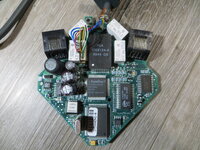
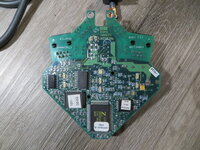
Looking inside, the power input is center positive and feeds straight into a 7805 so I presume the original PSU was probably something like 7.5-9 volts? A quick attempt with around 7V in gave stable 5V out from the regulator but the LED did not light up (perhaps it won't until there is link, activity or drivers loaded and it switches into the faster mode).
 

Attachments

  • FlashBox1.jpg
    FlashBox1.jpg
    708 KB · Views: 47
  • FlashBox2.jpg
    FlashBox2.jpg
    1.1 MB · Views: 36
  • FlashBox3.jpg
    FlashBox3.jpg
    901.2 KB · Views: 30
  • FlashBox_disk.zip
    FlashBox_disk.zip
    118.9 KB · Views: 0
  • FlashBox_emu.jpg
    FlashBox_emu.jpg
    231.6 KB · Views: 39
Looking at the picture you provided, the installer probably just copies the files to the correct location, perhaps depending on the computer model.

So if the installer isn't working, I would try just copying the FlashTalk, FlashTalk II, FlashRadius, and FlashTalkRadius to your System Folder (System 7 should automatically move them to the correct places.) Connect your FlashTalk adapter, then reboot. Then run the FlashCheck app.

I don't know what the difference between the FlashTalks are.
 
If someone reverse engineered the FlashBox, I wonder if you could just run it off the ADB port without needing an external power supply.
 
Thanks ole.

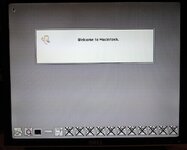
I switched gear and on my Mac LC I can run the installer from the floppy image so the image seems to be fine! The installer does its thing but after restart (as soon as the "@FlashTalk INIT" is in the Extensions) I get this on boot (endless string of FlashBox icons with an X) and nothing more happens. Or actually at some point it paints another row of those icons on top of the old ones!

If there is no power connected to the FlashBox I get an error that it can't be detected, and sometimes during boot I have seen the LED on the FlashBox to flash briefly.

I did try connecting a PhoneNet-adapter to the FlashBox but that didn't make any difference. I can't think it would fail like this with no network connected (haven't tried, can't easily setup another Mac right now).
 

Attachments

  • 20250128_194952.jpeg
    20250128_194952.jpeg
    198.6 KB · Views: 23
I tried a fresh install of 7.0.1 on the LC (was using a 7.1.1 previously and that installation had MacTCP etc installed previously so I thought that might have conflicted with something), but it fails the same way on 7.0.1 with row of icons on boot. I wonder if the drivers are meant for System 6?
 
It wouldn't surprise me at all if the drivers only worked on System 6. I've only got one and haven't tried it yet (it's still away with @Bolle to have the PAL cracked) but from an eyeball of the disk, it looks kind of system 6 specific (or perhaps specific to a relatively early range of AppleTalk versions, which boils down to the same thing)
 
I wonder if there was ever a newer version.

Macintosh Garden has a copy of TOPS 2.0. It indicates it's System 6 only.
 
I see you found that guy selling those on ebay :)

TOPS has different interpretations.

TOPS/Terminal was some kind very early TCP type of thing.
TOPS/Macintosh was the Macintosh part of the TOPS file sharing stuff. Versions also existed for DOS, SUN and VMS/VAX stuff. It, like the next one, worked over LocalTalk or FlashCard type things.
TOPS/Inbox was a email type thing.

TOPS 2.0 won't be for what this unit is on about. TOPS 2.0 on Macintosh Garden is the TOPS/Macintosh thing. Instead this TOPS FlashBox is used to interconnect to other TOPS FlashBoxes or FlashCards. FlashCards are 8-bit ISA cards for PC compatibles which included software on a 5.25" disk for the FlashCard.

As for reverse engineering, cheesestraws is probably on the matter. The PAL chip has apparently already been dumped. However if we are to replicate this unit, I think we can use modern understanding to get better results than these old things worked like.

Based on the stuff I've got, it's for System 6 at the most. System 4.1/Finder 5.something was the earliest this stuff was meant for.
 
@Mk.558: actually no, this was from a local auction and I paid a grand price of 2EUR for the two units, disks and cables :cool:

Great info on the different TOPS's. Would be neat if the PAL can be dumped/cracked for reverse engineering.

I'll try to set up a System 6 machine and try if I can get the drivers working on that! Kinda limits the usability but would still be neat to have even a short test-drive on these.
 
Would be neat if the PAL can be dumped/cracked for reverse engineering.

It has been. (@Bolle did it, not me, I do not wish to take credit here).

I'm intending to have a poke around of mine when I get it back, as mental health permits (but do not let that stop anyone else; at present mental health very much does not permit any complex projects outside of work).
 

Attachments

at present mental health very much does not permit any complex projects outside of work

I share your pain on that one 😫 🫂

I just did a clean install of System 6.0.8L on my LC and now the driver installs and loads fine!

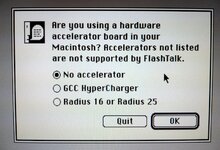
Interestingly the installer started with this prompt (which didn't show up on the LC so I guess it did some model identification):

20250129_174301.jpeg

A quick google suggests those are SE accelerators so perhaps that's the intended period of systems?

I see the FlashBox icon on boot, and I can select it in the network panel. Can't see any other controls and now I need to get some other System 6 machine up to test further. My Portable is at hand but it hasn't been used in a while and it's temperamental even on the better days but I'll try that one now...
 
I share your pain on that one 😫 🫂

I just did a clean install of System 6.0.8L on my LC and now the driver installs and loads fine!

Interestingly the installer started with this prompt (which didn't show up on the LC so I guess it did some model identification):
That explains the FlashTalkRadius.
 
A side note -- I have on my desk the peculiar WaveLAN Mac/PowerBook adapter. This is not the daisy-chainable AAUI adapter, which was also a part of the WaveLAN lineup. Instead, it's a daisy-chainable 10baseT adapter that plugs into the printer port, and uses a "High-speed serial driver for enhanced performance". An external AC adapter is required, natch. An obvious use case was the PowerBook, but it's also a great way to get an LC on ethernet while using the expansion slot for something else.

I mention this because another potential use for a re-clocked accelerated LocalTalk adapter would be to plug into an ethernet network and get 2-3x the speed. I should crack this adapter open and see what it looks like inside...
 
That's a somewhat common device, aka Farallon EtherWave Mac/PB Adapter or sometimes called the Farallon EtherWave Printer Adapter. It uses a custom chip in the middle with a heat sink strip, a Z80 CPU with some RAM and a DP83902 ethernet controller. I'd imagine there's a RS422 bus transceiver somewhere in there.

IMG_0001.JPGIMG_0002.JPG

In my experience, if it works, it's great, but heavy on the "if" part. This one was recapped. The AAUI device is a little different inside.

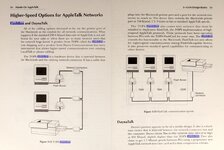
About the FlashBox, the MacWorld test is fascinating. https://archive.org/details/MacWorld_8912_December_1989/page/n174/mode/1up

It seems that for smaller files the gain isn't that much, the picture on page 171 (PDF page 176) kinda shows the idea. If we're going to build our own overlocked system, I'd wager we'd be better off with the EtherWave concept because it doesn't really care about small files like that as much.
 
I've been fiddling with the FlashBoxes but now I have a problem; while I do have two System 6 machines at hand now (SE FDHD and LC) what software I could use to test? I've used to System 7 having the built-in file server parts, but is it doable under System 6?

I guess I could get a third machine up (with System 7) to be the file server, but then that one couldn't use the FlashBox and there would be no way to see any speed improvements (as the System 6 machines couldn't do anything between themselves).
 
The way I've done it for the Data Transfer Rates section was just a known file of managable size, in your case probably 3-4MiB, and a stopwatch.

Inside the Newer Technologies EtherTech Installer disk is a Performance program. Pretty sure it uses AFP, so you'll need a file server of some kind. If you want to do it under System 6, you'll need AppleShare File Server 2.0.1, EasyShare, or TOPS/Macintosh. Assuming things work out, System 6 will be markedly faster than System 7. Using Ethernet, most typical machines get about 3x the performance versus System 7.
 
Back
Top