

• Hello MLAers! We've re-enabled auto-approval for accounts. If you are still waiting on account approval, please check this thread for more information.

The fruits of my labor. iMac G5 PSU Repair.

coius

68030
The max component repair I have done is DC Jacks on a laptop. I have trumped my previous experience and am proud to show off what my skills have yielded. It took 3 hours (1 hour just to cut the silicon crap out of the PSU), but after following these instructions and buying the parts off that website, I have resurrected an iMac G5 1.8Ghz w/ 1.25GB RAM

The symptoms are the typical. Sporadic shutdowns, sometimes not turning on, then not turning on at all. All-in-all, 7 of the 9 capacitors that I had to replace had either vented, or had bulged and were bad. I replaced the non-bulging as well, including getting to a really hard capacitor to replace (see the image where it points under the heatsink).

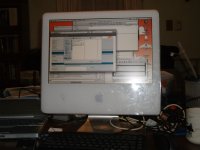
3 hours later, I am up and posting on said iMac (see picture) and it runs great. it's been fine, steady and no issues that I can see. The new caps should also be more sturdy.

This is the worst component replacment I have done to date, with the previous worst was a 3 capacitor replacement on a motherboard.
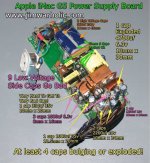
imac-g5-psu-capacitors-locations.jpg

iMac G5 caps replaced running.jpg

 
Thanks. Although my soldering skills are quite good, I was just hoping I didn't put a cap in backwards. I marked down as well as I could, but when I got to the 5th, I noticed silkscreened on the board under where the capacitor was soldered down, there was a white colored-in spot on the diagram that indicated the negative post. I tried to check all of them, but it looks like it came out right.

The iMac is running great, except I have to reinstall. Not only did the powering up and shutting down cause issues, but there seems to be some back blocks on the hard drive by the bootsector.

Does anyone know if Zero out Data under OS X's Disk utility would mark off bad sectors, kinda similar to a full format on Windows would?

If it does, that should work. There are only a few, but I want to see if I can get this iMac back up. I would hate to have to spend more money buying a hard drive if I could just mark them off and either reallocate it, or just get rid of them altogether.

 
Zeroing out all data on a HD with existing bad sectors would take days - not worth the time and effort, just chuck it :p

 
Awesome job, coius! Now the next question: Did you burn any fingers in the process of soldering? Yes, you do get extra points and my full respect from one bench (electronics) technician to another. :o) 8-)

73s de Phreakout. :rambo:

 
Re:Byrd

Actually it was 12 bad blocks. it's done and the HDD is now working. I kept having "resource busy" errors, and then when I reset the PRAM, all the problems went away. I formated the drive, and when I tested the drive with TechTool Pro, there were no bad blocks. I wiped the drive 7x with the "Zero Data" option under Disk Utility. It worked great. The blocks weren't all in one area. So I have a feeling it's been like that for a while. It's the original drive.

To make sure formatting wasn't a fluke, I restarted the machine and formatted it again. I then shut it down, started up and formatted as MBR and NTFS FS (I have NTFS-3G installed in my powerbook) and it worked, formatted as GPT and HFS+(J) and that went fine. Back to the APT HFS+(J) and it works now.

The owners of the iMac (I sold the iMac to them) lost their OS X discs, and right now I have created a recovery partition and am copying over the disk image of 10.5 to that partition. They can then reinstall with that.

So I am trying to create a simple-as-possible system to avoid further issues.

The drive should be fine. It is natural to get bad blocks over the course of the lifetime of the HDD. It's when you can't get rid of them or they are all in one area that you have to worry. that indicates physical damge. In the whole drive, 12 bad blocks don't indicate hardware issues, it's just that they went bad. It's expected of a hard drive over the life time. As long as you can mark them off and you don't have issues with the drive reading/writing after they are marked off, it will be fine

 
Back
Top

