• Hello MLAers! We've re-enabled auto-approval for accounts. If you are still waiting on account approval, please check this thread for more information.

SE with dead ADB ports

Is there anything that can be done with an SE with dead ADB ports?

This machine was a street find, and I stupidly hot swapped the mouse in the process of trying to boot it when it was acting flaky. Turned out cleaning the 3 prong power connector did the trick and now it powers up every time.

I just went through another round of cleaning it up and washed the logic board this time - the machine boots perfectly from floppies but doesn't respond to the mouse in either port. Keyboard doesn't work either.

There was talk of a fuse that could be replaced but it seems like this SE logic board has no such fuse.

I'm thinking the only thing to do is sell this logic board for parts and get a working one on ebay, but thought I would throw it out there first to see if there were any other ideas.

 
Find another one that is dead from another cause and swap out the ADB Controller for the one you likely zapped.

This is the first report I've ever heard of such zappage, but that's the reason for NOT hot plugging ADB. You've got expeience to gain and little to lose if someone else has a parts MoBo to send or we can figure out which IC(s) you need removed from one and then even the shipping will be reduced to a postage stamp or two.

Anybody got a DOA SE board and a desoldering iron? }:)

 
I would think that a trip to "The Dead Mac Scrolls" might be in order. I'd look it up myself, but I'm at work and the book is at home. Failing that, Macintosh Repair and Upgrade Secrets might cover such a failure, but it is less likely.

Actually, as I recall, Apple did strenuously recommend against hot-plugging ADB devices. My guess is that if you plug/unplug it too quickly, the step function change in current causes a voltage spike which kills something.

 
Douglass High's Troubleshooting Your Macintosh says:

The SE's most common cause of failure is a little Eight thru-hole contact box labeled on the silk screen layer as either "L1" or "Filter." It's the "RF Choke Filter" for noise suppression and is a "very high failure item on all Macs." It's usually located behind the two controller ICs. Check the Choke Filter"s pins from side to side for continuity.

Most Macs newer than the Mac SE are also equipped with a 1-amp pico fuse.
So this second highest failure component won't be present unless maybe if it's a later SE-DualFDHD version.

In terms of a short, the RF Choke Filter can act as a fuse.

I'm home on lunch, so that's all I can say for now, but there are testing procedures, more caveats, symptoms and diagnostics outlined. Sounds like component transplants needed for a terminally ill Mac SE to me, but the author says . . .

. . . the ADB transceiver chip on the logic board is not really a high-failure item. Usually it's the stuff between the port and chip that goes.
He has a table of "Problematic Mac models and their high failure items" in the ADB section . . .

. . . for the SE:

R14____470 ohm_____Resistor

R15____1K ohm______Resistor

Q1_____2N3904______Transistor

What's the scoop on ADB spelunking in your library, trag?

 
I'm no electrical engineer, but I did some poking with a friends voltmeter a while back, and if I remember right, I found the 5V before the filter but not after, and not in the appropriate pin on the ADB connector.

I found the Apple Guide to Macintosh Family Hardware at archive.org:

http://archive.org/details/apple-guide-macintosh-family-hardware

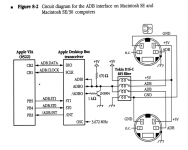
Here's the schematic for the SE and SE/30, which shows no fuse on the power line. The II, IIx, IIcx and IIci show a 1A fuse on the left side of the filter.

Screen Shot 2012-08-07 at 1.42.29 AM.png

 
Assuming that diagram is accurate, I think your best bet is to determine the inductance of the individual coils in that array, and replace the chip with four individual inductors.

I think that because after a bit of searching, I cannot find inductor arrays still available anywhere. Of course, this is when someone comes by and says, "I saw them for sale, over there." Which would be great, if that happened.

The easiest thing, of course, is if the inductance of the filter is documented somewhere. Otherwise, you may need to pull the array and measure the inductance.

BTW, the resistance across each pair of terminals should measure pretty close to 0. If it doesn't, that's your blown inductor within the array. You might do okay, especially if it's just the 5V inductor that's blown, to just bypass it with a wire and see how it fares.

That is, leave the component in place, but if there's no continuity between the ends of the 5V inductor, solder a bit of wire to connect the two ends of the 5V connection.

Vishay makes a ferrite bead array, which might meet the requirements, but it appears to only be available in a leadless surface mount package.

jt, I forgot to check my books last night. Yours sounds like a good reference. I've never looked through that one before.

 
It's a well focused pre-Quadra tome with a copyright date of 1992 and updates through 1995 from M&T Books. It harks from the era when "Hackintosh" meant a hardware hacking tour de force as opposed to a mere rogue installation of CatWare.

< swerves back on topic >

@mikepick

. . . locate the the contacts of the RF choke filter and check for continuity from side to side. If you detect an open circuit, that means the RF choke filter must be replaced or temporarily bypassed with a jumper wir . . .
Belay that! He further adds:

I usually wire a 1-amp pico fuse across the open circuit (I put a turn or two in the lead). Pico fuses are less than a dollar and are easier to install than an RF choke filter that costs a few dollars (if you can find them). It's also safer than running a straight piece of wire (which would be like putting a penny in hour home fuse box).
That sounds like it may do the trick for your SE now that you've mentioned the location of your 5V continuity failure.

< swerves back onto the more interesting and generally useful troubleshooting tome side topic >

I've never seen the The Dead Mac Scrolls, what's the MacTimeLine coverage of that one?

I think this one is is right smack in the middle of the gottahaveit! category. It has a 36 page chapter on testing utilities, tools and safety including an explanation of how to use and what kind of logic probes necessary for pre IIfx & IIfx/Quadra era Macs.

Troubleshooting

Your Macintosh

...........................................

The Complete, Hands-On Guide

To Upgrading and Maintaining

Your Macintosh.

...........................................

Douglass High

$29.95 back when that was real money!

 
TroubleshootingYour Macintosh

...........................................

The Complete, Hands-On Guide

To Upgrading and Maintaining

Your Macintosh.

...........................................

Douglass High
That looks good. I think I may get that; they're $0.11 on Amazon right now...
I've never seen the The Dead Mac Scrolls, what's the MacTimeLine coverage of that one?
It pretty much covers the Mac 128k through the SE and SE/30, with (I think?) some MacXL/Lisa info.
It's a pretty good book, aimed mainly at beginners I think.

c

 
Back
Top