• Hello MLAers! We've re-enabled auto-approval for accounts. If you are still waiting on account approval, please check this thread for more information.

SE/30 with a smaller screen?

mc9625

6502
I was looking at the monitor of my new (and first) SE/30. Actually the screen looks smaller than what I believed, so I had a look around to other SE/30 pictures on internet. And actually let's compare these two images:

The first one is an image I've found on internet. The screen seems large without any bezel on the sides (a little bit on top and bottom):

1.jpg.ced35a27685d178c100b2644e4ac8a98.jpg


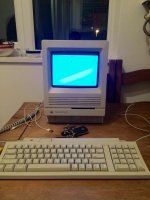
And this is my SE/30. The screen doesn't reach the borders to the site:

2.jpg.a01a965367ac0f377b2b709e41fdc1a2.jpg


Is this normal?

 
No problem on your screen, this is the standard setup.

The screen can be stretched, but is not what was intended by Apple.

 
Actually, your screen seems slightly shrunken and is off center slightly, so it could stand being re tuned a bit..

I agree with bibilit, however. All Compacts came from the factory with borders around the display (I believe it's supposed to be approximately 1/4 inch all around).

c

 
According to Larry Pina's repair guides, the screen on all 9in Macs should be 7.11 (a little less than 7 1/8th) inches wide by 4.75 (4 3/4) inches tall.

You can make adjustments to the pots on the Analog board to get these measurements, and center the screen too. This will leave a black border around the screen about 1/2 inch or more around.

Just be careful when you do this and use a sewing measuring tape taped across the screen. Use plastic and not metal tools.

Edit: To adjust the brightness, adjust it all the way bright and look at the black border, it will glow slightly. Then tune it down until it glows no more and Black is Black. Your picture seems to look fine on that regard.

 
Last edited by a moderator:
Those measurements of screen's display (7.11 inches wide by 4.75 inches tall) will match the printed page on an ImageWriter printer, which has a 1/72 of an inch pixel dot size, the same as the screen's pixel dot size. So you end up with a near perfect WYSIWYG print comparison between page and screen. This was no accident and exactly how Apple intended it to be. This was true for their early laptops too.

Though still WYSIWYG with Laser printing, only if you stayed with Apple Monitors, once you went outside of Apple Video Cards and monitors, WYSIWYG went out the window but it came pretty damn close.

So when you make your measurements on you little 9in B/W Screen, these are the measurements you use: 7.11 inches wide by 4.75 inches tall - centered on the screen. This leaves a black border of about a 1/2 inch around the display.

NOTE: Those who modify their Color Classics to display 640 X 480 on a Mac 550 or higher board, you just threw all that out the window. Though it is nice to have 640 X 480 on a Color Classic, it is no longer WYSIWYG.

 
Last edited by a moderator:
Hi elfan, WYSIWYG or not is it recommended to tweak the screen to make it fill the screen? I had actually thought of doing that with mine but must confess as my se/30 has no screen burn wasnt sure if i should or know if there are imprecations of doind that?

 
One has to remember that this is not a TV set where the full screen is used up. You should have the screen set to what Apple designed it to do. Making larger or smaller puts it out of frequency and analog board parts die faster. Lets supposed that a part is meant to last 1 year - 52 weeks. But if you run it out of tune, it will die out in 50 weeks, 2 weeks premature. This is not really a big issue.

But also the larger image will distort slightly to match the curvature of the screen. If you are just doing word processing and playing games, this is not much of a hassle. If you doing desktop publishing or vector graphics, you will be straining your eyes a lot more.

It should be what you are comfortable with. But by Apple specs, it is 7.11in X 4.75in. And the border is normal, you should have some border around your display even if you expand your display.

To avoid screen burn, adjust the brightness as I describe before and take it down a tiny notch more. When you sit in front of the Mac, you eyes should be wide open, not squinting; so take that as a hint as to how bright it should be. And use a Screen Saver. After Dark is the best for the old 68K Macs.

EDIT: Under Apple Specs when doing vector graphics, when you draw a circle, it will be a circle and not an egg or an oval. Taking it to a larger screen size will screw that up, but how many here will be using their SE\30 for vector graphics?

*Slowly raises hand...*

 
Last edited by a moderator:
Ah actually i want to use illistrator and photoshop so you make a valid point and to be fair to the little screen its crisp and has far greater contrast than any lcd ive seen so should be happy with that afterall it is a vintage machine + i hadn't considered it waring out either im just so used to pressing a button on the screen or via software to maximise picture i hadnt thought about issues like that :)

 
On average, analog board parts last about 5 years, but since the SE and SE\30 have fans to keep everything cool inside, they last longer. So in this case things wear down a month or so earlier but that is a minor point to many because after 5 years things are replaced or upgraded. For us vintage Mac users, we are looking for 20+ years for our Macs that have been already around for almost 30 years! Eventually the Analog Board will need to be recapped a couple more times during this 50-some odd years of use. HA! HA! HA! HA!.... My Mac SE\30 might outlast me! Not if i can help it!

Vector Graphics on the SE\30 would be great. Even better if you can get an accelerator for it. I use FreeHand on my Macs for most of my Vector Graphics needs and then export it as a EPS file for Photoshop or other programs to use. Freehand is small, simple and fast. And you can use Freehand from System 6 and 7 on a 68K Mac to OS9 under OSX on my G4; as i use Freehand 5.0 this way. Eventually Freehand got bought out by Adobe and got merged into Illustrator.

 
I vaguely remember freehand from my college days, didnt realise it became illustrator. After reading up more and more i only found out excel, PowerPoint and badically all of ms office suite wasnt actually designed by Microsoft at all but someone else who they brought out, like aldus pagemaker another package sucked onto a large company in that case adobe

 
MicroMedia owned Freehand and Shockwave/Flash which Adobe bought out MicroMedia and put FreeHand into Illustrator and, well you know about Shockwave and Flash being the top web animation programs out there.

MS Office was originally the Star Office Suite by Intergalactic Digital Research; the makers of CP\M. MS also bought out Corel, makers of WordPerfect and Corel Draw (both being sold by MS under the Corel Label). Adobe, like you stated, also bought out PageMaker and SiteMaker (for making webpages). Even PhotoShop was a small company before Adobe bought them out too. Its amazing how company mergers can effect the whole industry.

Back to the point, if anyone is doing graphics or desktop publishing they should have their screens synchronized with the printed output so one can get an idea as to how the finished product will turn out when done. Drawing circles on a screen that is off will produce ovals in the final print out and the graphic artist will go mad trying to figure out why when the problem is right there staring right back at him.

 
Yes you're right i wont touch my screen i really hadnt thought about those factors and i do want to dabble with graphics agains as its what i did at college whilst on a classic mac has that nostalgic appeal, i know i'll end up buying a printer for it next ;)

 
You should adjust it and get it centered, it is a bit off (looks a bit lower than it should be).

Let me see if I can find the Larry Pina Test Screen Pattern Generator. I'll post a link for it when I find it. And using it, you can adjust the screen perfectly. You will need plastic TV Tuning tools to do this with. And some cloth measuring tape and some string. And the machine has to be on when you make the adjustments.

For me, when I work in Freehand, I then export the file to EPS (Encapsulated Post Script), put it to floppy or Compact Flash. Compact Flash? Yeah. On the 68K/PowerPC laptop with a PCMCIA slot I can save my work on a Compact Flash card with a CF-to-PCMCIA Adapter, and then use a CF-to-USB Adapter on my modern machine to get my files. As an EPS file, I can then import it to other programs like Photoshop. Illustrator can import and export to/from EPS. And on the new machine, once the file is imported, I can send it to my printer.

 
String? To adjust the screen?

Yes...

Tape some string across the opposite corners of the screen's plastic corners and make an "X" with it. This will show you the center of the screen. With this you can make adjustments center the screen's display. The corners of the displayed area will not line up directly with the string but they line up a bit above (on the top) and below (on the bottom) the strings.

On the Analog board there are two pots, one for vertical centering, one for horizontal centering. Turn them slowly to nudge the screen into place and then let it sit for a while to see it it stays. And that should be it for centering the screen.

 
I have a soft tape as my wife does knitting, hopefully my board will come back from uniserver this week so i can actually put my se/30 back together and set things up again and i can pop to maplin to get some plastic tools as well. Thanks i'll give it a try :)

 
Back
Top