• Hello MLAers! We've re-enabled auto-approval for accounts. If you are still waiting on account approval, please check this thread for more information.

SCSI noise?

jdcurry

6502
So, related to my earlier post about the two SEs I purchased, it seems one of the drives actually makes a noise and the system attempts to boot over and over. I'll eventually get the ? symbol but it keeps retrying the drive to try and boot. The sticker on top says Miniscribe. Any idea what might be the issue?

Here's a quick clip:

Thanks
 
Probably the drive is trying to align / calibrate it’s heads, I had the same issue with the drive in my Mac SE. A low level format fixed the issue for me.
 
Probably the drive is trying to align / calibrate it’s heads, I had the same issue with the drive in my Mac SE. A low level format fixed the issue for me.
I guess the part I'm stuck at is I don't have a way to boot into it to do a format? I'm still toying with the BMOW device but I might wait for the Blue SCSI to arrive in the mail.
 
I was lucky to have a working Mac LC 630 available; I just hooked it up to its scsi port (externally), waited for it to finally calibrate and backed it up/formatted it from that machine. If you need to format the drive in the SE it may help to create or ask someone for a macOS 6.0.x floppy with Apple’s HD SC Setup program or SCSI Director on it.
 
Are you open to buying more Macs? :D I use a G4 with a SCSI card for this purpose, it's really handy to hook up drives to and then format them/transfer stuff to them.

 
This is the typical sound of the Miniscribe drive. but probably the step motor is seized and not able to do the full cycle.

you can try to pour some fine oil in the bearings (center part of that arm)... nothing to lose.

Most of those drives are dead by now.
 
Are you open to buying more Macs? :D I use a G4 with a SCSI card for this purpose, it's really handy to hook up drives to and then format them/transfer stuff to them.
I have a G3 iBook with OS9, would you happen to know if those had any SCSI support (an external drive perhaps?)
 
The G3 iBook will not support any Scsi drive natively.

Was dropped for USB, the former PowerBook G3 still had it.
 
The G3 iBook will not support any Scsi drive natively.

Was dropped for USB, the former PowerBook G3 still had it.
Appreciate the quick response. Unless something falls in my lap, it seems both drives are probably shot and I’ll have to be patient until the BlueSCSI arrives.

I’m not a wise man, but I’m curious why nothing like SCSI to IDE exists. I understand that the cables use different amount of pins but they both appear to use molex power adapters. I don’t know enough between the two technologies why there wasn’t some kind of crossover or adapter , if it does exist I’m just not aware of it, so you’ll have to forgive me. Maybe the two technologies are so vastly different and I don’t really understand how
 
Appreciate the quick response. Unless something falls in my lap, it seems both drives are probably shot and I’ll have to be patient until the BlueSCSI arrives.

I’m not a wise man, but I’m curious why nothing like SCSI to IDE exists. I understand that the cables use different amount of pins but they both appear to use molex power adapters. I don’t know enough between the two technologies why there wasn’t some kind of crossover or adapter , if it does exist I’m just not aware of it, so you’ll have to forgive me. Maybe the two technologies are so vastly different and I don’t really understand how
Acard AEC-7720U adapters allow the use of IDE drives with SCSI controllers.
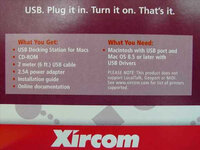
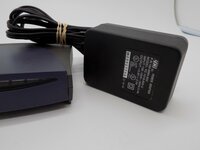
The Xircom PortGear PGMFHUB allows external SCSI devices to be used with a USB equipped Mac. If anyone has one of these, I'd appreciate knowing the power adapter specs - I lost the power adapter to mine a couple decades ago.

Edit: If anyone has an AEC-7720U or 7720UW, I'd greatly appreciate knowing the values of the electrolytic capacitors.
 
Last edited:
Acard AEC-7720U adapters allow the use of IDE drives with SCSI controllers.
The Xircom PortGear PGMFHUB allows external SCSI devices to be used with a USB equipped Mac. If anyone has one of these, I'd appreciate knowing the power adapter specs - I lost the power adapter to mine a couple decades ago.

2.5A. That's a start. https://www.recycledgoods.com/xircom-pgmfhub-mac-usb-dock-apple-imac-ibook-usb-port-upgrade/

I would say 5V if I compare it to a device manufactured by the same company here: https://www.ebay.com/itm/125909057860 (I know this isn't the same device)

Based on what little information is available, I would say 2.5A, 5V would be a good place to start with a universal power adapter where you can change voltages... like this one: https://www.amazon.com/SoulBay-Universal-Switching-Selectable-Electronics/dp/B01N7RS0NG/


xircom-pgmfhub-mac-usb-dock-apple-imac-ibook-usb-port-upgrade-5.17__23241.jpg

s-l1600.jpg
 
2.5A. That's a start. https://www.recycledgoods.com/xircom-pgmfhub-mac-usb-dock-apple-imac-ibook-usb-port-upgrade/

I would say 5V if I compare it to a device manufactured by the same company here: https://www.ebay.com/itm/125909057860 (I know this isn't the same device)

Based on what little information is available, I would say 2.5A, 5V would be a good place to start with a universal power adapter where you can change voltages... like this one: https://www.amazon.com/SoulBay-Universal-Switching-Selectable-Electronics/dp/B01N7RS0NG/


View attachment 56121

View attachment 56122

Many thanks indeed!
 
Back
Top