Follow along with the video below to see how to install our site as a web app on your home screen.
Note: This feature may not be available in some browsers.
Hello MLAers! We've re-enabled auto-approval for accounts. If you are still waiting on account approval, please check this thread for more information.
Hi,
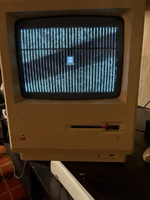
I've an original Macintosh from 1984 and the sad Mac error I get on boot is 04ACBA
How to pinpoint which RAM chips are bad?
Where to get replacements? I'm based in Dublin, Ireland.
UPDATE! :) Gary Rice generously released the Black & Bleu - The Ultimate Mac Error Codes Utility on Macintosh Garden. This is an excellent resource for making sense of the Sad Mac codes, more than what is listed below. Apple's overview below is...
UPDATE! :) Gary Rice generously released the Black & Bleu - The Ultimate Mac Error Codes Utility on Macintosh Garden. This is an excellent resource for making sense of the Sad Mac codes, more than what is listed below. Apple's overview below is...
My best advice is to replace them all. That subcode usually means that more than one IC is gone bad. The RAM chips on the original 128k and IIc are known for going bad after some time. Some failed even back in the day. Could be also one of the 74244s.
Have you try to clean the ROM sockets re-seat the ROM ICs?.
04= Bad RAM, you should start by replacing all RAM ICs.
Yes, if it's a 128k those use Micron DRAMs that are a bit notable for self-destructing. You may wish to replace them all, or if you don't, you may wish to keep (non-Micron) spares for when the remaining micron ones disintegrate.
I think I got mine from ebay, but it was so long ago I can't remember.
This site uses cookies to help personalise content, tailor your experience and to keep you logged in if you register.
By continuing to use this site, you are consenting to our use of cookies.