
-
Hello MLAers! We've re-enabled auto-approval for accounts. If you are still waiting on account approval, please check this thread for more information.
You are using an out of date browser. It may not display this or other websites correctly.
You should upgrade or use an alternative browser.
You should upgrade or use an alternative browser.
Remotely shutdown a classic mac
- Thread starter galgot
- Start date



Cron Job, and tell it to shut down from a text file as a bash or perl script.
Specify what day (all) and time (I believe in 24 hour format) when to shut down.
On start up, Linux/OSX/UNIX checks for cron jobs and remembers any that need to be done during the day.
Specify what day (all) and time (I believe in 24 hour format) when to shut down.
On start up, Linux/OSX/UNIX checks for cron jobs and remembers any that need to be done during the day.
Last edited by a moderator:
Hi Elfen,
Yes, I understand that would work on a osx or linux running machine.
But I'm asking how to do that remotely, from a osx or linux, shuting down a OS classic running Mac.
Running System 6 to 7, or Mac OS 8 to 9, without any vnc server or timbuktu installed. Is it possible ?
Sorry if I've not been specific enough .
Yes, I understand that would work on a osx or linux running machine.
But I'm asking how to do that remotely, from a osx or linux, shuting down a OS classic running Mac.
Running System 6 to 7, or Mac OS 8 to 9, without any vnc server or timbuktu installed. Is it possible ?
Sorry if I've not been specific enough .

It may be possible with AppleScript and HTTP (or file sharing), but maybe not due to Classic AppleScript's limitations. All you would have to do is update a .txt file on an http server (or something else simple) with a signal for the AppleScript to detect and act upon. I suppose you could do it easily by editing a file locally on the Mac, with remote file sharing turned on.Hi Elfen,
Yes, I understand that would work on a osx or linux running machine.
But I'm asking how to do that remotely, from a osx or linux, shuting down a OS classic running Mac.
Running System 6 to 7, or Mac OS 8 to 9, without any vnc server or timbuktu installed. Is it possible ?
Sorry if I've not been specific enough .
The script would work this way:
1. AppleScript reaches the end of a timer, triggers subfunction 1a.
1a. Subfunction downloads the contents of a plaintext file or web page.
2. The contents of the plaintext are parsed and checked for a signal. (IE: "1" or "poweroff") If no signal is found, it ends the main script and resets the looping timer.
2a. Upon detection of the signal, it sends shut down command to Finder.
You may need to make use of 2 scripts in order to get it to run smoothly. Having a single script constantly looping (timer or not) can get very unstable and it will eventually crash. So, you could simply run a timer Daemon that ends itself and activates the main parsing script, which then activates the timer Daemon upon ending itself as well.
Last edited by a moderator:
I can try it under System 7.6.1 for you. I haven't done anything with AppleScript in years, but I used to make hugely complicated shell-inclusive AppleScripts for GeekTool on OS X. I'll report what I find out! If AppleScript is too limited to do it on System 7, we could incorporate a baby Perl parser to compensate.Thanks
I will try something like that.
But I'll have to learn more Applescripting first
Hell, at that point, you could even make another script that does the signal-sending for you.
Last edited by a moderator:
That would be very nice, thank you !
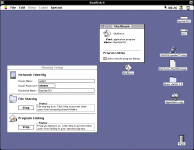
I've also been looking in the Sharing setup ctrl panel, there is the Program Linking option. Do you think this could be of use ?
Went on, you can share an application to "allow remote program linking"
Done a very simple script to shutdown, an I can share it through that Program linking, but from there, what to do ?...
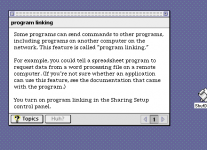
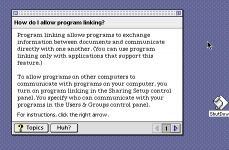
This is what Apple Guide says on a 7.6.1 system, not very explicit :
I've also been looking in the Sharing setup ctrl panel, there is the Program Linking option. Do you think this could be of use ?
Went on, you can share an application to "allow remote program linking"
Done a very simple script to shutdown, an I can share it through that Program linking, but from there, what to do ?...
This is what Apple Guide says on a 7.6.1 system, not very explicit :


I gotta admit, I've been struggling with the AppleScript 1.1 basic command set. There's not even a "delay" command. Because of the limitations, I had to use a text-only web browser to download the page contents first. We could probably implement this in a separate baby Perl program, but for now it's WannaBe 68k.
Here is my proto-script! For now, it is not automatic, and requires you to choose the path of the saved file in a "Save As" dialog box:
set filespec to (new file default name "test.txt")
tell application "WannaBe 68k" to fetchurl "http://10.0.0.76:80/test.html" to filespec
open for access filespec
set testvar to (read filespec)
close access filespec
if testvar contains "testing!wow" then beep
(The bbcode "code" function seems to be totally broken??? Lol.)
Basic rundown of stuff:
- 10.0.0.76 is my IIS server right next to the System 7.6.1 machine.
- "test.html" is a test file containing the string "testing!wow" which Applescript looks for.
- The "beep" command can be changed to "tell application "Finder" shut down". It's "beep" for testing purposes.
- There's probably a way to set the filepath automatically, and get rid of the dialog box.
Now, with all that said, maybe simple File Sharing would be easier to implement. You could basically get rid of all the web parsing schmuck (removing the need for a Perl program/web browser and an http server) and check a file directly with the "open for access" commands.
Here is my proto-script! For now, it is not automatic, and requires you to choose the path of the saved file in a "Save As" dialog box:
set filespec to (new file default name "test.txt")
tell application "WannaBe 68k" to fetchurl "http://10.0.0.76:80/test.html" to filespec
open for access filespec
set testvar to (read filespec)
close access filespec
if testvar contains "testing!wow" then beep
(The bbcode "code" function seems to be totally broken??? Lol.)
Basic rundown of stuff:
- 10.0.0.76 is my IIS server right next to the System 7.6.1 machine.
- "test.html" is a test file containing the string "testing!wow" which Applescript looks for.
- The "beep" command can be changed to "tell application "Finder" shut down". It's "beep" for testing purposes.
- There's probably a way to set the filepath automatically, and get rid of the dialog box.
Now, with all that said, maybe simple File Sharing would be easier to implement. You could basically get rid of all the web parsing schmuck (removing the need for a Perl program/web browser and an http server) and check a file directly with the "open for access" commands.
Last edited by a moderator:
Like Floofies has, you can use Apple Script to activate the Shutdown Script in the Apple menu.
Funny. If you had Timbuktu (the older version is more prone to this than the newer), it has a bug in it. If you try to SSH/Telnet to Timbuktu's port, it shuts down the machine. I am not sure if this would work for an emulated machine but is did for a G4 on OS8 and OS9 back in 2004.
Funny. If you had Timbuktu (the older version is more prone to this than the newer), it has a bug in it. If you try to SSH/Telnet to Timbuktu's port, it shuts down the machine. I am not sure if this would work for an emulated machine but is did for a G4 on OS8 and OS9 back in 2004.
I did some digging, and it doesn't look good for System 7 or 68k Macs. Apparently the earliest version of AppleScript that supports the "Delay" command is AppleScript 1.3, which only loads on Mac OS 8.5 or later, and is 99% PowerPC native so it won't work on a 68k Mac! This means we have to figure out another way to run the main script on a timer, if it's going to work on anything below Mac OS 8.5 or on 68k. Perhaps a separate "program scheduler" application? (Maybe Cron Manager)
Not looking easy, lol.
Not looking easy, lol.
Last edited by a moderator:
Wow thanks, will try that script tomorow.
How about setting a ftp server on the classic Mac, say with NetPresenz, setting the script to regurally read a text file in a certain folder shared by the ftp server, then when you upload a text file with proper command into that folder it could trigger the script to shutdown...
Still the problem, as you say, is the delay option absent on early AppleScript.
Or wait... If Cron Manager could just launch a script at certain time, it could trigger any script uploaded into the ftp server.
How about setting a ftp server on the classic Mac, say with NetPresenz, setting the script to regurally read a text file in a certain folder shared by the ftp server, then when you upload a text file with proper command into that folder it could trigger the script to shutdown...
Still the problem, as you say, is the delay option absent on early AppleScript.
Or wait... If Cron Manager could just launch a script at certain time, it could trigger any script uploaded into the ftp server.
Last edited by a moderator:
Ok, Tried some things.
Thank you for pointing me to Cron Manager, excellent stuff.
I've set up a Ftp server on the OS 8 mac, using MacSSH, installed Cron Manager.
Any files named appropriately and placed into the "Cron Events Folder" in the System Folder will be launched.
So made a simple "do beep" applescript. make an alias and name "*1" (without quotes of course).
*1 means Cron Manager will open it every minutes, *60 would be every hours.
Got that "*1" alias to a OS X running Mac. From there connected via Ftp to the OS 8 Mac.
Uploaded the "*1" to the "Cron Events Folder"… And after a minute , Cron Manager opens… An empty text file named "*1"
Of course, when I upload the "*1" alias via ftp, it looses his Mac resource forks, and is seen as a text file...
Only way to upload it and keeping these resources is to make it a .sit file.
So made a stuffit archive of a restart applescript also named "*1 .sit" (note the space after 1, I don't think this is necessary…), then uploaded it back into "Cron Events Folder" via ftp. After a minute, it unstuffed the archive and launched the resulting "*1" restart script. So it works
You can launch almost any script remotely like that. The caveat is that it as to be with some more delays than 1 minute, otherwise you end up with xx "*1" files in the "Cron Events Folder" After restart , it unstuffed again "*1 .sit" and again launched the script, so I had to be fast emptying the "Cron Events Folder" .
I think best is to make a file called "*10", so to have 10 minutes of delay, and be able to ftp into the "Cron Events Folder" to delete the files if you need.
Or maybe there is a way to make the script so that it delete any .sit files and move itself out in the "Cron Events Folder" ?...
Thank you for pointing me to Cron Manager, excellent stuff.
I've set up a Ftp server on the OS 8 mac, using MacSSH, installed Cron Manager.
Any files named appropriately and placed into the "Cron Events Folder" in the System Folder will be launched.
So made a simple "do beep" applescript. make an alias and name "*1" (without quotes of course).
*1 means Cron Manager will open it every minutes, *60 would be every hours.
Got that "*1" alias to a OS X running Mac. From there connected via Ftp to the OS 8 Mac.
Uploaded the "*1" to the "Cron Events Folder"… And after a minute , Cron Manager opens… An empty text file named "*1"
Of course, when I upload the "*1" alias via ftp, it looses his Mac resource forks, and is seen as a text file...
Only way to upload it and keeping these resources is to make it a .sit file.
So made a stuffit archive of a restart applescript also named "*1 .sit" (note the space after 1, I don't think this is necessary…), then uploaded it back into "Cron Events Folder" via ftp. After a minute, it unstuffed the archive and launched the resulting "*1" restart script. So it works
You can launch almost any script remotely like that. The caveat is that it as to be with some more delays than 1 minute, otherwise you end up with xx "*1" files in the "Cron Events Folder"
After restart , it unstuffed again "*1 .sit" and again launched the script, so I had to be fast emptying the "Cron Events Folder" .I think best is to make a file called "*10", so to have 10 minutes of delay, and be able to ftp into the "Cron Events Folder" to delete the files if you need.
Or maybe there is a way to make the script so that it delete any .sit files and move itself out in the "Cron Events Folder" ?...
Last edited by a moderator:
Excellent information you done here. But this quote has me scratching my head.Of course, when I upload the "*1" alias via ftp, it looses his Mac resource forks, and is seen as a text file...
Only way to upload it and keeping these resources is to make it a .sit file.
Does the text file end in .txt or some other extension? And to where is it being downloaded too?
I had this issue before because the files did not have an extension and I needed to Use a program like Utility Dog to recreate the resource header of the file. But the thing is, when it eliminated the resource headers, it opened the file as a text file! Using the extension somehow kept the resource headers and saved a lot of headaches.
Last edited by a moderator:
Well, nothing was downloaded. the Applescript "do beep" app , named "*1" was uploaded to the OS 8 Mac via Ftp into that "Cron Events Folder". Without any .txt or anything as it's an Applescript app.
After a minute Cron Manager triggered it to be opened by the finder, but the resource forks being gone, it could not see it as an app.
So I suppose the system checked what application could be used to open the file , found it was a text file and opened it as an empty file (white page) with SimpleText.
The Applescript was uploaded from a Mac OSX 10.5 running MacMini using Ftp, which destroy any classic mac resource forks, if i had used a classic Mac to upload it ,running say OS 8 like the test machine, I would have connected with Appletalk, and the resources would have been preserved.
So a good way to preserve these using another file transfer protocol, is using Dropstuff.
Note the script was done and stuffed on the test mac, to avoid any incompatibilities if ever it was done and compressed with more recent versions of Applescript and Dropstuff. Then send to the OS X MacMini, to be send back to the test OS8 Mac
Here is an excellent summary of the resource forks on Mac on the PPC Luddite blog :
http://ppcluddite.blogspot.fr/2012/11/a-little-about-resource-forks.html
After a minute Cron Manager triggered it to be opened by the finder, but the resource forks being gone, it could not see it as an app.
So I suppose the system checked what application could be used to open the file , found it was a text file and opened it as an empty file (white page) with SimpleText.
The Applescript was uploaded from a Mac OSX 10.5 running MacMini using Ftp, which destroy any classic mac resource forks, if i had used a classic Mac to upload it ,running say OS 8 like the test machine, I would have connected with Appletalk, and the resources would have been preserved.
So a good way to preserve these using another file transfer protocol, is using Dropstuff.
Note the script was done and stuffed on the test mac, to avoid any incompatibilities if ever it was done and compressed with more recent versions of Applescript and Dropstuff. Then send to the OS X MacMini, to be send back to the test OS8 Mac
Here is an excellent summary of the resource forks on Mac on the PPC Luddite blog :
http://ppcluddite.blogspot.fr/2012/11/a-little-about-resource-forks.html
Last edited by a moderator:


Similar threads


- Replies
- 2
- Views
- 1K


- Replies
- 1
- Views
- 1K