• Hello MLAers! We've re-enabled auto-approval for accounts. If you are still waiting on account approval, please check this thread for more information.

Radius Rocket: Error #4102

Trash80toHP_Mini

NIGHT STALKER
68040
Has anyone seen Error #4102 and under what circumstances?

Interesting conundrum here, I had the Rocket 33 up and running under RocketShare in my "incompatible" IIsi long ago.

RocketWare was a no go, dammit! But I got RocketShare installed on an HDD in the IIcx and transferred it to the IIsi in the same manner. I was up and running and formatted one of my SAVVIO SCA drives on the internal bus as a dedicated "Rocket Drive 1" to later run off the Fast/Narrow SCSI2 daughtercard. I never went any further than the successful Rocket-in-IIsi hack because Rocket and IIsi under RocketShare running off vampire video @640x480 was unacceptable and a workaround needed to be found for that.

Just put together as much of the Rocketized IIsi setup as I could easily find as my activity for the day, only the standard boot drive was missing. The IIsi boots and the Rocket launches off the Savvio hooked up to the internal bus, but I get a cute icon of a crashed rocket with the message:

ROCKET detected an error while loading (#4102)

Rocket does not work on this CPU.

Well I KNOW it does in fact run on this CPU (IIsi) after my bait and switch workaround for the installer's simple Gestald ID roadblock to IIsi installation.

Gotta find the IIsi Boot Drive I'd set up in the IIcx as my next step. Assuming that works, it appears there's another level of compatibility checking for RocketShare that runs after initial RocketWHOOSH, but before RocketShare startup.

It's interesting that when I try to boot from the "Rocket Drive 1" HDD" I get this system hang on Error #4102. This will likely go away with the IIsi boot drive in the picture again, but I think this bears further investigation by the Rocketeer contingent.

Time to give RocketWare another working over too. :ph34r:

 
Last edited by a moderator:
I'm more of a Rocket-naive-er than a Rocketeer at this point, but you're probably the only one to have ever launched a Rocket in a IIsi, so there's a bit of undiscovered country in there.  I tried searching for your old thread on the Rocket in the IIsi, but it's dead Jim.

What I don't understand, if you're using a different boot drive, how did you install the RocketShare software this time round?  And is the current boot drive installed with "for any macintosh" option?

If it worked before, there must be a way to make it work again.  Maybe Wish I Were could help?

No doubt you've already attended to such musings, but I'll think it out anyway.

 
Pretty sure I just copied the system folder from the original boot drive to "Rocket Drive 1."  I think that's how RocketShare setup sees it? Dunno, it's the first of the 11 maximum size partitions on the Savvio to hit the desktop before I pulled the plug on FWB. Too bad I didn't think to copy the data from the standard SCSI boot drive over to the SCA drive along with the System Folder. ::)

Nope, I'd never heard of anyone launching a Rocket in a IIsi either, so that felt good. :approve: I have a feeling it won't be the last time someone takes a swack at it. [;)]

Won't be a biggie to do it over, just annoying. LOL! So many of my older threads have disappeared, it's irritating. The pics are still in "my attachments" for some, so I've been rebuilding research from there. Much was lost when the PSU gave out in my QS'02 and I made the bonehead move of installing its HDD in the BG3DT  .  .  .  no real backup there either for the ensuing corruption.

Screenshots of the Rocket-in-IIsi hack aren't here in "my attachments" or with the iFrog pics. Maybe I'll find 'em when I find the boot drive that took them! I can't find my SuperIIsi thread either, but a lot less attachments remained orphaned.

 
I feel a little lot better, it won't run in the IIci either. [:o)] Learned some new stuff.

Tried copying System from Rocket partition to the next, but the Mac still boots off the first partition. I'm not familiar with 7.1, does the System need to be installed in the first partition? Interesting things:

-  all partitions show up in Startup Disk as bootable drives even though they're blank

-  after copying System over and then setting the boot drive to the second partition it boots from first partition as noted

-  but upon opening Startup Disk EVERY partition show up in the window as selected!

-  -  PRAM bat removal and powerdown required, second time, same as the first.

Error #4103 is more helpful, it just says that turning off Virtual Memory is required, which might lead me to believe that #4102 may also memory related, but I don't think so. Seems like it's doing a pre-flight check, the crashed Rocket icon is a bit misleading, it never gets off the ground.

The Rocket lifts off after turning off VM.

Rocket screen stays up for about 25 seconds

- It has 96MB on board, is that about right for a memory check?

 -  -  Only had 32MB back in the day, never took much note of boot times because I had so much other stuff to do.

-  -  -  I now see why memory check bypass is so popular, 128MB check on a 16MHz or even 25MHz bus  .  .  .  BLECH!

After memory check (assumption) MoBo Video goes blank and no other activity is detected.

Radius PrecisionColorXp installed - no change, video is poleaxed after wait, no further activity detected.

Memory in IIci was 4MB at start of testing, upped to 20MB after Video Blank stage achieved: no change.

______________________________________________________________

Forgot to list the setup: IIci/Rocket 33/SCSI2/System 7.1  .  .  .  OOPSIE!  .  .  .  Removed SCSI2 booster from Rocket, no change. IIcx bait install, IIsi switch and successful IIsi runs were all done sans SCSI2 Booster.

Next step, back to the IIcx to see if it'll work. Not likely, so a system rebuild from scratch on another Savvio will likely be next up.

 
Got the IIx together and finally got the Rocket working off this drive. Apparently it's a RocketWare install, not a copy of the RocketShare setup on the standard drive that worked in the IIsi.

Now I can just delete everything, do a clean install of 7.1 and RocketShare on this drive with a high probability of it working again after transplanting the goodies to the IIsi.  [:)]

Found a new one! Error #4100 popped up when I was booting the IIcx and Rocket from the ROM-inator 2. The Rocket software checklist gives that error, saying it's not compatible with the universal MacII image version of ROM.

Pulled the ROM-inator, replaced the jumper and it was good to go. Needs MODE32 in the IIx, but don't remember having any real problems.

Now to find the floppies, lots of floppies. ::)

 
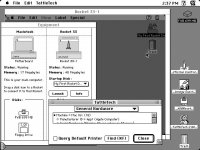
YAY! Haven't tried the install yet, but I tested the FDD in the IIfx with a custom utility disk and right there was the documentation screenshot I'd set up of the IIsi/Rocket/7.1 running under RoketShare!

IIsi-RocketShare-Stats-1.jpg

So, of course, after I'd hooked up the Zip drive the Floppy decided to be unreadable (gotta swap the FDD out that's what

I've been testing) but I'd copied the screenshot over to one of the Savvio's partitions for backup.  [:)]

Get Info: Created: Thu, Apr 4,2013, 2:37 PM

A time slice of Hack Life from five years ago, three years after returning to the forums.

 
Last edited by a moderator:
Got the IIx together and finally got the Rocket working off this drive. Apparently it's a RocketWare install, not a copy of the RocketShare setup on the standard drive that worked in the IIsi.

Now I can just delete everything, do a clean install of 7.1 and RocketShare on this drive with a high probability of it working again after transplanting the goodies to the IIsi.  [:)]

Found a new one! Error #4100 popped up when I was booting the IIcx and Rocket from the ROM-inator 2. The Rocket software checklist gives that error, saying it's not compatible with the universal MacII image version of ROM.

Pulled the ROM-inator, replaced the jumper and it was good to go. Needs MODE32 in the IIx, but don't remember having any real problems.

Now to find the floppies, lots of floppies. ::)


Not surprised here.

One problem I ran into with having a Rocket in a Quadra (650/800) is that the Rocket refused to boot via RocketShare with a custom ROM burned onto the ROMinator I'd installed.

It works fine with the stock ROMs, which makes me wonder if the Rocket software has some kind of authentication check to make sure you're using an official ROM on your host Mac. That'd make some sense.

 
Last edited by a moderator:
Yep, since each Rocket copies host ROM into memory I'd say error checking/checksum validation would be part of the process. Haven't played with customization and haven't read about it since dougg3's development thread. Does the checksum change in a way the OS of the host doesn't care about, but makes the Rocket spit it out with that error?

edit: if not checksum, size of the ROM image would likely be checked?

 
Last edited by a moderator:
Well, as I recall, part of the customization effort involved patching the mechanism that checks the validity of the checksum so that it's essentially inert.

The Rocket likely has something similar, and as Trash suggests, it probably throws this error when it sees either an unexpected checksum or an unexpectedly large or small ROM.

c

 
Back
Top