• Hello MLAers! We've re-enabled auto-approval for accounts. If you are still waiting on account approval, please check this thread for more information.

Quadra 700: memory controller capabilities and possible mods?

stynx

6502
I have looked through the schematics and i have seen that the memory controller only has two of four 32bit banks connected physically. The onboard memory lacks 2 address lines but the bus-driver pins to the mem-c are actually prepared but not connected. So in theory, the Q700 could address 256Mb of memory by heavily modding the board. Or possibly 128Mb with minor modding. Has anyone attempted to mod a Q700 to access a full 64Mb bank on the onboard bank?

I have two Q700 mainboards that are a bit buggy/defective to tinker with. One mainboard has a defective NuBus (no cards are recognised) and the other board has battery damage. I may be tempted to solder a 64Mb 72pin simm onto the onboard-ram pads. ... If i find the time (i have a "Milan 040" TOS compatible computer waiting to get some love)

-Jonas
 
I have looked through the schematics and i have seen that the memory controller only has two of four 32bit banks connected physically. The onboard memory lacks 2 address lines but the bus-driver pins to the mem-c are actually prepared but not connected. So in theory, the Q700 could address 256Mb of memory by heavily modding the board. Or possibly 128Mb with minor modding. Has anyone attempted to mod a Q700 to access a full 64Mb bank on the onboard bank?

I have two Q700 mainboards that are a bit buggy/defective to tinker with. One mainboard has a defective NuBus (no cards are recognised) and the other board has battery damage. I may be tempted to solder a 64Mb 72pin simm onto the onboard-ram pads. ... If i find the time (i have a "Milan 040" TOS compatible computer waiting to get some love)

-Jonas

The chipset is the same as the Q900 and basically the same as the Q950, so it should be capable of 256MB. Any Q9x0 schematics are probably a good start... Or bolle's reloaded layouts.
 
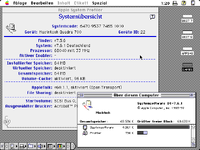
I just removed the onboard ram from a Q700 and it still works normally. It only shows the ram in the ram-sockets (as expected). I will see if i can install a 72pin socket on a PCB and connect the needed signals.
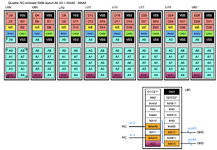
q700_64mb.png
 
The floating setup that i have soldered to the pads is not working at the moment. I may have soldered a wrong connection or i have switched around a wire... It's a bit stupid that the Q700 only gives a sad chime without any info what is exactly wrong.
I have already fixed a missing wire (RAS#2) and a bad solder connection on the 72pin simm (A9). Still, there is another bug somewhere....

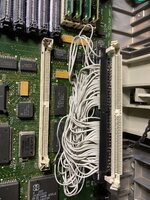
I will mkae a photo of the rats nest tomorrow :p

-Jonas
 
The floating setup that i have soldered to the pads is not working at the moment. I may have soldered a wrong connection or i have switched around a wire... It's a bit stupid that the Q700 only gives a sad chime without any info what is exactly wrong.
I have already fixed a missing wire (RAS#2) and a bad solder connection on the 72pin simm (A9). Still, there is another bug somewhere....

I will mkae a photo of the rats nest tomorrow :p

-Jonas

You could connect another Mac to its modem port and use a terminal emulator to see what the error is.
 
Found it here

There are tow pads on the Quadra 700 in the front (near the battery) labeled J24. Short these pads on boot.

Still cannot get info about the Ram. I only get *ERROR**T as reply when i try any ram related test. I am using the 2nd ram bank (simms) only at the moment. The computer will work and boot in this configuration. No onboard ram and no 72pin Simm is installed in the socket that i installed.

*S -> service mode: works
*A -> ASCII for parameters: works
*T000000010000 -> ram size: *ERROR**T

-Jonas
 

Attachments

Found it here

There are tow pads on the Quadra 700 in the front (near the battery) labeled J24. Short these pads on boot.

Still cannot get info about the Ram. I only get *ERROR**T as reply when i try any ram related test. I am using the 2nd ram bank (simms) only at the moment. The computer will work and boot in this configuration. No onboard ram and no 72pin Simm is installed in the socket that i installed.

*S -> service mode: works
*A -> ASCII for parameters: works
*T000000010000 -> ram size: *ERROR**T

-Jonas
What's the response code if you enter *R?
 
Adrian Black did quite a deep of analysis of the diagnostic mode, building on the work of Rob Braun:


The original doc by Rob Braun is available here, which you already found:

Adrian Black’s updated document is here:

The above resources should get you up to speed on the diagnostic mode. The response code I mentioned is important to analyse as a first step:

This will return the current value contained in the ROM's diagnostic status register (D6), along with the current flag settings (bottom word of D7). Output will be in the form of "000000000000", 12 hexadecimal digits. The first 8 digits are the 32bits of the status, and the last 4 digits are the major error code.

The major error code in your case might be a RAM addressing failure (0005) or data bus error (000E). The 8 digits before this will tell you where the error is.
 
Adrian Black did quite a deep of analysis of the diagnostic mode, building on the work of Rob Braun:


The original doc by Rob Braun is available here, which you already found:

Adrian Black’s updated document is here:

The above resources should get you up to speed on the diagnostic mode. The response code I mentioned is important to analyse as a first step:


The major error code in your case might be a RAM addressing failure (0005) or data bus error (000E). The 8 digits before this will tell you where the error is.
Has anyone had a look through the comments in the ROM source of the diagnostics mode in the super mario source?
 
Funny that you mention the TechStep. I took out my (complete in carry-case) TechStep to look if the Quadra 700 was supported. Sadly, it is not. I have Vol1-Vol3 of the CPU tests but they cover the computers only up until the 68030. The (also complete) "Apple CAT" i own has support for only the older computers as well.

I will watch the Adrian Black video later this week.
 
yeah the techstep is only for pre-040 machines... probably because apple moved towards "logic board fault? replace the whole thing" around that time.
 
The major error code in your case might be a RAM addressing failure (0005) or data bus error (000E). The 8 digits before this will tell you where the error is.
For the test of the debug function, i only had 4mb in the 30pin simm slots installed.
The system boots without problems in this configuration. Why would there be bus- or ram-errors if the system boots normally?

I want to have a starting point where i know the correct results before using the newly installed 72pin ram slot.
Reading the PDF, i have definitely use incorrect commands.

-Jonas
 
Why would there be bus- or ram-errors if the system boots normally?

Well, since you said this:

it's a bit stupid that the Q700 only gives a sad chime without any info what is exactly wrong.

I thought you wanted to know what the sad chime represented. So if you check the response code at this point, you could see the major error code and the 32bit status.

You can enter the serial test manager by pressing the NMI button to invoke it; but if it crashes with sad chimes, it automatically drops into test manager for you to debug it as well.
 
Last edited:
You have not read everything i have written in order. ...Whatever.
I am really thankful for your pointers and help.

The sad chime is a problem with the additional ram-socket, not the mainboard in general.
Only if the additional 72pin ram is installed, i get the sad chime.
I think i have the tools now, to find out whatever is wrong with my soldering (most likely a wrong connection somewhere)

Maybe i have a hard time getting my thoughts across since i am not a native english speaker.
 
The sad chime is a problem with the additional ram-socket, not the mainboard in general.
Only if the additional 72pin ram is installed, i get the sad chime.
I think i have the tools now, to find out whatever is wrong with my soldering (most likely a wrong connection somewhere)

Sorry if I misunderstood you.

Good luck with the fault-finding, interested to see if you get it working.
 
Back
Top