• Hello MLAers! We've re-enabled auto-approval for accounts. If you are still waiting on account approval, please check this thread for more information.

Powermac G5 (Dual Core 2.3) PSU repair?

Hello 68kMLA!

I recently acquired a G5 Dual Core 2.3, and it seems like the power supply in it is dead. It clicks twice when plugged in, and the "trickle power" LED indicator on the logic board only briefly lights up before going dark.

Somehow, I managed to get the Power Supply out of the mac, and thought that I might be able to repair it, or replace it with an ATX power supply - however, the last generation of PMG5s seem to use a power supply that's different from other G5s, as the connectors are completely different (and the PSU has bus bars on the top), so most online resources (like the Damn Technology mod, and every single pinout chart online) seem to be tailored to a different model of PSU. Picture attached:
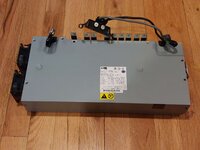
20230207_174309.jpg
Opening it up, I spotted what looks like a scorch mark on the other side. Not good! Most of the fuses read good though, and the PSU shocked me as I tried to turn the PCB over, so it seems like power is flowing through it - just not to the computer.
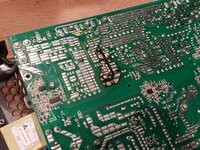
20230207_171213.jpg
Does anyone here have experience with repairing these later PSUs, or replacing them with an ATX power supply? Replacement PSUs of this model are about $45 on eBay, but I don't want to spend that much only to find out that there's a simpler/cheaper/more reliable solution out there.
Thanks!
 
In my experience, a common fault in PowerMac G5 PSUs are the small, 4.7uF electrolytic capacitors soldered vertically onto a daughterboard attached to the mainboard. These capacitors likely play a role in monitoring the DC voltage rail for stability and preventing shorts. Replacing these capacitors can be a repair option, but it requires soldering expertise and carries the risk of damaging other components if not done carefully.
 
 
I ended up recycling the old PSU and buying one of those replacements I was dreading... I thought about repair, or maybe replacing it with a modern PSU, but I couldn't find a pinout for the G5 PSU, and the PSU kept shocking me as I tried to handle the board. So frustrating to know that the answer all along was bad caps!
 
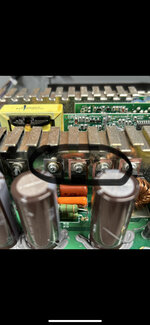
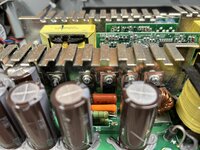
Trying to resurrect two dual core 2.3. Both bad psu. So annoying as one did work. Do these look burnt or hot? Caps look fine. Hate to recap whole thing to not fix it
 

Attachments

  • 5A9BB2D7-3F80-4A53-8FB4-7ED35C2638F8.jpeg
    5A9BB2D7-3F80-4A53-8FB4-7ED35C2638F8.jpeg
    1.5 MB · Views: 31
  • 73430346-D5CD-42EF-B7B3-EAF743585E2C.jpeg
    73430346-D5CD-42EF-B7B3-EAF743585E2C.jpeg
    3.2 MB · Views: 25
Trying to resurrect two dual core 2.3. Both bad psu. So annoying as one did work. Do these look burnt or hot? Caps look fine. Hate to recap whole thing to not fix it
How has this worked out? I took apart a similar PSU to find similar damage. Strange that a diode would short across that surface.
 
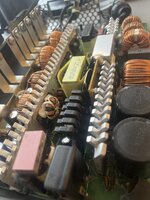
Does anyone have any idea what to look for inside a 710-watt PS from a "Late 2005" dual-core 2.3 GHz? Nothing in here looks scorched, discoloured, bulgy, or leaking. I can't find anything that looks like @Builder68's daughterboard with caps on it - there's a daughterboard of some sort in the middle of the board, but it's buried deep in a morass of heatsinks and potting compound, so I'm very reluctant to go digging when I can't even see any caps on it.

There is also a fuse clamped to the board, marked "F15AH/250V" (it's made of opaque ceramic! that's a new one to me) - it reads at about 0.2 ohms, so I figure it's probably OK.

TL;DR: I'm lost. What should I be looking for?
 
image.jpg

This is a shot of the power supply board, looking from the end with the air-intake fans towards the end with the power-intake socket.
 
I'm actually not 100% certain that the problem is even IN the power supply. All I know is that the machine made a "snap" noise and went stone dead when I tried to power it on. (I'm going to feel very silly indeed if it turns out the two hours and change I spent extracting the PSU - a process which requires first removing the entire logic board - was wasted.)

Has anyone got a bare-bones diagnostic procedure that would tell me whether the power supply is working? It's got 17 conductors spread over three flying leads, plus nine big busbars, only some of which are meaningfully labelled. I have no idea what voltages ought to be present where, nor whether it's even safe to plug it in when not connected to a load.
 
I'm actually not 100% certain that the problem is even IN the power supply. All I know is that the machine made a "snap" noise and went stone dead when I tried to power it on. (I'm going to feel very silly indeed if it turns out the two hours and change I spent extracting the PSU - a process which requires first removing the entire logic board - was wasted.)

Has anyone got a bare-bones diagnostic procedure that would tell me whether the power supply is working? It's got 17 conductors spread over three flying leads, plus nine big busbars, only some of which are meaningfully labelled. I have no idea what voltages ought to be present where, nor whether it's even safe to plug it in when not connected to a load.
There is a lead that has either four or six pins. Shorting one of these pins to a ground pin will trigger PS ON.

I’m not exactly sure the color, either brown or green, but shorting one of these with it’s black neighbor keeps it powered.

Your crack of death is what I experienced. Best I can tell is that a cap is dry, full current draws across it, and power arcs out of something else along the circuit. My evidence of arcing is that some of those chips attached to the large heat sinks (they look like transistors) had scorch marks around them on the heat sink.

If you don’t have a variac, I don’t think is a great idea to try to power it again until the shorted cap is dealt with.

I purchased a PSU to replace mine and indeed I could short the PS ON lead with a black ground and it would provide all the expected voltages.

Hint: the PS ON lead is labeled on the circuit board.
 
That's very helpful, thank you! I did indeed see that marking but had no idea how to trigger it. I shall investigate further. Hopefully without excess lightning bolts.
 
Back
Top