Follow along with the video below to see how to install our site as a web app on your home screen.
Note: This feature may not be available in some browsers.
Hello MLAers! We've re-enabled auto-approval for accounts. If you are still waiting on account approval, please check this thread for more information.
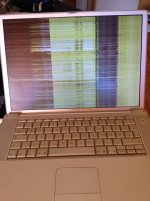
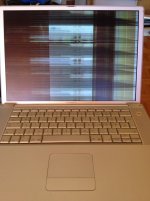
I have purchase recently a PowerBook G4 with internal screen problem as you can see from the pics.When connected in external monitor works fine.The seller told me that if I hit it around the speakers the picture comes back...
Loose,damaged,bad video cable? Does tapping around the speaker fix the screen?
Working in the LCD panel is not something I would want to do so you would need to replace the whole panel assuming the graphics chip isn't messed up then you need a new laptop.
If the picture looks okay on an external monitor, it’s definitely not the GPU. If the picture comes back when you tap around the speaker, you likely have a bad/loose video cable.
Be careful when removing the top casing! Those tabs by the optical drive slot are a pain.
This site uses cookies to help personalise content, tailor your experience and to keep you logged in if you register.
By continuing to use this site, you are consenting to our use of cookies.