


I need some help booting my Mac Powerbook G4 (A1095) laptop. I don't know if I have the 1.3Gh model or the 1.5Gh model.
When I bought it on ebay it was broken. When I tried to boot it, I heard what sounded like a bad fan or a bad hard drive spin up. It was very noisy. It would only boot to a screen with a flashing question mark and a file folder.
I stuck in a apple 10.2.3 DVD and healed down the "C" key. It would not boot to the DVD. I could not get the disk to eject. After days of playing with it, it finally came out.
I decided to open up the powerbook and see what was making all the noise.
I used this guide:
https://www.ifixit.com/Guide/PowerBook+G4+Aluminum+15-Inch+1-1.5+GHz+Hard+Drive+Replacement/227
Taking it apart went well. Once I had the powerbook open I booted it and found out the grinding noise was coming from the hard drive. The fans were quiet.
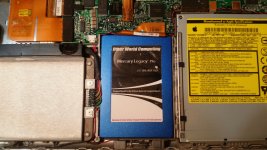
As luck would have it, I had a OWC (Other World Computing) SSD model MLP 120 It is called a Mercury Legacy Pro. It is a 120 GB 2.5 inch IDE/ATA solid state drive.
The Fixit guide was helpful. I pulled out the original hard drive. It was a 80GB Toshiba 5400 RPM apple branded drive (MK8026GAX). I installed the new SSD. I put the computer back together, and tied to boot it.
It booted to the same screen with the question mark and file folder. I stuck in a Apple DVD of 10.2.3 and healed down the "C" key. It booted to the same question mark screen. I tried this several times, all with the same results. Again, I had to screw with the powerbook to get the disk to eject, but it finally came out. I tried again with a apple branded Leopard 10.5 DVD. Same thing. I tried a DVD of the classic OS 9.2 and same thing.
I plugged in a portable USB drive, but the drive light on the USB drive never did come on with or with out a floppy. I believe this powerbook will not take a classic OS, but needs a version of OSX.
Do I need to do any magic when I hold down the C key when I boot? Do I hold down the C key and then boot the computer and keep the key depressed? Or do I press and release, press and release, etc. I have tried both ways, and I still boot the question mark screen.
I can open this puppy back up and and take a closer look at the DVD drive. When I put a DVD in the drive, I can hear the drive spin up and run. I don't hear anything that I would call bad noise from the DVD drive when I put a DVD in it. It runs. When I opened the powerbook up, it looked like I was the first person inside. The yellow tape was still on everything. I don't think anyone else has been inside. It looked like it just came from the factory. I could be wrong...
If I lived someplace other then Ecuador, I would buy a replacement DVD drive from ebay and swap it out. But mailing stuff to my country is almost impossible.
Any suggestions on what my next step could be?
It should boot to a Leopard 10.5 DVD right? I just put the DVD in the drive, hold down the C key, and then turn the computer on, right???
What the heck am I doing wrong?? Any other magic key combos I should try?
Thanks everyone. Pic enclosed. New SSD installed.
mraroid
Someplace in my apt I have a portable USB CD/DVD drive. If i ever found it, could I plug that into a USB port and boot to a DVD in it? Hold down the C key? Or will this machine even see a external USB CD/DVD drive....??
When I bought it on ebay it was broken. When I tried to boot it, I heard what sounded like a bad fan or a bad hard drive spin up. It was very noisy. It would only boot to a screen with a flashing question mark and a file folder.
I stuck in a apple 10.2.3 DVD and healed down the "C" key. It would not boot to the DVD. I could not get the disk to eject. After days of playing with it, it finally came out.
I decided to open up the powerbook and see what was making all the noise.
I used this guide:
https://www.ifixit.com/Guide/PowerBook+G4+Aluminum+15-Inch+1-1.5+GHz+Hard+Drive+Replacement/227
Taking it apart went well. Once I had the powerbook open I booted it and found out the grinding noise was coming from the hard drive. The fans were quiet.
As luck would have it, I had a OWC (Other World Computing) SSD model MLP 120 It is called a Mercury Legacy Pro. It is a 120 GB 2.5 inch IDE/ATA solid state drive.
The Fixit guide was helpful. I pulled out the original hard drive. It was a 80GB Toshiba 5400 RPM apple branded drive (MK8026GAX). I installed the new SSD. I put the computer back together, and tied to boot it.
It booted to the same screen with the question mark and file folder. I stuck in a Apple DVD of 10.2.3 and healed down the "C" key. It booted to the same question mark screen. I tried this several times, all with the same results. Again, I had to screw with the powerbook to get the disk to eject, but it finally came out. I tried again with a apple branded Leopard 10.5 DVD. Same thing. I tried a DVD of the classic OS 9.2 and same thing.
I plugged in a portable USB drive, but the drive light on the USB drive never did come on with or with out a floppy. I believe this powerbook will not take a classic OS, but needs a version of OSX.
Do I need to do any magic when I hold down the C key when I boot? Do I hold down the C key and then boot the computer and keep the key depressed? Or do I press and release, press and release, etc. I have tried both ways, and I still boot the question mark screen.
I can open this puppy back up and and take a closer look at the DVD drive. When I put a DVD in the drive, I can hear the drive spin up and run. I don't hear anything that I would call bad noise from the DVD drive when I put a DVD in it. It runs. When I opened the powerbook up, it looked like I was the first person inside. The yellow tape was still on everything. I don't think anyone else has been inside. It looked like it just came from the factory. I could be wrong...
If I lived someplace other then Ecuador, I would buy a replacement DVD drive from ebay and swap it out. But mailing stuff to my country is almost impossible.
Any suggestions on what my next step could be?
It should boot to a Leopard 10.5 DVD right? I just put the DVD in the drive, hold down the C key, and then turn the computer on, right???
What the heck am I doing wrong?? Any other magic key combos I should try?
Thanks everyone. Pic enclosed. New SSD installed.
mraroid
Someplace in my apt I have a portable USB CD/DVD drive. If i ever found it, could I plug that into a USB port and boot to a DVD in it? Hold down the C key? Or will this machine even see a external USB CD/DVD drive....??




