• Hello MLAers! We've re-enabled auto-approval for accounts. If you are still waiting on account approval, please check this thread for more information.

powerbook g4 12" keeps hanging and asking for reboot

Hello everybody,

I am restoring a powerbook g4 12" - I increased memory and replaced the hd with a ssd, but when I try to install OSX (either 4 or 5) it asks for restart, or installs the first OSX 4 and then when rebooting, again it will ask for restart. What could it be? what would you look for? I really have no clue...
 

Attachments

  • IMG_2387.jpeg
    IMG_2387.jpeg
    3.6 MB · Views: 2
one time i had a windows phone and my mac mini would KP if i booted it with the phone plugged in; are there any extra devices hooked up that you could remove while diagnosing?
 
Which model do you have? I would bet the heatsink is not attached. At this point, nearly every one of these I've opened has broken solder joints. If you can get it to run in "reduced" mode (half speed using DFS) then you might be able to limp along, but I would suggest opening it up and repairing it. Another way to test, if you can get it booted, is to monitor the CPU temperature. If the heatsink is the problem, the temperature will spike quickly if you run something CPU intensive.
 
Which model do you have? I would bet the heatsink is not attached. At this point, nearly every one of these I've opened has broken solder joints. If you can get it to run in "reduced" mode (half speed using DFS) then you might be able to limp along, but I would suggest opening it up and repairing it. Another way to test, if you can get it booted, is to monitor the CPU temperature. If the heatsink is the problem, the temperature will spike quickly if you run something CPU intensive.

Today I am planning to check the heatsink. @herd you were mentioning broken solder joints, I see in the repair manual that the heatsink is simply connected to the logic with screws... so which solder joints were you thinking about?
I guess thermal paste will be needed - and I see around that some models had pads... so I will also need to understand where to get new ones of those.
 
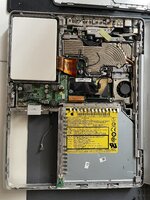
Someone was definitely in there before… no tape left and one cable (speaker?) disconnetted and stored below the hd strip cable. Is this meant to plug in that 2pin plug? I don’t seem to find any other plug that could fit… but how is the correct routing of that cable now?

IMG_2388.jpeg
 
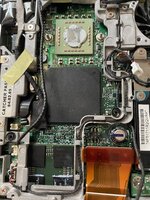
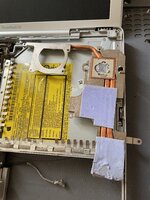
Now to the heatsink: it seems ok to me, but the pad on the gpu seems a bit ruined. Also the thermal paste on the cpu seems quite dry… Could this alone cause the reboot request issue?

I wonder if the blue goo from the thermal pad on the gpu chips could cause some shorting too. Better give it a good cleaning anyway…

IMG_2389.jpegIMG_2390.jpeg
 
This thread shows pictures of the typical problem:

forums.macrumors.com/threads/powerbook-g4-12-maintenance-servicing.2243978/

Yours looks intact, but I would look closely at the joints while you have it open. Does the fan ever turn on?

Maybe testing with/without the RAM module could show a difference?
 
This thread shows pictures of the typical problem:

forums.macrumors.com/threads/powerbook-g4-12-maintenance-servicing.2243978/

Yours looks intact, but I would look closely at the joints while you have it open. Does the fan ever turn on?

Maybe testing with/without the RAM module could show a difference?

yes the fan turned on sometimes during the OSX install process - and without the RAM module everything is the same.
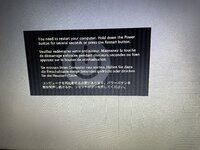
I had found that thread before, it seems to confirm that heath issues are common, but I am afraid that, having that kernel panic screen when I turn it on now, it could more likely be the GPU failing.

I still need to understand better which joints are you referring to... is that the GPU? I was planning to try with a heathgun to see if something happens...
 
Last edited:
Good RAM is OK, I’d be switching the SSD with another next (back to IDE spinning) - plenty of reasons that might foul the OS boot
 
Back
Top