

• Hello MLAers! We've re-enabled auto-approval for accounts. If you are still waiting on account approval, please check this thread for more information.

PowerBook 540c screen problems

I picked up a PowerBook 540c not long ago, and while it seems to boot normally, there's an obvious problem with the screen (see attachment). Has anyone seen this before? My gut says it could be bad caps on the screen's driver board, but I've never encountered this problem before so I can't say for sure. After a little while the image does get better slightly, but not a substantial amount.
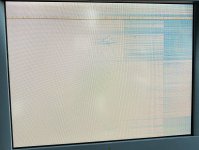
IMG_8450.JPG
 
Hi,

I'd be cracking open the PowerBook and cleaning/reseating the video cable. The ribbon can also be damaged around the hinge with overuse; check this too.
 
The display cables can very easily become detached, especially the one located in the upper left of the monitor bezel (when facing the monitor). There's also another one under the clutch cover that @Byrd mentions that's more accessible, but if it's not that you'll need to remove the monitor to access the other one.
 
Does anyone fix these display problems? I have two 540c displays and they both have three horizontal bars of pixels. Sometimes if you put pressure on the corner you can get part of the picture working. Tried it with multiple machines and cables so I know it’s the display.
 
giving the clutch cover a gentle press about an inch or two to the right of the mic hole below the screen can sometimes help. There's a connector right underneath there that can loosen. Been a while, so I forget precisely what the symptom of that one is, but it's a just few seconds to check.

http://kalleboo.com/retrotech/powerbook-540c/photos/1280/540c.jpg shows it, the beige rectangle that the orange flex cable goes into.
 
I picked up a PowerBook 540c not long ago, and while it seems to boot normally, there's an obvious problem with the screen (see attachment). Has anyone seen this before? My gut says it could be bad caps on the screen's driver board, but I've never encountered this problem before so I can't say for sure. After a little while the image does get better slightly, but not a substantial amount.

View attachment 33906
Hi Colin how is it going? If you need the flex cable let me know. I should have a spare. PM me for the price.
 
Probably something on the panel's driver board. Hopefully something simple like a cracked solder joint. Either way the panel likely has to be at least partially disassembled to get at it.

Sadly a number of components, especially the driver transistors, are attached flip-chip style directly to the flex cables that are then bonded to the display. I have absolutely no idea how to go about attempting to fix problems with bonds in either of these cases (cable-to-glass or chip-to-cable).
 
Back
Top
