• Hello MLAers! We've re-enabled auto-approval for accounts. If you are still waiting on account approval, please check this thread for more information.

Power Mac 5500 picture problem

toples50

6502
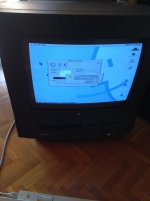
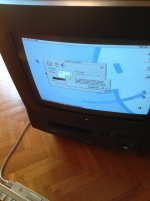
I have picture problem(distorted picture)when I switch the resolution from 832x624 to 1024x768.Also sometimes I hear from the screen some clicking sounds.

IMG_2863.jpg

IMG_2865.jpg

 
Audible clicking the coincides with screen distortions is usually solved with a recap but it could also be the Fly-back transformer in my experience.

 
With those displays you need to calibrate with special tool or apple device to calibrate. Its not simple like old macs can with pots.
Cheers

AP

 
Clicking could be the multisync relays kicking in. Not descriptive enough. 

Also when you switch resolutions you need to adjust the geometry using the control panel. 

 
Another thing to try is to decrease the brightness until the screen is just barely visible and see if things get better. If the clicking and distortions stop or decrease then then caps are suspect. Lowering the brightness lowers the stress on the analog board components.

 
Another thing to try is to decrease the brightness until the screen is just barely visible and see if things get better. If the clicking and distortions stop or decrease then then caps are suspect. Lowering the brightness lowers the stress on the analog board components.
Not to mention it drastically increases CRT life. 

 
I always push the brightness down as far as possible on any CRT I use, whether it's a TV or a computer monitor. Haven't had a CRT die yet!

 
I do the same thing. Never run any modern display or even vintage display at full brightness or they wont last. 

my Samsung 20" LCD monitor I bought brand new in 2007 which are known for capacitor failures lasted up until about a few months ago because I only ran it half brightness or so. 11 years on all of its original parts before failure. Not bad. The Chimei I bought 6 months later at an after Christmas sale is still going. its my daily driver as my secondary. 

I definitely dont run CRTs at full brightness either. its harder on the deflection components because the current draw of the CRT itself increases, but it also accelerates cathode wear. 

 
Last edited by a moderator:
Got my Apple Cinema Display in February of 2009, and it's doing well. I've run it at full brightness during most of the last 9 years, though, which musn't have helped it.

As for my various computer CRTs, I use them seldom enough that operating them at full brightness when I do use them probably won't do much harm.

My 27" TV, however, I use at somewhere between half and two-thirds brightness, because the colors bleed like mad when it's at full (probably due to wear and tear, as I vaguely remember reading somewhere that when that happens, the CRT is probably at best half-way through its service life). We did buy it new in 2005, so it's +/- 13 years old. That probably explains it.

c

 
Last edited by a moderator:
Back
Top