As the thread title suggests I have serious overheating issues when the processor is under prolonged heavy loads.
This occurs when the computer is working on processor-intensive tasks of long(er) duration (>30 minutes)
The issue appears to be entirely due to the fact that computer's fan will not come on before the computer overheats and locks up. In fact it doesn't come ... ever. I know it used to ... back in the day ...
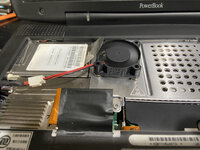
I have unbuttoned the keyboard and flipped it out of the way then placed a small 5v fan directly over the processor heatsink (powered by a USB cable from another computer) and have not been able to get it to overheat and lock up after running it hard continuously for over 2 hours:
Have tried resetting the NVRAM.
Have NOT resent the Power Manager yet though.
I have tried getting it to run an OF script at boot which supposedly resets the settings for the stock fan to lower the on/off temperature values. Still doesn't come on ... but getting the script to actually run may be problematic (due to multiple partitions on the drive as I understand it)
Installed a modified "AppleThermal.kext" - that was specifically done for the Pismo - that purports to lower the on/off temperature settings for the fan.
After addressing some issues with that "installation" still got no activity from the stock fan.
May still have issues with the "installation" of that kext though ?
I suspected that maybe the fan was bad.
So I pulled the fan plug out of the header on the logic board and used the above mentioned USB cable to feed it 5v ... fan spins up and runs fine.
So then I wondered whether might be a dicey connection from the logic board to the header ... hard to tell visually for sure (connections/pads are tiny and my eyesight isn't all that great ... even with the assistance of lots of light and magnification) so I plugged the fan harness back into the header and fed 5v to the solder dimples on the two pads that the header is connected to. Fan spins up and runs fine.
Right now I have the machine torn apart to address some reassembly issues that I missed on the first go-round.
I would be happy to hard wire the stock fan to a 5v source so that it is always on whenever the Pismo is on ... but I lack the necessary knowledge/expertise to go poking around on the internal components trying to find a power source and apparently there no schematics available.
Pulling power from anything drive or battery-related seems to me to be kind of dicey ... for obvious and maybe not so obvious reasons.
Last night I pulled the modem because at this point, given the ubiquity of wifi, it's pretty much dead weight.
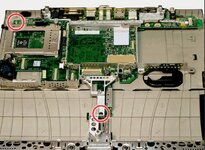
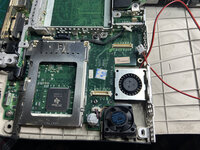
I was hoping to shoehorn a small blower fan under the processor heatsink. It looks like that can be done ... after removal of one small plastic tab on the bottom case that apparently served no discernible purpose:
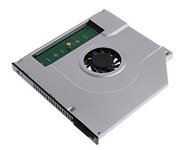
Another possibility is the hdd drive bay (now occupied by the Ablecon adapter and mSATA SSD) where the air intake vent is:
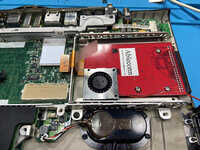
... although the clearances issues there may be too much to overcome.
In any event, a power source still remains an issue.
To that end, after thinking about it a bit, I thought that the easiest and least likely to cause problems way to tap a power source was the incoming power from the AC power adapter. That seemed like a good possibility ... since the times when the computer is going to be working this hard it will be plugged into external power.
The issue is the incoming power is 24v and the fans are 5v.
To solve that issue I was considering using a small Buck Converter board like the one linked below, soldered to the incoming power feed which can be seen in the above photo:
MP1584EN 5pcs Mini 5V Buck Converter Board - 5-30V to 5V, 1.8A Output, Small Size, Black
That thing is tiny ... so it might be possible to shoehorn in there. And the power draw is minimal.
Honestly, the most preferable route would be to get the stock fan to be always on whenever the machine is ... but I sure don't seem to be having much luck with that.
Any thoughts, input, and/or insights appreciated.
This occurs when the computer is working on processor-intensive tasks of long(er) duration (>30 minutes)
The issue appears to be entirely due to the fact that computer's fan will not come on before the computer overheats and locks up. In fact it doesn't come ... ever. I know it used to ... back in the day ...
I have unbuttoned the keyboard and flipped it out of the way then placed a small 5v fan directly over the processor heatsink (powered by a USB cable from another computer) and have not been able to get it to overheat and lock up after running it hard continuously for over 2 hours:
Have tried resetting the NVRAM.
Have NOT resent the Power Manager yet though.
I have tried getting it to run an OF script at boot which supposedly resets the settings for the stock fan to lower the on/off temperature values. Still doesn't come on ... but getting the script to actually run may be problematic (due to multiple partitions on the drive as I understand it)
Installed a modified "AppleThermal.kext" - that was specifically done for the Pismo - that purports to lower the on/off temperature settings for the fan.
After addressing some issues with that "installation" still got no activity from the stock fan.
May still have issues with the "installation" of that kext though ?
I suspected that maybe the fan was bad.
So I pulled the fan plug out of the header on the logic board and used the above mentioned USB cable to feed it 5v ... fan spins up and runs fine.
So then I wondered whether might be a dicey connection from the logic board to the header ... hard to tell visually for sure (connections/pads are tiny and my eyesight isn't all that great ... even with the assistance of lots of light and magnification) so I plugged the fan harness back into the header and fed 5v to the solder dimples on the two pads that the header is connected to. Fan spins up and runs fine.
Right now I have the machine torn apart to address some reassembly issues that I missed on the first go-round.
I would be happy to hard wire the stock fan to a 5v source so that it is always on whenever the Pismo is on ... but I lack the necessary knowledge/expertise to go poking around on the internal components trying to find a power source and apparently there no schematics available.
Pulling power from anything drive or battery-related seems to me to be kind of dicey ... for obvious and maybe not so obvious reasons.
Last night I pulled the modem because at this point, given the ubiquity of wifi, it's pretty much dead weight.
I was hoping to shoehorn a small blower fan under the processor heatsink. It looks like that can be done ... after removal of one small plastic tab on the bottom case that apparently served no discernible purpose:
Another possibility is the hdd drive bay (now occupied by the Ablecon adapter and mSATA SSD) where the air intake vent is:
... although the clearances issues there may be too much to overcome.
In any event, a power source still remains an issue.
To that end, after thinking about it a bit, I thought that the easiest and least likely to cause problems way to tap a power source was the incoming power from the AC power adapter. That seemed like a good possibility ... since the times when the computer is going to be working this hard it will be plugged into external power.
The issue is the incoming power is 24v and the fans are 5v.
To solve that issue I was considering using a small Buck Converter board like the one linked below, soldered to the incoming power feed which can be seen in the above photo:
MP1584EN 5pcs Mini 5V Buck Converter Board - 5-30V to 5V, 1.8A Output, Small Size, Black
That thing is tiny ... so it might be possible to shoehorn in there. And the power draw is minimal.
Honestly, the most preferable route would be to get the stock fan to be always on whenever the machine is ... but I sure don't seem to be having much luck with that.
Any thoughts, input, and/or insights appreciated.