

• Hello MLAers! We've re-enabled auto-approval for accounts. If you are still waiting on account approval, please check this thread for more information.

Outbound Laptop HDD question ... weird display issues.

olePigeon

68040
So I bought a 344MB IBM drive on eBay to replace the dead HDD on my Outbound laptop. The weirdest thing happens. When I plug the HDD in and boot, the top 1/2 of the screen gets vertical lines. When it boots al the way (this is booting off an external SCSI drive), it pops up the window that it can't recognize the HDD, then it'll freeze if I try to initialize it.

The fact that it freezes when I try to initialize doesn't bother me, but the vertical lines on the top 1/2 of the screen is just weird. It doesn't do that with the old HDD plugged in (or no HDD.)

Any ideas?

 
Heck if I know. The battery is dead and it gives a battery warning.

I wonder if that could be it. It uses a standard camcorder battery, I suppose I could buy a new one. I just didn't want to spend any more money that I don't have. :(

But would that be a problem if it's plugged in with the AC adapter?

 
Well, I can't get the HDD to show up on any computer. I'm guessing it's broken. It'll periodically power down and then back up. I've tried it on several different computers and none of them can detect it.

Time to see if I can get it returned. :-/

 
They were nice enough to refund my money and shipping. Tossed the HDD, it was bad.

I grabbed an old iBook 30GB drive. I partitioned and formatted it on my PowerMac. I stuck it into the Outbound and it booted fine with no screen artifacts. It detected the HDD and asked if I wanted to format it (which I had already done.) Unfortunately, it appears to get stuck at that point. It'll start the format process and not do anything. :\

I set it to 400MBs. I found a thread on a different site that said the largest they shipped with was 80MBs, and he wished someone could hack the firmware to allow for bigger drives. I'm going to try partitioning it to under 80MBs an see if that works.

 
Well, I let it run and it formatted... but not really. It finished but didn't show up in Finder. Rebooted and said it was corrupted. I'm guessing because it's 30GB. Even though I partitioned and formatted before I put it in.

Reading up more, it looks like they also shipped with 120MB disk drive. I found a guy selling a bunch of 120MB Conner 2.5" drives, used my recent refund to get one. I know, I know, Conner are crap. But it's the original drive to the machine. Hopefully this will work.

 
On a side note, nice to know the machine is OK. The screen artifacts were definitely a problem with that broken HDD. Looked fine with the iBook drive in it. I'll wait for the Conner drive to come in and give it a whirl.

 
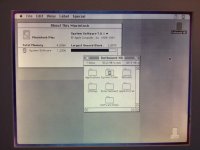
Success! Installed a Conner 120MB HDD. This was one of the upgrades offered for the Outbound Notebook, it's just by chance some guy had a bunch of these. Worked like a charm! :D As you can see, it has the vertical and horizontal ghosting. The backlight starts off fairly dim, but after only a couple minutes of use, it's nice and very bright. I suppose it's just old. :) Would a recap alleviate the ghosting, or is this just a sign of age for these old B&W LCDs? I've seen it on older PowerBook 100s as well, and especially on older x86 luggables.
001.jpg

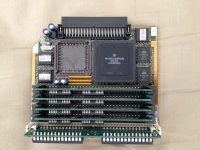
Upon opening the laptop, it appears it's also been upgraded. Check out that 68030. 8-) This was a 2000 model, it's now a 2030 with a 120MB HDD instead of the regular 20MB. I upgraded the RAM from 2MB to 4MB with some extra SIMMs I had. Pretty smokin'! I think it'll go up to 16MBs of RAM. There's a spot there for an FPU, unfortunately I don't have an extra one lying around.
002.jpg

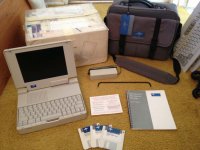
And here's the whole shebang. About as complete as you can get, I think. I haven't decided if I'm going to sell it. I really need the money, but how common is a complete Outbound Notebook? Sigh. It is kinda cool to have what is essentially a portable Mac Plus. Dark Castle anyone? :)

003.jpg

 
I'm hesitant to take it apart since there are no directions or service manuals for it. The middle picture is the CPU daughter card & RAM slots. That's all I could figure out how to take apart, and that was pure luck that I found the screws.

 
Well, I don't know. My IIsi completely flopped. I'll see how I feel about it later. Not sure if I'm going to sell it. I have a few other things I'm putting up.

 
I'd keep it. It seems like you'll regret selling it if you do.

I'm having a similar dilemma with an SE of mine, although they are probably much more common.

Anyway, it looks like a neat setup!

I'm hesitant to take it apart since there are no directions or service manuals for it.
Maybe someone with more experience can take a look at it and create a take apart manual?
I'm sorry I didn't come through with the hard drive. It sounds like you really didn't need it anyway, though. And the one you got is more authentic anyway.

c

 
Great news. Excellent work. And nice set of photos. Thank you.

I'm pretty sure that the ghosting is a normal artifact of the passive matrix displays. We don't see it now days because no one has made an LCD panel which isn't active-matrix in a very long time.

At least, I see the same ghosting on all the Outbound Laptop Model 125s (predecessor to your Notebook 2030).

Would you mind posting a link to the Conner drive sale? As far as I know the Model 125 doesn't support anything larger than 80 MB, but it might be worthwhile to try the 120MB. Besides, I have at least one of those Notebooks around here somewhere (though, not as nice as yours).

 
By ghosting, I don't mean that when you move an item, it's leaves a trail. I probably used the wrong term. If you look in the picture of the screen, you'll see wherever there's a window, it makes the screen a bit brighter vertically and sometimes horizontally. You can minimize it by fiddling with the contrast and brightness. A healthy passive matrix is very cludgy, but I don't think it'd be doing the vertical and horizontal stuff.

 
Back
Top


