• Hello MLAers! We've re-enabled auto-approval for accounts. If you are still waiting on account approval, please check this thread for more information.

New LC475

derek

6502
Hi,

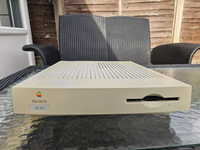
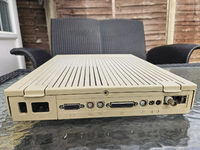
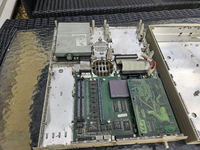
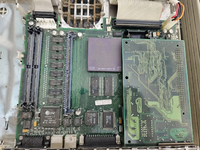
I just got a LC475, from eBay:

LC475Front.pngLC475Back.pngLC475-inside.pngLC475LogicBoard.png

which does not have a power supply. Being located in the UK, geniue replacement power supplies are hard to come by.

I read in previous posts of LCII being powered by a Meanwell power supply, can this be done with the LC475?

Also I was thinking about a BlueSCSI or ZuluSCSI to replace the missing hard drive.
 
Congrats on your new computer! The 475 is a great machine, hope you enjoy it.

I haven't done it personally but powering with a DC supply is a reasonable approach. The mAcTX LC can convert an ATX PSU to work with your computer, then you can use a PicoPSU and the DC brick. mAcTX LC is open source, it looks like RHC has them for sale currently. Depending on how adventurous you are it can be done other ways too.

You'll also need some VRAM SIMMs, the 475 has no on-board memory for video and uses those two vacant slots. There are some newly-made options from @Siliconinsider (aberco on eBay) and Garrett's Workshop, among the usual period options. 2x256K has been fine in mine but you can research whether you want more.

Most importantly, strongly consider recapping the logic board you start using the computer extensively, the whole LC series is notorious for poor cap performance. Probably goes without saying but the PCB looks like it could use a good cleaning in the process.
 
Pretty much agree with @saybur here, just a few extra notes:

The 475 is a great machine. Powering them is easy, you have options. Generally instructions you find online about powering earlier LCs (I/II/III) apply here, except the 475 is a bit more power hungry. You want 5/12/-5V ideally, although the -5 is optional (earlier LCs use -5 for serial, I don't know if the 475 does but I expect so).

The connector to the motherboard is a Molex KK396. You can get compatible connectors cheap on eBay. The pinout is here. https://old.pinouts.ru/Power/mac_lc_power_pinout.shtml

You can either power it with DC-to-DC options or with a more "traditional" mains PSU. I've never used the mAcTX LC personally but people I trust speak highly of them - that will let you use an ATX PSU, including a picopsu, as @saybur says. The meanwell RPT-60A PSU works well (I can't remember who posted this first, but it's a good idea) and that can end up looking more stock because you can reuse the power plug and the switch at the back of the PSU unit. This is what I use on one of mine. Or you can run it off any other DC PSU that provides those rails, or make your own.

As you're in the UK, I probably have a spare metal PSU case so whatever you do will clip into the computer case properly, if you'd like one. I will check in the cupboard but you can have it for cost of postage assuming I haven't misremembered. Probably wouldn't be worth posting internationally.
 
Hi

Thanks for the the replies, I am in cleaning mode at present.

I was under the impression there is 4Mb Ram and 512Kb soldered to board, and upgraded by the SIMM Sockets. But mist be wrong, I am learning all the time. Will get some ram.

Assuming the rest of the board is okay, will the board boot up to the disk prompt?

I love in UK, some would like a PSU case, will send you a PM.

I have a couple of Meanwell power supplies, I got to upgrade a sell Amiga computers. I will try the Meanwell route first.

I can recap the board quite easily.
 
A couple of points:
1. The LC 475 is probably my favourite 68K mac. It is very upgradeable and can run almost all 68K software well.
2. It needs a PRAM battery to start up. Originally it came with a 3.6V ½AA battery and the battery requires at least 3V to start the machine. I use a CR3032 in a 3D-printed holder. Mine is from MeowToast from Etsy and there are other models available. A new 3.6V ½AA battery is not a bad choice. just remember to change it in 20 years' time.
3. The single RAM slot can take up to 128MB SIMMs. I have one in mine at 132MB is overkill (I got it from an old Sun server). I use the excess as a RAM disk which is anyway no longer so much of a speed benefit since the SCSI2SD et al. became available. If you can get your hands on a 32MB SIMM, it will be more than enough, unless you plan to edit video or work with massive PhotoShop files (either of which is a test of your patience).
4. With a single change, the bus speed can be increased from 25Mhz to 33 or 40Mhz.
More info here: http://www.applefool.com/clockchipping/q605.html.
The LC part of the processor means 'Low Cost' and it means that the FPU is missing. How much of a difference it makes, I'm not so sure. If you got your LC 475 to crack open Excel 2.0, then yes, the FPU is what you want for complex mathematical computations. But for Civilization? I'm not so sure.
In short, if a 33MHz 68LC040 becomes available at a good price, get it. The speed increase (once your busspeed is increased) is noticeable and recommended.
5. As mentioned above, you need 2 VRAM SIMMs. I, personally, recommend that you splash out on 2x 512K SIMMs. They have become pricey of late but they will allow you to drive a monitor at 1024x768 at at least 256 colours, which is nice. You can also get millions of colours at lower resolutions.
6. As you mentioned above, a solid state HD is very much worth while. It reduced the PSU consumption, reduces the heat generated inside your Mac, is much, much quieter (although you may like the whirr of the HD) and is much, much faster.
7. The PDS slot can hold one card unless you find a piggyback card. I always recommend an ethernet card so that i can connect the Mac to my mac mini G4 which acts as my file server and gateway to the Internet. It is the easiest way to get files & software on and off your LC 475. That being said, there are many Apple II fans out there and the Apple IIe PDS card with Y-connector is also much loved. There are also sound cards, graphics cards and CPU accelerators available in theory but patience and deep pockets are required for them.

If you don't have a Mac Mini G4 running Mac OS 9.2.2 (or something similar), a few external SCSI devices are also worth getting so that you can move software on and off your LC 475. A SCSI CD-ROM is a useful device to have. Portable media are useful if you have one for a modern machine and a SCSI one for your LC 475, but these media are getting harder to read and write to on modern machines. Examples are Zip-disks, Jaz-disks and MO (magneto optical) disks.

 
I was under the impression there is 4Mb Ram and 512Kb soldered to board, and upgraded by the SIMM Sockets. But mist be wrong, I am learning all the time. Will get some ram.
You're correct on the 4MB main memory, but the LC 475 uses separate memory (VRAM) for video; it came from the factory with 512K (2x256K) but someone must have swiped the sticks at some point in the computer's history. Like @ArmorAlley said, having more is better. I personally use the default 512K because I'm a cheapskate :)

Edit: re-reading this it might not be clear, but the 512K is not soldered down, it's only on the VRAM SIMMs. The 4MB is soldered to the board.

Assuming the rest of the board is okay, will the board boot up to the disk prompt?
Advice above about batteries is on point, you will not get it to boot otherwise (though see here for an alternative). Once you have power, VRAM, and the battery sorted out, you should get a chime and the blinking boot disk, barring some other component failing.
 
Last edited:
A couple of points:
1. The LC 475 is probably my favourite 68K mac. It is very upgradeable and can run almost all 68K software well.
2. It needs a PRAM battery to start up. Originally it came with a 3.6V ½AA battery and the battery requires at least 3V to start the machine. I use a CR3032 in a 3D-printed holder. Mine is from MeowToast from Etsy and there are other models available. A new 3.6V ½AA battery is not a bad choice. just remember to change it in 20 years' time.
3. The single RAM slot can take up to 128MB SIMMs. I have one in mine at 132MB is overkill (I got it from an old Sun server). I use the excess as a RAM disk which is anyway no longer so much of a speed benefit since the SCSI2SD et al. became available. If you can get your hands on a 32MB SIMM, it will be more than enough, unless you plan to edit video or work with massive PhotoShop files (either of which is a test of your patience).
4. With a single change, the bus speed can be increased from 25Mhz to 33 or 40Mhz.
More info here: http://www.applefool.com/clockchipping/q605.html.
The LC part of the processor means 'Low Cost' and it means that the FPU is missing. How much of a difference it makes, I'm not so sure. If you got your LC 475 to crack open Excel 2.0, then yes, the FPU is what you want for complex mathematical computations. But for Civilization? I'm not so sure.
In short, if a 33MHz 68LC040 becomes available at a good price, get it. The speed increase (once your busspeed is increased) is noticeable and recommended.
5. As mentioned above, you need 2 VRAM SIMMs. I, personally, recommend that you splash out on 2x 512K SIMMs. They have become pricey of late but they will allow you to drive a monitor at 1024x768 at at least 256 colours, which is nice. You can also get millions of colours at lower resolutions.
6. As you mentioned above, a solid state HD is very much worth while. It reduced the PSU consumption, reduces the heat generated inside your Mac, is much, much quieter (although you may like the whirr of the HD) and is much, much faster.
7. The PDS slot can hold one card unless you find a piggyback card. I always recommend an ethernet card so that i can connect the Mac to my mac mini G4 which acts as my file server and gateway to the Internet. It is the easiest way to get files & software on and off your LC 475. That being said, there are many Apple II fans out there and the Apple IIe PDS card with Y-connector is also much loved. There are also sound cards, graphics cards and CPU accelerators available in theory but patience and deep pockets are required for them.

If you don't have a Mac Mini G4 running Mac OS 9.2.2 (or something similar), a few external SCSI devices are also worth getting so that you can move software on and off your LC 475. A SCSI CD-ROM is a useful device to have. Portable media are useful if you have one for a modern machine and a SCSI one for your LC 475, but these media are getting harder to read and write to on modern machines. Examples are Zip-disks, Jaz-disks and MO (magneto optical) disks.

Remember there's a soft-oveclocking option now. I took my ole LC040 up to 40MHz with it.
 
Hi,

Wiith regards to the VRAM, can the SIMMS be added individually?

What is the display options for VRAM: 256K, 512K, 1024K

Is the PRAM battery rechargeable?
 
They need to be in pairs: either 2x256K (512K total) or 2x512K (1M total).

The battery is not rechargeable. I personally use modern Tadiran 1/2AA replacements from a reputable supplier (at least historically I've never seen one of theirs explode). @ArmorAlley listed some other good options. No matter what you choose, it is unwise to put the computer into long-term storage with the battery included: remove it before you shelve the system.
 
Hi

Thank you for the information, I have found this supplier: Battery Station looks cheap enough in UK.

There is a eBay supplier selling 256Kb VRAM

Bit I will see about 2 x 512Kb VRAM
Hi buddy
Just to get you started so you can check if the machine is in shape and worth salvaging I could let you have:

A fully recapped LC PSU that is missing the molex connector (I needed that for a IIgs ATX swap). It’s the slightly lower power version but it should be ok especially if you are going to use a Bluescsi. I’ve tried it with spinning disks and it works OK.

A fresh 1/2 AA battery

A 4 MB Simm (I know not much but at least you can check if the machine works or not)

Spinning Hard drive with installed OS (various options but a small one would suffice)


No VRAM I’m afraid (it’s all tied up in my 7 pizza boxes)

Price: whatever you think it’s worth plus shipping from Italy (should be around 15-18 euros)
DM if interested.
 
Last edited:
Can’t add much beyond what’s been said already, other than the Q605/LC/Performa 475 is a great if not the best budget 68k machine! A good ultrasonic cleaning, recap the logic board, max the RAM and VRAM, and add a ZuluSCSI, and you’re set! My favorite pizza box Mac!
 
Hi

Thanks for the info, I have not got an Ultrasonic cleaner. But I will give the logic board a good scrub with a toothbrush and IPA.

What is the best capacitors, Tantalum or Solid Polymer?

I was thinking about ZuluSCSI, but write up of BlueSCSI V2 looks good.
 
Great Computer the LC475 I use mine regularly. Tants work fine and a v1 bluescsi works great unless you want the wireless networking option instead of ethernet. Enjoy
 
I was looking for some 72 Pin Simm to expand the memory, the manual says 32Mb maximum, added to the 4Mb onboard to give 36Mb.

What is the best type of ram: EDO or Fast Page 72 pin ram 80 ns or better?

Would this be OK: 32 Mb EDO Ram
 
I was looking for some 72 Pin Simm to expand the memory, the manual says 32Mb maximum, added to the 4Mb onboard to give 36Mb.

What is the best type of ram: EDO or Fast Page 72 pin ram 80 ns or better?

Would this be OK: 32 Mb EDO Ram
It does do 136MB, so it will also accept a 128MB SIMM, practically a 32MB SIMM is MORE than enough :).
 
Back
Top