


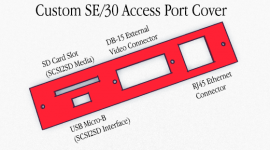
In the process of building my ultimate 68k Macintosh, I felt the need to create a custom access port cover for simple access to the SCSI2SD. So, I came up with this idea, which I plan to cut out of steel with a Dremel and a file.
Inside the Mac, I am running the Asanté MacCon IIsi with PDS passthrough, and an XCEED on top of that. I still need to build the angle adapter to make it fit in the case. The last piece in the puzzle to make the ultimate machine would be a socket mounted Daystar SE/30 PowerCache accelerator. If anyone can help with that last item :O , please PM me.
- I'll use an SD card extension cable from the SCSI2SD. (I prefer fullsize SD cards to the micro versions), so the slot is cut for regular SD.)
- I'll use a USB Micro-B extension cable for the SCSI2SD access port.
- For the video card's external DB-15 connector, I will remove it from the existing access cover and place it in this new one.
- For the Ethernet port, I will relocate the card's daughterboard to where the HDD normally sits (easily enough space there because SCSI2SD is so small), then run an extension cable to new port cover. An alternative, I could run an AAUI cable directly from the cards header to the new cover and use an external transceiver. The latter would give me blinkin'lights, so that's interesting, but I'd need to change the port cover slightly to accommodate the AAUI connector instead of RJ45. And I'd need to worry about having the transceiver instead of a built-in solution.
Inside the Mac, I am running the Asanté MacCon IIsi with PDS passthrough, and an XCEED on top of that. I still need to build the angle adapter to make it fit in the case. The last piece in the puzzle to make the ultimate machine would be a socket mounted Daystar SE/30 PowerCache accelerator. If anyone can help with that last item :O , please PM me.





