

• Hello MLAers! We've re-enabled auto-approval for accounts. If you are still waiting on account approval, please check this thread for more information.

Macintosh Classic II Blues... :/

nkomarn

6502
So, I need some help here. I recently got hold of a Macintosh Classic II. It had the whole checkerboard pattern and all. I only remember it booting fine once and then the checkerboard thing happened. So, I recapped the motherboard with nice tantalum caps and I also did part of the analog board (I replaced only the ones described here as well as the two large ones). Yesterday, I put everything back together (after Retr0briting it, of course ;D). To my surprise, the system itself actually booted. However, there's nothing on the screen at all. When I boot it, I hear the chime and later hear a sound from the system, so I can safely assume the motherboard is fine. However, the CRT has no picture at all (not even a line). I went back in to try to fix some things on the analog board. I saw that there was a bit of capacitor fluid around the board, so I gently scrubbed it off wherever I could see it (I assume it's from the old capacitors). Then I booted the system- and still nothing. So then, I went back in to look for cracked solder joints, but really couldn't see any on either the neck board or analog board. As a last ditch effort, I freshened up the solder on the yoke connector. And, as you could expect at this point.. still no display.

When I boot the system, everything sounds normal. I hear no arcing or anything that would be signs of issues. The system is fine based on the sounds I hear, but the CRT is blank as ever. So yeah, I could really use some suggestions as to what I should do now.... I can provide images of whatever if needed.
 
Is the CRT ok? Sometimes the little glas part at the end (behind the yoke, covered by the neck board) is broken off. Then you need a new CRT.

The analog board needs a recap too.

If you can get a working analog board, you can see if the analog or the logic board is the problem. I think that you have a defect in the analog board. The analog boards of the Classic and the Classic II have different analog boards because the one connector is different. If you can get a Classic you can replace the analog board and the CRT.

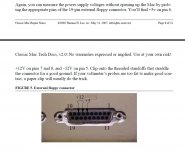
Did you check the voltages at the floppy port? Must be 5, 12 and -12 Volt. But when the logic board booted, the voltages are probably not the problem.

Voltages Floppy Port.jpg

 
CRT seems fine- the glass bit at the end of the neck is still intact and in general the CRT is physically in great condition. I don't really have another analog board readily available, but I do know that this board worked just before I recapped it. I think there might be some bad parts on it, since I saw some of the capacitor fluid on the board last time I took it out. I want to give a shot recapping some more of the analog board. I only replaced the stuff that I boxed in red:

XCP33af.jpg.4a19d11013ad990a9c1a504fd9fa338e.jpg


Should I recap the rest of it? I want to give replacing those a shot, although I'm not sure if that's the problem. I haven't gotten around to testing voltages on the system, but as you said, it boots so it shouldn't be an issue. All of the parts seem to be getting enough power, as the floppy, hard drive, and system boot and work. I'll test the voltages later today to make sure though. If I can't get this board to work, I might look around for a Classic to transplant parts from, but that's a last ditch option more than anything.

 
Is there static on the front of the screen when you start up the machine? If so, your HV supply is working so that rules out at least the flyback and high voltage stuff. Play with the contrast pot a bit? Maybe a bad connection?

It should be 5V logic for video and I can't imagine the system would boot without that.

I know it sucks with the speaker there but you should really try to get more of that capacitor goo off the board. Canned contact cleaner can work. The electrolyte can slowly eat away at traces and such on the board so getting off the stuff that leaked can help you avoid possible future troubles. The two red marked areas are the areas of highest priority, I tested a couple from the other positions on the board and it was fine. In fact, out of all 20 or so caps only two had leaked and they were both in the low voltage area on the right and both of them had phenolic bottom caps vs rubber.

 
There's nothing on the display at all- not even static. I tried fiddling with the Contrast and brightness stuff, but it makes no difference. I also tried the focus control, but as you'd expect that did nothing at all.

I'm yet to test voltages, but doubt that anything will be wrong with those.

I just took a look at the back of the board again... a HUGE portion of the HV side seems to have fluid on the bottom. I am going to clean that and *fingers crossed* that was the issue. If that doesn't fix anything, should I consider replacing the caps on that part of the board?

 
There's nothing on the display at all- not even static. I tried fiddling with the Contrast and brightness stuff, but it makes no difference. I also tried the focus control, but as you'd expect that did nothing at all.

I'm yet to test voltages, but doubt that anything will be wrong with those.

I just took a look at the back of the board again... a HUGE portion of the HV side seems to have fluid on the bottom. I am going to clean that and *fingers crossed* that was the issue. If that doesn't fix anything, should I consider replacing the caps on that part of the board?
Well, that cleaning didn't do anything :/ I guess I might just have to recap it if I can't come up with more things to do.

 
As long as you did a good recap with quality parts and correct polarity, I suspect your logic board is at fault. More than likely electrolyte is still on the board and scrambling the PWM brightness signal to the analog board.

When I started this hobby in 2014 I acquired 2 computers, a Mac Plus, and a Performa 200 (which is a Classic II). They both had checkerboards upon boot, I recapped them both, I cleaned the boards thoroughly and yet they still didn’t work. I checked voltages, I cleaned them again, de-soldered and installed new caps, still nothing. Well, finally I figured I had nothing to lose, so I placed the board in the dishwasher and dried it on my oven (200F) and it worked. The reality is that when these caps leak, sometimes the electrolyte leaks under the chips and without a high pressure wash you’re unlikely to get it working again. 

With that in mind here is what I would suggest:

1.       Label and remove the Rom ICs.

2.       Place the logic board in an empty dishwasher and run it on the pots and pans mode without soap.

3.       Take it out and blow it out a little with compressed air. (paying special attention to the ports and rom sockets)

4.       Place it on a piece of cardboard and place it in your over for 2 hours 200 degrees Fahrenheit

5.       Reinsert the Rom ICs and try again.

Also, if you’re wondering, for the plus I discovered it had a backwards rom IC.

 
Last edited by a moderator:
As long as you did a good recap with quality parts and correct polarity, I suspect your logic board is at fault. More than likely electrolyte is still on the board and scrambling the PWM brightness signal to the analog board.

When I started this hobby in 2014 I acquired 2 computers, a Mac Plus, and a Performa 200 (which is a Classic II). They both had checkerboards upon boot, I recapped them both, I cleaned the boards thoroughly and yet they still didn’t work. I checked voltages, I cleaned them again, de-soldered and installed new caps, still nothing. Well, finally I figured I had nothing to lose, so I placed the board in the dishwasher and dried it on my oven (200F) and it worked. The reality is that when these caps leak, sometimes the electrolyte leaks under the chips and without a high pressure wash you’re unlikely to get it working again. 

With that in mind here is what I would suggest:

1.       Label and remove the Rom ICs.

2.       Place the logic board in an empty dishwasher and run it on the pots and pans mode without soap.

3.       Take it out and blow it out a little with compressed air. (paying special attention to the ports and rom sockets)

4.       Place it on a piece of cardboard and place it in your over for 2 hours 200 degrees Fahrenheit

5.       Reinsert the Rom ICs and try again.

Also, if you’re wondering, for the plus I discovered it had a backwards rom IC.
Just finished doing all of the stuff you described above! Unfortunately, it still has no display. The system boots just like it did before (luckily- putting it in the dishwasher was nerve wracking), but there still isn't a picture on the display. I'm unsure as to what to do at this point. I'm considering giving it another wash but with soap (dishwasher soap has anti-corrosives so it shouldn't cause issues with the metal), but at this point I'm starting to doubt how effective that would be. :/

 
I just went back and did some more inspections on the state of the CRT stuff. I fired up the display without the back cover on the machine. The CRT heater seems to be working in the back, so I don't know what that would mean for the state of the analog board but that's just what I noticed.

fVhBTIR.jpg.f15d07420a6168640688fcd73e8a4b16.jpg
Bp6YGqB.jpg.e42b5094d9f8e2a33eeb984ede6e069e.jpg


I'm starting to think that this might actually be something to do with the logic board. I already gave it a clean, but I'll give it another shot tomorrow. I hope the video isn't not working because of the capacitors I installed. I replaced all of the electrolytic ones on the board with tantalum ones. Here you can see the capacitors (I had to run some small wire near 4 of them since the pads literally corroded away):

vJDmPog.jpg.cbf182246424be52e5be7fb2b720fa10.jpg


I'll give the board another wash tomorrow :p

Also, there's another thing that worries me a bit. The anode cable for the CRT that runs into the suction cup seems a bit flaky to me. The cable is very thin where it touches the clips and it might be another issue worth noting in this puzzle. I'm not sure if the cable is just fine or if it's got something to do with my display's issues, but here's what it looks like:

CSg8qmJ.jpg.3a6054a08fec707882e737b8e1e1cad5.jpg


Anyways, I know that's a lotta stuff. I'm just laying out all of the details here so that if anyone notices something a bit off or has suggestions, it would be easier to pinpoint the problem :/

 
Last edited by a moderator:
1. I can't say I've ever seen a broken connection there at the flyback anode, it is a fairly thin wire though, I'd give it a gentle tug and make sure it's attached.

2. If you have an o-scope you can check the pwm signal from the logic board.

3. If you are able to give an up close picture of the logic board I'll see if I can see anything.

4. Are you in the US? I can test that logic board for you with one of my spare chassis.

 
I don't currently have an oscilloscope, otherwise I would test the signals. I am planning on getting one fairly soon though, so if I don't figure anything else out by then, I'll test with that oscilloscope.

I gave the logic board another wash today, using some soap to possibly help out in the process- yet the video still isn't working :/

Here's what the board looks like as of now (4 of the caps have small pieces of wire running from them to patch the board up as some of the pads are gone):

qDWp9jH.jpg.d671a01de513d1eb37918337b0ee6e29.jpg


All of the caps are tantalum ones and should be the correct rating (this is the "enhanced audio" board). I also took out the RAM modules for that photo.

There is some crusty looking stuff around the caps, which I *think* might be the flux that I used that didn't get cleaned off all the way, but at this point I couldn't be sure. I wiped that stuff off with some alcohol and it still isn't making any difference (mind you, this is the third time I've washed this board).

I gave the anode wire a bit of a look, I think it's probably fine, but I can't be sure as there isn't much of a way to test it.

Also, thanks for the offer! I might have to send the board out if I can't get it to work soon enough (still hoping I can figure this stuff out though :p ).

 
It probably is a faulty logic board, if the display section of the analog were not working you'd probably at least get a chime as long as the voltages look good.

Something to consider, is that some of the pads for these caps also serve to interconnect two vias or other components. I might suggest a pin check, pay special attention to C13, if you don't connect the two points on C13 it will never boot. Something else to keep in mind is that a CII board will boot without any of those large caps installed, audio will not work however, but it is good for troubleshooting. After that, you can check the reset signal, it comes from the audio chip, you should also ensure your buttons aren't stuck. Another thing to check is the connections at the ram ICs, leakage can corrode that connection there also. Basically, you have to pin check everything around the caps, U10 also looks suspect.

Here is the schematics:

https://drive.google.com/drive/folders/0B_Xp3uN-BcxsQjFLRUZqeEw2VFE?usp=sharing

I think that the CII schematic is for a 4 rom version of the board but it should be pretty close.

 
Last edited by a moderator:
It probably is a faulty logic board, if the display section of the analog were not working you'd probably at least get a chime as long as the voltages look good.

Something to consider, is that some of the pads for these caps also serve to interconnect two vias or other components. I might suggest a pin check, pay special attention to C13, if you don't connect the two points on C13 it will never boot. Something else to keep in mind is that a CII board will boot without any of those large caps installed, audio will not work however, but it is good for troubleshooting. After that, you can check the reset signal, it comes from the audio chip, you should also ensure your buttons aren't stuck. Another thing to check is the connections at the ram ICs, leakage can corrode that connection there also. Basically, you have to pin check everything around the caps, U10 also looks suspect.

Here is the schematics:

https://drive.google.com/drive/folders/0B_Xp3uN-BcxsQjFLRUZqeEw2VFE?usp=sharing

I think that the CII schematic is for a 4 rom version of the board but it should be pretty close.
Here's what my C13 looks like:

RiWhGsb.jpg.931e041355fde6adae54723a3e9beb96.jpg


I've also cleaned it a bit since last time. I also used those schematics (major thanks by the way) to do a lot of testing. So far, I don't see anything off, but I'll keep looking at it. Are there any more of those pads that connect multiple things? I couldn't find any after looking around for a bit (only C13). Currently the board boots into the OS, but no video. Everything else seems to work alright (as far as I can tell by the sounds made in the OS).

Buttons aren't stuck and RAM ICs are good from what I can tell. Also, what's off about U10?

YAleGTR.jpg.148b0539379d425d2d7397bd1f1ce3d4.jpg


yUyBPr4.jpg.a928fecaa16c948859e6b0ef8e0e2129.jpg


nOqEwEv.jpg.e533bf973f043ff72fd2e15229db548e.jpg


Last edited by a moderator:
The easiest way is to cut the problem in half, meaning, try another logic board. This is easy for me since I have 40 computers in my collection. In your case, you can buy another logic board, buy a classic I, or ask a member to test your board.

 
Might have found an issue... most of the cables underneath the clip aren't even connected. I'm going to try to solder them back on and see if it gets better.

Pg6pqMR.jpg.557fa80339e5eb8012565e90eac524da.jpg


After a bit of cutting and splicing, I've soldered a nice big chunk of wire to the clips.

IBSfhlF.jpg.a954e25bea36715ff143f217f66f18f9.jpg


LsyfFW1.jpg.def44f8f5ab352331b827225bb35f130.jpg


It's not the prettiest, but it will do! :p

 
Back
Top
