• Hello MLAers! We've re-enabled auto-approval for accounts. If you are still waiting on account approval, please check this thread for more information.

Macintosh 512K corrupt display issue

6809er

6502
I have a Macintosh 512K (M0001W) which has been sitting in storage for the last 15 years. When I last used it, I remember it working fine however when I powered it up this weekend I was greeted with the "Sad Mac" face and a partial error code as seen below.
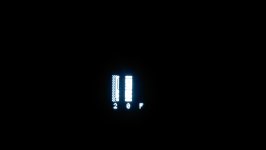
sad_mac_1.jpg

I've searched the forums here as well as a few other places online and even though it's similar to other corrupt display issues with this series of Mac, my issue seems to be a bit different. This leads me to believe that I may be dealing with multiple issues. As you may be able to tell from the image, only 3 digits from the error code are visible with alternating columns of the graphics missing. From what I've been able to piece together, I believe the "_2_0_F" error code may actually be "0200FF" - which on some forums indicates bad DRAM while others have indicated issues with the Analog Board.

I left the system on for about a half-hour and after a while, garbled graphics started to appear and flash on the display - even in the columns that were missing from the initial power on, but still with alternating columns blank. Here is what it looks like after sitting for a bit.
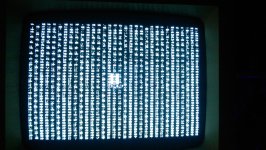
sad_mac_2.jpg

My initial reaction is to place an order with Jameco and replace all the DRAM. but since that will be quite a bit of work I thought I'd ask if anyone else has seen this issue with only a partial corrupt display. Also, if I am in fact experiencing the "0200FF" error code, should I believe what I've read on other forums and plan to troubleshoot the Analog Board before replacing the DRAM?


 
When the 128k does that, it usually does mean mean bad ram.   Some people have had issues with some 74 series I/C on these things too.

 
Well, personally, Consider this a warning message for whats to come with newer hardware... 

Since the 128/512K is the oldest of Macs, those are the first starting to suffer from serious chip failures due to age, oxidation, silicon impurities, you name it. 

Already seen it with a couple SE/30s, the RAM muxes are starting to fail causing random chimes of death or just chimes of death. 

 
Last edited by a moderator:
Thanks for the replies and the suggestions guys.

One thing I did forget to mention in my original post is that this occurs both with and without a disk loaded in the drive, and the error is displayed as soon as I turn on my Mac. Also, I am getting the normal power-on chime when turning on the system.

I also received a slightly different error as indicated by the image below - the "F" in my original error replaced with a "6". This is leading me to believe I do have a DRAM issue and I plan to start there for further troubleshooting.

sad_mac_3.jpg

 
If you feel defeat at any point, I have a big pile of 512k boards. Need to test them, but they should work.

 
Chips can and do fail due to the reasons Techknight described, but aren't newer chips less susceptible due to improvements in the manufacturing process?

If so, that would suggest that "newer" old Macs, provided things like batteries and caps are well taken care of, can theoretically last forever. Yes?

c

 
You would think so. But they all use the same materials. And eventually the newer chips will fail. 

Also, it depends on the environment the chips were used, and especially, stored in. That also makes a huge difference. 

 
Thanks for the offer unity - I haven't conceded just yet. I just ordered some replacement DRAM from Jameco, planning to start there. If the memory swap doesn't fix the issue, I'll check the shift registers and look into analog board issues.

 
Then I guess someone should reverse engineer replacements for the custom chips and make pin-compatible clones.

c

 
So I'm sad to report that my RAM replacement didn't go as I had hoped and I think my logic board is toast.

Although I was careful in extracting the old RAM chips, I inadvertently lifted a couple of traces off the logic board. I became aware of the issue when, instead of being greeted by the '? diskette' icon and the normal power-up chime, I was greeted with a black screen and two faint clicks from the speaker. I pulled the logic board to inspect my work, ensuring that I didn't have any cold solder joints or areas where I may have inadvertently created a solder bridge - everything looked good. I then started to check with my meter and as I went through the continuity checks, I noticed that I didn't have consistent continuity across the address pins, I then realized I had broken traces.

After a little digging, I came across this schematic http://www.kiramek.com/21test95/EarlyMacSchematics.pdf, using it to check continuity across all 256 pins, I discovered that I had a total of 4 pins which needed to have traces repaired. I used some wire-wrap wire and made the repairs, but I'm still having the same issue - black screen with a couple of clicks from the speaker.

Since I used dip sockets instead of soldering the new RAM directly, I decided to pull the new RAM and try it with my old RAM - I figured I would at least get back to the point where I had a healthy power-up chime and the display would be corrupted with the 'Sad Mac' error. Instead, I get the same exact thing - black screen, two speaker clicks.

In addition to the lifted traces, I must have some damage in the middle two layers of the logic board. I haven't used the schematic above to test continuity outside of the area of the 16 RAM chips, but I guess that's my next step.

I'll dig deeper tomorrow...

 
yeah that is why i always say a re-ram is a big nasty job... but i can do it everytime with out damage.

and that is why i charge $175.00 to do it.

 
The problem is, that is a multilayer board. Chances are, there are some traces that run from the pins between the layers to other chips. 

So, If you pulled the chip out and ripped a trace, that means you pulled the plating/via and annular ring out with it. This also breaks internal layer connections if they exist. 

So without pin to pin checks, and short tests, its pretty much junk. 

 
Last edited by a moderator:
Okay, made progress tonight and fixed my botched RAM swap. After doing a thorough pin-to-pin check I discovered that I had no continuity for the CAS pins (CAS.HI) on the G-row bank of RAM to pin-2 of the RP3 resistor array. So after fixing this, I am now back to my original issue of the "_2_0_F" error code being displayed - I have never been so happy to see this error.

Now that I'm back to square-one, I'll take a closer look at the analog board and also check the muxes on the logic board.

 
Last edited by a moderator:
Back
Top