
-
Hello MLAers! We've re-enabled auto-approval for accounts. If you are still waiting on account approval, please check this thread for more information.
You are using an out of date browser. It may not display this or other websites correctly.
You should upgrade or use an alternative browser.
You should upgrade or use an alternative browser.
Mac ii flashing green video.
- Thread starter crazyben
- Start date

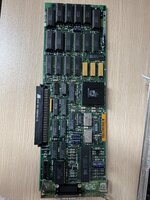


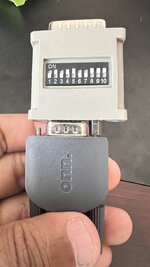
The card is sync on green and the monitor isn't - the sync is bleeding through to the image.Any idea what is causing this flashing green screen for my mac ii. I am using NEC multisync adapter to connect my lcd monitor.
I think either you want a 10 switch adapter (set to separate sync), or a different video card. Some monitors are happy with sync on green too, that would sort it.


Maybe its your monitor? I had the same issue with a 19" LaCie Electron Blue III CRT using my 8.24GC card and High-Res card. There was a fault somewhere in the monitor.
They /don't/ want sync on green.Check the 660AV post last updated yesterday. There is a table on the post, suggesting switches 1 and 4 on, the others off will produce a 640 x 480, 66 Hz, sync on green picture. This is the standard Mac II signal, though other settings may produce a higher rez picture.
1and 4 on setting gets no video. I have tried all different settings suggest on the forums none have worked.
1457
Or 1467

Same flashing green with that setting.They /don't/ want sync on green.
1457
Or 1467
Both settings?Same flashing green with that setting.
1457 flashing green.Both settings?
1467 no signal.
These are the least LCD friendly of any of Apple's cards, so all this isn't a surprise.1457 flashing green.
1467 no signal.
Have you tried another monitor with 1467?
I have tested all but I will do it again and keep you posted.
I bought this card just to rule out the card issue.
Is this card any good or same as existing one?

I bought this card just to rule out the card issue.
Is this card any good or same as existing one?
Apple Macintosh II Nubus Video Card - 820-0198-A7 | eBay
Find many great new & used options and get the best deals for Apple Macintosh II Nubus Video Card - 820-0198-A7 at the best online prices at eBay! Free shipping for many products!
www.ebay.com
Sorry to say that card is effectively identical.I have tested all but I will do it again and keep you posted.
I bought this card just to rule out the card issue.
Is this card any good or same as existing one?
Apple Macintosh II Nubus Video Card - 820-0198-A7 | eBay
Find many great new & used options and get the best deals for Apple Macintosh II Nubus Video Card - 820-0198-A7 at the best online prices at eBay! Free shipping for many products!www.ebay.com
Oh do they even make any good card for mac 2?Sorry to say that card is effectively identical.
There are hundreds of cards, you just picked an identical one! Really bad luck.Oh do they even make any good card for mac 2?
What is your budget?
Honestly idk. I paid $10 for the mac ii that needs to be recapped. I am just getting started with collecting mac. Hope that’s explains why I don’t about my budget.There are hundreds of cards, you just picked an identical one! Really bad luck.
What is your budget?
Then I suggest trying multiple different LCDs untill you find one that works. That's the cheapest answer. Do you have a ViewSonic?Honestly idk. I paid $10 for the mac ii that needs to be recapped. I am just getting started with collecting mac. Hope that’s explains why I don’t about my budget.
Basic cards are overpriced and fancy cards are usually over $100.
Similar threads

- Replies
- 5
- Views
- 442


