• Hello MLAers! We've re-enabled auto-approval for accounts. If you are still waiting on account approval, please check this thread for more information.

M1212 Color Skewed

mrw

6502
I recently purchased an M1212 Apple Color Display that was shipped locally. The seller's picture confirmed its colors were accurate, but it was bumped badly enoug in transit that the colors now are off.

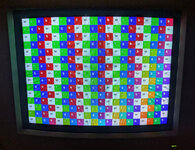
I wrote a Think Pascal 4 program (attached) that demonstrates this by drawing labeled white, red, green, and blue boxes. Here's a picture of M1212 displaying its output:
m1212-bad-color.jpg

Red, green, and blue in the upper left hand corner appear shifted left one (that is, "red" is actually green, "green" actually blue, and "blue" actually red), but drift towards the correct values towards the bottom right hand corner. White and black stay consistently ok.

Is it possible to fix this? I believe it might be a loose yoke, but poking the yoke clamp while the monitor's on has yielded no results. Thanks!
 

Attachments

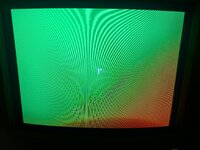
Some additional pictures of plain colors might be clearer than the original grid:

This should be red but it's green (there's an aberration at the bottom because I didn't do a long exposure for this one):
red-is-green.jpg

This should be green but it's blue:
green-is-blue.jpg

And this should be blue but it's green:
blue-is-green.jpg

I've also attached the updated Think Pascal 4 program that generated these colors.
 

Attachments

That looks like a combination of the colors being swapped on the cable and the lower right corner the CRT needs degaussing. There is no bump in transit that would cause pure swapping of the 3 primary colors like that.

Does the machine show correct color with another monitor?
 
Thank you @Arbee !

I've tested with two machines (PowerBook 180 and a Mac II), and each of those with the M1212 and a Dell UltraSharp 2001FP. Both machines with the M1212 show the same output as in the pictures.

Since writing I used a degaussing wand on the M1212 and it still looks the same as in the pictures. I'm going to pull the board out soon to see if anything got bumped there. I'll also see if the DB15 breakout boxes I have will allow me to swap the colors around without destroying a cable.
 
I removed the main board and didn't see any obvious issues. Given @Arbee's suggestion, I paid special attention to the degaussing circuit given (see attached schematics.)

I don't know much about electronics, but I learned that in 1993, degaussing circuits often consisted of an RC circuit where the resistor was a thermistor. The degaussing coil around the CRT should induce a magnetic field only briefly to magnetize the aperture grille (not a shadow mask, since the M1212 uses a Trinitron tube) with a minimal bias. The thermistor starts off cool, and therefore with low resistance, allowing a complete circuit around the coil. The more current runs through the thermistor, the higher its temperature and its resistance gets, until the latter is high enough the circuit is shut off and degaussing stops. Neat!

On a whim I search this forum for "thermistor crt" and found this useful and depressing thread:

Color Classic Inverted

I hadn't heard the degaussing coil "boing" while turning the monitor on, so I hoped that somehow the circuit was broken in shipping. The connections between at RP12 and BP3 and BP4 beeped out (that is, my multimeter in continuity mode beeped when I put its probes on the negative terminals and then positive terminals of RP12 and BP3, then the positive ones), as did the connections between RP12 and the degaussing coil connector BP2. I measured the thermistor's heat while plugged in with an infrared thermometer and it didn't seem to heat up quickly enough to imply a short.

It occurred to me that my degaussing wand can magnetize the aperature grill in a way that would require degaussing. I left the monitor unplugged for a few hours so the degaussing thermistor could cool down. Then, I turned the wand on and off quickly in front of the screen in a way that left it badly magnetized in previous testing. Finally I turned on my test machine and turned on the monitor.

The good news: I heard the degaussing circut activate and the effects of the wand weren't visible. The bad news: the screen looked the way it does in my earlier pictures. Based on the Color Classic thread, it seems like my monitor was also knocked around in transit enough to displace its aperature grill, which means there's no repair I can make.

Lessons:

* Avoid shipping color CRTs if at all possible;
* Even weirdly specific color distortions like mine can be the result of broken aperature grills.

I'll probably continue to use it as a black and white display. Oh well!
 

Attachments

Back
Top