• Hello MLAers! We've re-enabled auto-approval for accounts. If you are still waiting on account approval, please check this thread for more information.

Is there such a thing as a premade bluesci v2 folder with the emulation completed?

I've tried all of the emulators and, I might just stupid, but I've had issues with all of them.
Particularly the suggested hard drives have all been locked and don't allow software installation.
Only helpful comments please.
 
what?

what are you trying to accomplish

what do you mean "tried all the emulators"

what do you mean by "suggested hard drives"

what machine is this intended for ?
 
Sorry I forgot to say its, for a blescsi adapter. It's intended for a mac classic 2.
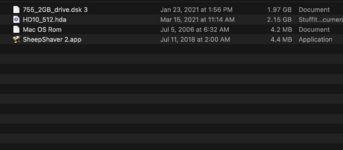
To enable the bluescsi to work you have to create an emulation of system 7 which includes various elements including a .ROM file, a hard drive, the "sheep shaver" emulator and this: HD10_512.hda. Oh yeah, and the bluescsi tool box. See the screenshot
 

Attachments

  • Screen Shot 2024-08-06 at 7.38.45 PM.png
    Screen Shot 2024-08-06 at 7.38.45 PM.png
    68.3 KB · Views: 12
Last edited:
Sorry I forgot to say its, for a blescsi adapter. It's intended for a mac classic 2.
To enable the bluescsi to work you have to create an emulation of system 7 which includes various elements including a .ROM file, a hard drive, the "sheep shaver" emulator and this: HD10_512.hda. Oh yeah, and the bluescsi tool box. See the screenshot
No.
You do not need a ROM, you do not need an extra hard drive, you do not need an emulator of any kind. Or the Toolbox.
You only need to create an image. Please read https://bluescsi.com/docs/Usage
There are even premade images to get you started at https://bluescsi.com/docs/BlueSCSI-Images
 
Sorry I forgot to say its, for a blescsi adapter. It's intended for a mac classic 2.
To enable the bluescsi to work you have to create an emulation of system 7 which includes various elements including a .ROM file, a hard drive, the "sheep shaver" emulator and this: HD10_512.hda. Oh yeah, and the bluescsi tool box. See the screenshot
Do you mean that you want to use an emulator to edit the contents of the .hda file? If the hda file only has a single volume you can use Basilisk II to mount and edit the hda. I have a guide on my site.

For your comment about the hda file being locked. Make sure it hasn't been set to read-only, and also make sure you aren't trying to view/edit it with two applications/emulators at the same time
 
Sorry if I wasn't clear. I actually was able to set up the bluescsi hd now, however I need a file transfer utility app for system 7
I want to transfer files from macbook pro to a Macintosh classic 2
 
Does the toolbox not transfer the file, or can you not open the transferred files? You might be having resource fork issues; check out https://tinkerdifferent.com/threads/fix-a-fork.3082/.

If the toolbox isn't working, the next easiest way is to set up the WiFi functionality and use that.

If you don't have one with WiFi, the next best way is probably to use Basilisk II (a Mac II emulator) to put the files on another image on the same BlueSCSI. @Realitystorm 's guide should give you the rough idea.
 
Back
Top