No input lag at all really, I nearly set a new personal best high score. As I mentioned though, there was no sound despite my efforts to procure some from my TAM.
Do you think apple still has a closet full of Fat Back's for the TAM kicking around at Cupertino?
Works great, have uploaded a number of games and programs through the USB slot reader.
Strangely starts a little slower than it used to....and froze on me once when starting. Going to try clearing the PRAM as the new battery went in at the same time as this card.
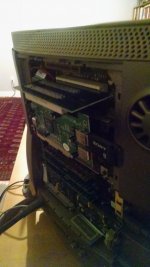
You've got to have something holding up that PCI riser. With the fat back and a card installed in the standard single slot riser the fat back holds the riser in place. Running it open, with a slightly longer card (the two slot is too tall to fit in the fat back IIRC) you're putting all the stress on the slot itself, which isn't good, but what's worse is that if part of the back of your USB card happens to come in contact with the metal HD bracket you're risking a short.
Gotcha, thank you. If anyone sees a one slot riser that will fit in a fat back (and/or a fat back for that matter) please PM me.
This is what I have to do to get programs on the TAM for now but I will take out the dual slot riser in between to keep stress off the PCI input. Thanks for the heads up everyone.
This site uses cookies to help personalise content, tailor your experience and to keep you logged in if you register.
By continuing to use this site, you are consenting to our use of cookies.