• Hello MLAers! We've re-enabled auto-approval for accounts. If you are still waiting on account approval, please check this thread for more information.

Horizontal line on Mac Classic

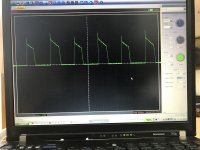
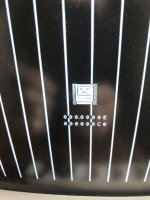
I'm hitting my head against the wall on this one. The system boots (firm bong), but the screen only displays a half horizontal line (photo below). I have replaced all the usual suspects on the AB (brown caps) and voltages are OK (5 and 12V right on the money). I checked the H and V sweep voltages with a scope, and they are both a bit funky (see V sweep below) when I compare to a "good" board, although I am admittedly a novice at troubleshooting video issues. Is there a component that could be responsible for both H and V sweep to be out of whack ? And why do I not see any V sweep on the screen when V sweep voltage shows a signal ?

By the way, the problem is very similar to the one on this 2018 post, which unfortunately does not have a conclusive resolution.
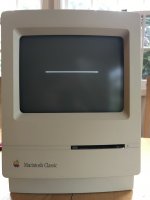
2020-03-24 18.29.58.jpg 2020-03-18_10_28_45.jpg

 
Update today. I have received the TEA2037A, and swapped it. Alas, no luck and the horizontal line was still there. I suspected that the flyback transformer could be the culprit, so I swapped it with one taken from a good board. No luck either.

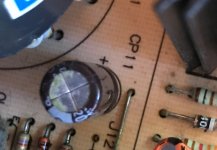
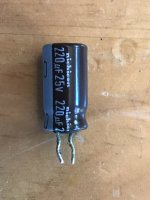
Upon examining the board one last time and slowly losing hope, I discovered another Nichicon "brown cap" which I hadn't replaced. It's CP11 - 220uF, kinda on its own, near the flyback. It was a bit sticky with lint attached to it, usually a sign of leaky goo (photo)

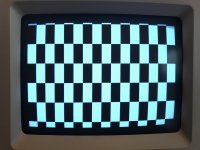
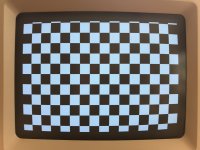
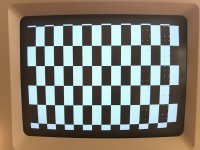
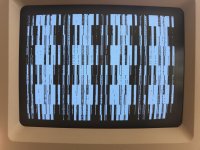
So I changed it, and the screen all the sudden showed sign of life. However, I now have the infamous checkerboard pattern (photo) !! I checked and rechecked all of the Tantalum caps which I had replaced earlier on the LB, thinking that they were somehow responsible for the horizontal line. I checked the traces and all the usual suspects, but no success. Another LB from a working Classic makes the system boots OK, so I know the AB is OK.

Have any of you seen this pattern on a Classic ?

2020-04-02 18.03.54.jpg2020-04-02 18.04.19.jpg2020-04-02_18_01_05.jpg

 
Yes! That is a good thing; AB is working. Has the logic board been re-capped? If so, try re-seating the RAM chips.

 
Yes LaPorta, the LB was recapped. How do you reseat the RAM chips ? Looks like the internal RAM chips are soldered on.

Interesting that you mention the RAM though, as I notice that the checkerboard pattern is different if I do not insert the external RAM module (left image), or even with two different modules (right 2 images). I'm hoping this can help me, but can't figure out what to do next.

2020-04-03 10.34.20.jpg2020-04-03 10.35.39.jpg2020-04-03_10_33_51.jpg

 
I misspoke, sorry, I meant reseat the ROM chips. That usually gives you the checkerboard pattern. The other possibility is capacitor goo somewhere there...but try the ROM chips first. If it is the Classic with the soldered chips, then I’d look for goo!

 
Yes, I swapped the ROM chip with one from a good board, but no effect. I also put the LB in a wash cycle in the dishwasher, and I get the same pattern.

 
Are you still having a Bong ?

strange, as this kind of pattern is related to a Rom issue, can you scope the reset and data lines ?

 
Sorry bibilit, I realize that my thread is somewhat confusing. When I tested the AB, I was using a good LB from another Classic. Once the AB was OK, I put the original LB in, and this is when I lost the chime/bong and the checkerboard issue came up. Sorry for the confusion. So I do not have the bong any longer.

I could probably easily scope the reset and data lines. Can you please let me know where to get them ?

 
Had a faulty board at home, and as i am locked in house with the Coronavirus issue, tried to troubleshoot it. 

Had the same pattern (checkerboard)

reset line was ok, but clock missing and apparently also a data line. 

After some poking around, without not finding the problem, I swapped a couple of chips with another bad board. 

I ended up with a sad Mac error, and last chip removed and swapped was the Swim. 

From the error, looks like a data line or swim issue. 

Don’t know what to think about it, anyway was just a way to spend time. 

949AEC53-D44D-4701-877B-C8924FF24944.jpeg

 
Hi Bibilit: I hope to catch you before the end of the day in Paris. All my siblings are there and they're starting to lose patience with the shelter in place. But anyhow, thanks for your help.

I finally got to hook up my scope, and get the clock and reset signals.

Looks like clock is OK. I measure 7.8 MHz at 0-5V p-p. Is this the right value ?

For reset, I get a 5V DC. Is this what the problem could be ?

Thanks again. Merci

 
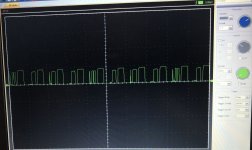
And here is one data line signal. There is something, but my limited knowledge fails to tell me if it's OK.

Clipboard01.jpg

 
Last edited by a moderator:
OK, I'm afraid the news is not good. I had previously swapped the ROM with one from a good board, with no effect. I then thought that the ROM was not the problem. But when I put the ROM from this board into the good Classic, I get checkerboard too, which tells me that the ROM IS bad, but something else has to be bad too. Oh, and the data signal is much cleaner (maxes out to 5V exactly and not 3-4V) with a good ROM.

 
Hi, yes I can understand that from your relatives, I am in the same situation, hopefully some work left and some toys to play with. 

So yes seems to be ok, clock should be 8 MHz,  7.8 looks low but I can be wrong. 

Concerning the reset, if everything is ok you should have a low signal, then a high one. 

As you have a scope, you can probably also check all Data lines, the one in your picture looks ok as far as I know 

Maybe be one is stuck high or low. 

Rom failure is uncommon, but as many boards have failed due to a Maxel bomb, chances of finding one in a bad board are high. 

 
Last edited by a moderator:
Back
Top