• Hello MLAers! We've re-enabled auto-approval for accounts. If you are still waiting on account approval, please check this thread for more information.

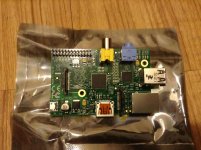
Got me a slice of Raspberry Pi!

OK, I know that this isn't a classic Mac snag, but I'm really stoked that I finally got my Raspberry Pi in the mail. I'm actually using it as I type. :lol: I have to admit that it's a really neat feat of engineering. I originally bought this so I could turn it into a Raspberry Pi-cade, but I think I might get another one so I can have a spare to mess around with while the main one is in the 'cade. My biggest problem is that I haven't been able to get MAME4all working on it yet. I have the program downloaded, and I have the necessary ROMs to go with it, but I have absolutely no idea how get it working. I've tried googling various tutorials on how to get it working, but they were about as helpful as smashing the Pi with a rock. So does anyone on here know how to get MAME4all running?

Pic related: It's my Pi.

1026243_528620120508653_1883785665_o.jpg

 
FWIW, the latest pimame includes mame4all. The pimame thing is just a customized raspbian image. I'm using that on my arcade setup.

I'm also using bunches of pi's to run my own cable tv setup. I run openelec on them with composite out, feeding into agile modulators that put each pi onto it's own cable tv channel. Each pi runs a playlist (on shuffle/repeat all) off of my iTunes library. So it's basically ye olde cable tv, but you control the content.

They're versatile devices to be sure. Their greatest value is all the software support. Technically speaking, there are better, more capable devices out there, like the Beaglebone Black. Unfortunately, they lack the software support the pi has. The pi has had a few years to refine the software stack, so who knows. Maybe the other devices will improve their software support over time.

 
You sir just made my day by posting that link. I'm going to load that onto my SD card and give that a shot. I've been having a crazy time trying to get Raspbian to run MAME since it hates EVERY SINGLE ROM that I throw in there. :lol:

 
Oh, so here's the joy of using MAME.

MAME hard codes the list of ROMs, their names, and their checksums/sizes, etc. And with each release things are added, changed, and rearranged.

Also, MAME ROMs are not standalone. They have parent/child relationships in the sense that the parent ROM has all the files it needs to run (maybe), and variations on that ROM will only include the files that changed. So for example, Pac-Man is a variation on the Japanese version Puckman. So the pacman.zip ROM can't run without the puckman.zip ROM being present. There's not really any good way to view these relationships. The windows-based MAME UI program has all that hard coded into it, so you need to find the version of MAMEUI that corresponds to the ROM set you have.

These relationships can change from release to release. The "maybe" I added in there refers to other ROMs that may be necessary, like for NeoGeo systems, they need the neogeo BIOS ROM. And for CPS2 systems, they have a qsound chip that needs the qsound ROM too. All of this changes from release to release as new hardware is emulated, or whatever.

So in summary, you really need the ROM set that matches the release of MAME you're using. Any old MAME ROM may or may not work depending on what ROM set it is from, what MAME version you're using, and what changed in the interim between those two releases.

MAME4ALL is based on version 0.37b5 of MAME, which is a particularly old release of MAME. But it has its reasons. Mainly, that is when fundamental changes to MAME took place that made it less suitable for lower powered systems. That's also the reason MAME4ALL is typically used on phones and other devices. Since it is a particularly old version of MAME, it also doesn't have support for everything that has been added in the interim.

 
Back
Top