• Hello MLAers! We've re-enabled auto-approval for accounts. If you are still waiting on account approval, please check this thread for more information.

Good video cards for IIsi

I've been restoring and upgrading a Macintosh IIsi, and am thinking about how I could improve performance further. One thing that comes to mind, since I have the Nubus riser card, is upgrading the onboard 'vampire' video.

Am I right in thinking it's a limiting factor?

I am not worried about having higher resolutions or bit depths as I am running an Apple 13" Hi-Res monitor that's fixed at 640x480.

Which cards would provide a performance increase so I can (for e.g.) play Hellcats more smoothly?
 
There are lots of options, an 8bit Radius Pro 8xj perhaps?

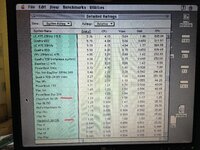
Have you considered overclocking to 25MHz? It made a disproportionate difference when I benchmarked a little while ago. These were the relative scores before and after :

IMG_20221111_143636.jpg
 
I have Radius Precision color 24x (pro) in it and it runs very well. It is 7” long and it fits perfectly. I have also installed custom rom simm that makes it faster booting, it skips ram check (65 mb).

Hope to try this overclocked variant soon, thanks to @Phipli :)
 
There are lots of options, an 8bit Radius Pro 8xj perhaps?

Have you considered overclocking to 25MHz?
Yep, I've swapped out the clock crystal and am running at 25MHz. It did make a noticeable improvement. I've got 65MB RAM and a 7,200RPM drive in there too.

I guess I'm just curious to know if the onboard graphics is considered a real bottleneck. If not an ethernet card could be a better use of the slot...
 
I have Radius Precision color 24x (pro) in it and it runs very well. It is 7” long and it fits perfectly. I have also installed custom rom simm that makes it faster booting, it skips ram check (65 mb).

Hope to try this overclocked variant soon, thanks to @Phipli :)
I'm surprised it isn't with you yet. It must be getting close :)
 
No, that card is unaccelerated, you'd likely find it slower, although it would possibly slightly improve RAM access.
OK, so the key is to find an accelerated card. Does that exclude all Apple cards (except the GC one that came with the IIfx)?

I've installed IIsi RAM muncher, btw. I don't know why Apple didn't just install dedicated VRAM on the 'board.
 
OK, so they key is to find an accelerated card. Does that exclude all Apple cards (except the GC one that came with the IIfx)?
The Apple 24 AC is also accelerated, but its mostly 3rd party cards.
I've installed IIsi RAM mucher, btw. I don't know why Apple didn't just install dedicated VRAM on the 'board.
:) I'm old fashioned - back when I had used of one I just had the disk cache set to 1MB.
 

Increase the disk cache to improve onboard video performance in the IIsi. I tried it and it did make a significant difference.
 
I've been restoring and upgrading a Macintosh IIsi, and am thinking about how I could improve performance further. One thing that comes to mind, since I have the Nubus riser card, is upgrading the onboard 'vampire' video.

Am I right in thinking it's a limiting factor?

I am not worried about having higher resolutions or bit depths as I am running an Apple 13" Hi-Res monitor that's fixed at 640x480.

Which cards would provide a performance increase so I can (for e.g.) play Hellcats more smoothly?

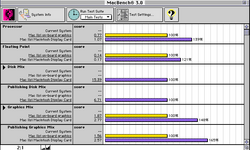
I recently restored a IIsi with a Macintosh Display Card and did the following benchmark.

666BA578-47D0-479D-80B7-A87AA930B857.png
 
For what it's worth, after trying both I ended up leaving a network card in my IIsi and doing the disk cache trick that @joshc posted, which I found the best overall usefulness tradeoff. Your mileage may, of course, vary, though...
 
Intermediate question. Does the overclocked IIsi needs a heat sink on 68030? The IIci runs at same speed and it does not have it.
 
Intermediate question. Does the overclocked IIsi needs a heat sink on 68030? The IIci runs at same speed and it does not have it.
I mentioned including one because the 68030 in your IIsi is a 20MHz grade chip and 25MHz is a 25% overclock. If you just want to try it, go for it. If it overheats all that is likely to happen is it crashes.

It will most likely be fine.
 
I mentioned including one because the 68030 in your IIsi is a 20MHz grade chip and 25MHz is a 25% overclock. If you just want to try it, go for it. If it overheats all that is likely to happen is it crashes.

It will most likely be fine.
I think everyone has been successful with the 25MHz overclock - I don’t recall anyone reporting problems unless they tried to go even faster.
 
This is really useful to see, thank you!

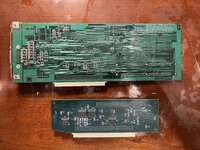
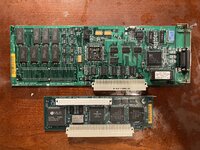
What is the Macintosh Display card? Is that its proper name? Did it come with another Mac, was it an aftermarket accessory, etc?
Yes, Macintosh Display Card is the name printed on the silkscreen. It came with the IIsi along with the angle adapter when I bought it via Yahoo Auctions Japan. I don’t know if I came original or was an accessory.

0AD9FFF0-E126-4808-92EF-53DA4B85B855.jpeg
 

Attachments

  • E5C74D33-284E-4209-B9E6-7CF10F65B9A1.jpeg
    E5C74D33-284E-4209-B9E6-7CF10F65B9A1.jpeg
    4.5 MB · Views: 38
To clarify, we'd normally call that the "Apple 4•8 Display Card". It is an unaccelerated framebuffer card, that can do 24bit if you add two VRAM (256k?) SIMMs.

Looking more closely - the SIMM sockets might not be populated, which would make it an "Apple 8•24 Display Card"... the 24bit version. Its hard to tell from the back of the card.
 
Back
Top