


I got an email last week from my electronic surplus shop, I almost skipped over it, but I figured they may be having another sale or something. It turns out, they are retiring the business and will be closing in 6 months, crap!
Everything is 20% off, and the discounts will only be greater over time. I will imagine they will still have most of the store to clear when they are locking their doors for the last time, so I will imagine I can score some free/dirt cheap items for the collection and resale pile.
Anyway, I headed up there today for the Quadra 950 and some IIvx computers, but I was thinking resale, as I have spent a lot of money on some stuff I will not be selling. I didn't feel ashamed for passing up the $40 Q950 because it is pretty trashed. There is no front case, it looks as it was literally smashed off, some stuff inside is bouncing around and bent up. I will be getting that later.
I saw some Mac Pros, and decided that shouldn't be too hard to upgrade, repair, and resale, so I got my sales guy to get me a price. He gave me $130, but I didn't feel satisfied with only the Pros. I headed over to the vintage shelf and picked up an IBM I knew nothing about, but wanted because it looked interesting.
He priced $145, I said 140, and we made a deal.
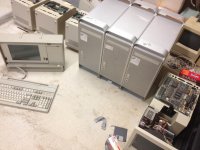
3x G5 Pros, and an IBM PS/2 Portable that I saw selling for twice what I paid for the lot. Not bad! I am now attached to the IBM, so I will not be selling it.
Everything is 20% off, and the discounts will only be greater over time. I will imagine they will still have most of the store to clear when they are locking their doors for the last time, so I will imagine I can score some free/dirt cheap items for the collection and resale pile.
Anyway, I headed up there today for the Quadra 950 and some IIvx computers, but I was thinking resale, as I have spent a lot of money on some stuff I will not be selling. I didn't feel ashamed for passing up the $40 Q950 because it is pretty trashed. There is no front case, it looks as it was literally smashed off, some stuff inside is bouncing around and bent up. I will be getting that later.
I saw some Mac Pros, and decided that shouldn't be too hard to upgrade, repair, and resale, so I got my sales guy to get me a price. He gave me $130, but I didn't feel satisfied with only the Pros. I headed over to the vintage shelf and picked up an IBM I knew nothing about, but wanted because it looked interesting.
He priced $145, I said 140, and we made a deal.
3x G5 Pros, and an IBM PS/2 Portable that I saw selling for twice what I paid for the lot. Not bad! I am now attached to the IBM, so I will not be selling it.






