• Hello MLAers! We've re-enabled auto-approval for accounts. If you are still waiting on account approval, please check this thread for more information.

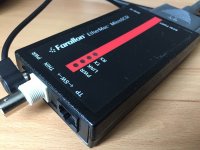
Farallon EtherMac MicroSCSI

Several utilities (TattleTech, SCSI Director etc.) can see this adapter on SCSI ID 5 and read it's informations (adapter version etc.).

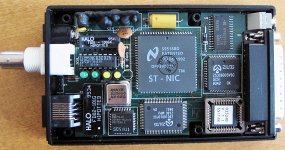
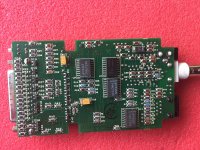
I also opened the adapter. It's power supply should deliver 5 volts - it's 4,8 volts.

Power LED is on, but there's no Link LED when I connect it to an old 10base-T Hub or a 10/100 switch, which are connected to my home net. 

Should I try to connect the SE/30 with MicroSCSI to an old 68k PowerBook (540c) via crossover cable? (must first search for one in my cellar...)

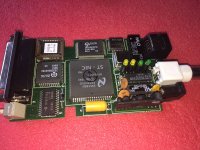
MicroSCSI inside.jpg

 
Last edited by a moderator:
Well if you can never get it to link, chances are it was a victim of a lightning strike. I have seen a ton back in the day. 

the big HALO matching transformer is probably open circuit as a consequence, you will have to meter it and see for sure though. 

Oh.. And... you did flip the switch. right? 

 
Last edited by a moderator:
Yes, I did flip the switch. :)
Is there a chance to get the adapter work again, if a lightning strike ruined the transformer?
In the meantime I found a crossover cable...

 
Should I try to connect the SE/30 with MicroSCSI to an old 68k PowerBook (540c) via crossover cable?
And so I did, I also changed the SCSI ID.

The Link LED is blinking now when I restart the SE/30 and network software extensions are loaded. After that, the Link LED is dark again. 

I installed several software packages (Asante, Farallon) to get any help from its utilities, but that doesn't really work, as these utilities need their special network adapters.

Nevertheless I see the Link LED blinking sometimes, when this software starts. 

What should this say that to me??

As I'm very patient today, I'm installing a fresh system now to do more tests. :)

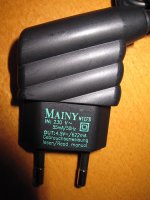
Maybe the power supply which I got with the adapter is wrong, so here's a picture.

It's important to me, to determine if the adapter is faulty or if I'm too silly to install the adapter without (missing) docs. :)

image.jpeg

 
As far as I found out, the power supply is not original: it should be 5 volts, not 4.5, so I'll search for a fitting one. 

 
[SIZE=12pt]PN574-C    EtherMac MicroSCSI Adapter PowerBook[/SIZE]

[SIZE=12pt]PN575-C    EtherMac MicroSCSI Adapter Macintosh[/SIZE]

[SIZE=12pt](the number in my first post was wrong)[/SIZE]

[SIZE=12pt] ADB delivers 5 volts. [/SIZE]

[SIZE=12pt]Does your adapter work well?[/SIZE]

 
Last edited by a moderator:
I tried the Iomega Zip power supply today which delivers exactly 5.0 volts with my MicroSCSI adapter: same results.

Link LED is blinking several times when my SE/30 is booting and thats all.

Ping tests from both Macs: timeouts...

I think I should give up: I've really bought a faulty adapter, grrrr@&€()%¥~$$$. :(

Now I'll have to wait for my Asante MacCon. I hope it's not faulty too...

 
Last edited by a moderator:
Finally this is what TattleTech tells about Farallons MicroSCSI adapter:

[SIZE=12pt]SCSI Device# = 6[/SIZE]

[SIZE=12pt]   ◊ Device Status = Device Connected[/SIZE]

[SIZE=12pt]   ◊ Name = NA[/SIZE]

[SIZE=12pt]   ◊ Driver# = -39[/SIZE]

[SIZE=12pt]   ◊ Type = 3   (Processor)[/SIZE]

[SIZE=12pt]   ◊ Manufacturer = Farallon[/SIZE]

[SIZE=12pt]   ◊ Product = EtherMac SCSI[/SIZE]

[SIZE=12pt]   ◊ Revision = 1.10[/SIZE]

[SIZE=12pt]   ◊ ROM Revision = C2100468B9D24000[/SIZE]

[SIZE=12pt]   ◊ Device Attributes :[/SIZE]

[SIZE=12pt]      + ANSI Compliant = Yes  (SCSI 1)[/SIZE]

[SIZE=12pt]      + ECMA-111 Compliant = No[/SIZE]

[SIZE=12pt]      + ISO IS 9316 Compliant = No[/SIZE]

[SIZE=12pt]      + Wide SCSI (32-bit Transfers) = No[/SIZE]

[SIZE=12pt]      + Wide SCSI (16-bit Transfers) = No[/SIZE]

[SIZE=12pt]      + Fast SCSI (Synchronous Transfers) = No[/SIZE]

[SIZE=12pt]      + Linked Commands = No[/SIZE]

[SIZE=12pt]      + Tagged Command Queuing = No[/SIZE]

[SIZE=12pt]      + Soft Reset = No[/SIZE]

[SIZE=12pt]      + Relative Addressing = No[/SIZE]

[SIZE=12pt]      + Terminate I/O Process = No[/SIZE]

[SIZE=12pt]      + Asynchronous Event Notification = No[/SIZE]

[SIZE=12pt]      + Response Data Format = 1[/SIZE]

[SIZE=12pt]---------------------------------- [/SIZE]


I had the exact same issue with my Farallon SCSI adapter.  It was the larger desktop version, but I never got it to work.  The lights would flash on boot and when loading the driver, but then nothing else.

Also, if I ran the network utility, it'd freeze the computer.  I eventually sold it as salvage.  I never did figure it out.  I sure hope you do, you seem more knowledgable about the technical side of it.

 
[SIZE=12pt]Does your adapter work well?[/SIZE]
I only used my Asante MicroEN/SC maybe twice with my PB 180 probably ~20 years ago. It worked fine then! :)

Back then I had several external SCSI enclosures and Appletalk-capable Macs and the internet was still mostly dial-up so there wasn't much need for it.

 
I bought my adapter for about $ 25 several months ago and was proud of this good purchase, as I never saw this adapter before and after. :)

Until yesterday I thought I was to stupid to install this adapter. ;)

 
Pretty sure my Futura II 10baseT daughtercard has a part similar to the HALO labeled transformer, but the ThinNet daughtercards don't. Maybe  a transceiver will work for that channel where the 10baseT section might be cooked?

 
Pretty sure my Futura II 10baseT daughtercard has a part similar to the HALO labeled transformer, but the ThinNet daughtercards don't. Maybe  a transceiver will work for that channel where the 10baseT section might be cooked?

 
Is the the transformer the part near the 10base-T connector? An IC is also labeled "HALO".

Hmm, I'll look for a [SIZE=12pt]hypothetic 10BASE2 to 10BASE-T[/SIZE] transceiver... :)

 
Last edited by a moderator:
Back
Top