

• Hello MLAers! We've re-enabled auto-approval for accounts. If you are still waiting on account approval, please check this thread for more information.

Duplicated floppy icons.

I'm not sure if I'm doing something wrong, but I'm getting the same floppy icon over and over whenever I put the disk back in.  I'm ejecting it each time.  Is it something I'm doing wrong?

I've just installed OS X 10.5.4 on a Mac Mini I forgot I had.  It's made transferring files so much easier than the DD command!  Anyway, I'm copying a file on the Mini, then putting it in the SE/30 and copying it, then ejecting the disk, putting the disk back in the Mini, deleting the file, putting the next one on, and so on.

It's not a big deal, as they go when I reboot, but it's annoying.
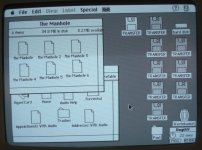
Cimg7197s.jpg

 
I'm not sure if I'm doing something wrong, but I'm getting the same floppy icon over and over whenever I put the disk back in.  I'm ejecting it each time.  Is it something I'm doing wrong?
Use "Put Away" in the File menu or drag the disc icon to the Wastebasket, rather than using the Eject command.  The Eject command leaves a ghost on the desktop to make floppy-to-floppy copying possible.  Not one of Apple's better UI decisions.

 
Drag the disk to the bin?  I'd expect that to delete everything on it!

Thanks :-)  

I'll try to remember to not eject the disk when I want to eject it, and put it in the bin when I still want it!   :blink:

 
Drag the disk to the bin?  I'd expect that to delete everything on it!

Thanks :-)  

I'll try to remember to not eject the disk when I want to eject it, and put it in the bin when I still want it!   :blink:


Yep, there were SO many old school memes back in the day over this. 

 
Use "Put Away" in the File menu or drag the disc icon to the Wastebasket, rather than using the Eject command.  The Eject command leaves a ghost on the desktop to make floppy-to-floppy copying possible.  Not one of Apple's better UI decisions.
Hold up though, this is in fact actually weird.

While it's true one can avoid this altogether by dragging the disk to the Trash, if you "Eject" then re-insert the same disk, it should "un-ghost" the existing icon, not add a new one.  So this shouldn't happen no matter what.

So, something is indeed amiss here.

 
So, something is indeed amiss here.
I assumed the OP was doing something to the disc while it wasn't inserted that was making the SE/30 see it as a new disc.  I don't actually know how the change detection works, but ...

 
Last edited by a moderator:
I assumed the OP was doing something to the disc while it wasn't inserted that was making the SE/30 see it as a new disc.  I don't actually know how the change detection works, but ...
You assume right, as the OP mentions he puts the disk back in the floppy drive attached to his Mac Mini, where he deletes the transferred file and puts on another file for transferring.

Mac OS X still has the "dragging the disk to the bin ejects it" feature, but in most if not all versions, the bin icon on the dock will turn into an eject icon when you grab the drive's icon.

 
Last edited by a moderator:
Back
Top


