• Hello MLAers! We've re-enabled auto-approval for accounts. If you are still waiting on account approval, please check this thread for more information.

Daystar Genesis PSU

Does anyone know what power supplies Daystar equipped their Genesis line with? I would assume it would be the same as a 9500 but I also know some of the clone makers stuck to off the shelf ATX parts for many things.

Thanks!

 
Powertrip,

I can pull the cover on my Genesis and let you know. Honestly don't remember if it looked like an off-the-shelf part (Apple or ATX) or if it was proprietary.

Will give me chance to fire up that guy as well :) Should be able to get to it this weekend.

 
Sounds great. Thank you so much!

What are the specs on yours? The only thing I know about mine is that it has 4x 200MHz processors and a TwinTurbo graphics card. But as with my 9600 and G3 projects, I am excited to find out!

 
No worries. Project is on my list but not a super priority. Once I get her up and running though... I will probably take you up on your offer for those MP enable extensions/files!

 
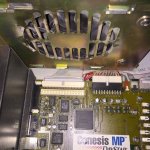
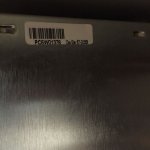
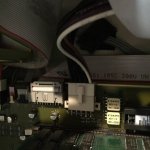
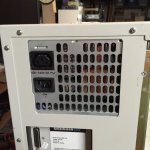
Here are some pics on the PS in my Genesis MP.

The board, I believe, is just the Apple board with a Daystar sticker on it, so I don't know why the Apple PS wouldn't work in theory; however the Genesis has a lot of leads to supply the drive cages, the power connector to the CPU board, etc. so I don't know if the Apple PS would cover all those bases.

I tried to power up the machine, but while I got chime, I didn't get any video out or signs of otherwise booting. I've had this happen before. Usually re-seating the processor card would allow the machine to boot, but that didn't happen this time. I put in the G3 upgrade card that the machine came with originally, and same result. PRAM battery is good, in case that matters.

I didn't take a close look at them, but there are a lot of caps that probably need replacing on that board. Uniserver will probably be getting an email soon : :)

Hope these pics help. If you need the Daystar files for the machine, there are ways...
IMG_0979.jpg

IMG_0980.jpg

IMG_0983.jpg

IMG_0985.jpg

 
Troubleshooting 101 - make sure all cards - especially the video card! - are fully seated in their slots.

Once that was done, the machine boots fine. :)

 
Back
Top