• Hello MLAers! We've re-enabled auto-approval for accounts. If you are still waiting on account approval, please check this thread for more information.

Cloning a PowerBook 100 HD

New member here! Learning a lot from reading all the great posts. Apologies for all the questions below!

I'm in the process of recapping my PB100, which has a 40 MB Quantum Go drive. I purchased this PB back around 1993 when they went on sale for ~$900 and I used it for a number of years. Now, I would like to restore it and clone the internal HD because I have a number of programs and files on it.

If all goes well with the recapping and the PB100 is running and if the HD works (a lot of ifs), what is the best way to clone the drive and to transition to an internal replacement drive? If I purchase a ZuluSCSI Pico Slim and connect it to the PB100, will it be recognized and will I be able to transfer files to and from my internal HD? What software would be best to use to clone the HD? I have the external floppy drive, but I don't want to deal with backing up to dozens of floppy discs, if I can avoid that.

What is the best replacement for the HD; a ZuluSCSI internal drive, or a BlueSCSI? How would I then restore my cloned system onto this replacement drive?

Any advice is greatly appreciated! Many thanks in advance!
 
a zuluscsi in initiator mode would be ideal for cloning the disk, but it's only available on the larger internal boards. you'd need to install it in an external enclosure... or install it in another mac and use the pb100 disk mode cable too connect it to that.

realistically, you're gonna get about one shot to image it. most likely you'll need to unstick it and it will probably die after a few more powerups,

replacement wise, most options are fine. stay away from the bluescsi v1, it's a compromised hardware design.
zuluscsi 2.5", gbscsi 2.5", scsiknife 2.5" are all functionally identical for this task. bluescsi v2 is derived from the zulu design and so is a functional equivalent.
 
If you have a desktop SCSI equipped Mac or PowerBook with adequate storage to spare, a SCSI Disk Mode Cable (or PB adapter with Disk Mode switch setup) will allow you to copy the PB100 disk's contents over to the host Mac's HDD in one fell swoop. ;)

I'm right there with you on this, snagged my very first ever PB/Sub-NoteBook the same way you did, NIB remaindered PowerBook 100 in the wayback!

Don't ever worry about what you might ask here, swapping info and learning about all but useless (if utterly fascinating) crap is exactly why this place has been here for over two decades!:D
 
Thank you, both! Unfortunately, I don't have any other SCSI Macs. I have a tangerine iBook, a Blueberry iMac G3, and Power Mac G5, but no SCSI Macs.

Does anyone know if the ZuluSCSI Pico Slim works with the PB100? And if so, would I be able to boot off of the ZuluSCSI Pico Slim?
 
Other option: if you can get an external BlueSCSI or equivalent, and adapter cable for the 100, just mount that on the 100 and use Disk Copy to make an image of the drive onto that.
 
Not sure if the 100 has termination power for that? But if so, no cable required. T or L shaped adapter will work great.
Any of the whatever->SCI setups can be powered via USB port no?
 
Not sure if the 100 has termination power for that? But if so, no cable required. T or L shaped adapter will work great.
Any of the whatever->SCI setups can be powered via USB port no?
Generally they are amenable to USB power, yes. I think this might be the easiest way for him to go rather than a larger setup.
 
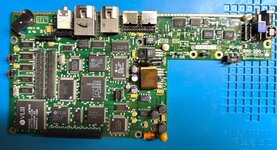
Update! My PB100 is now working, but it took 2 times replacing caps on it. The first time I replaced the old caps with tantalum caps:

Tantulum.jpeg

But the PowerBook did not work at all. No chime, nothing on the screen. The HD made some sounds, but then stopped doing anything.

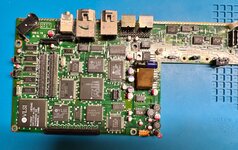
I read a post in these forums that mentioned that the PB100 works best with electrolytic caps, so I removed the tantalums and replaced them with electrolytic caps, except in the LCD, I kept the tantalums on there (for now?):

Electrolytic.jpeg

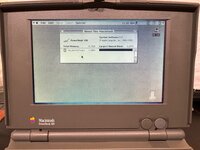
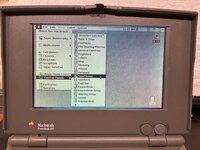
Now, everything works! This is the first time I have powered up this laptop in ~30 years! I was surprised to see all of the extensions I had running on it. In particular, the extension(s) that give you an Apple menu with sub-menus that branch off.

PB100.jpg

Apple menu.jpg

I do see now that there is some ghosting above windows that extends to the top of the screen. I didn't actually notice it until I took pictures of the screen. Is that due to issues with the LDC caps?

Anyway, I'm encouraged to work with it some more. I did find an old external SCSI HD, so I'm going to purchase cables to see if that works and if perhaps I can use that to clone my internal HD to replace it with a ZuluSCSI. If that doesn't work, I'll try one of the suggestions above.
 
Nice work! They are tricky machines to resurrect so good to see another alive. Yes, the banding from the LCD is due to 8 x leaking caps on the inverter/controller board inside the LCD casing. Can confirm they need replacing for a better display, but you'll always see some ghosting due to the LCD style.

If you have an old SCSI controller on a Mac/PC it might be cheapest to get a 2.5" to 3.5" SCSI adapter and plug into an external SCSI case this way to transfer data.
 
Good news! I was able to clone my internal HD and now have everything working on a ZuluSCSI 2.5 unit installed in the PB100.

Before I got my PB100 working, I had purchased a working PB100 off eBay just in case I could not get mine to work. My recap did eventually work, as noted in the earlier post, so now I have 2 working PB100s. The one from eBay is my test machine (the screen has purple trackball markings on it). I was able to get the ZuluSCSI 2.5 working in the test machine, then I purchased the ZuluSCSI Pico Slim and that also worked on the test machine.

Next, I attached the Pico Slim to my PB100, which booted off of the internal HD, and it did not recognize the Pico Slim at all--none of the 3 drives on the SD card loaded. So, I installed the ZuluSCSI 2.5 in my PB, along with the SD card from the Pico Slim and booted off of that. I then chose one of the Pico Slim drives in the Startup Disk control panel and restarted. That all worked fine.

Next, I put my HD back in my PB, then used the SD card in the Pico Slim, and the PB booted off of the Pico Slim and recognized my internal HD and all the other drives on the SD card. At that point it was super-easy to copy all of my files from my internal drive to the Pico Slim, then remove the HD and install the ZuluSCSI 2.5 with that same SD card that was in the Pico Slim, and now everything is working off of the internal Zulu.

Now, I can use the Pico Slim to transfer files from my MBP to the PB100 without having to remove the SD card from the internal Zulu. The ZuluSCSI Pico Slim is great! I was so happy to see that the PB would boot off of the Pico Slim!
 
100 batteries are lead-acid unlike the rest of the PowerBook line which used Ni-Cd.
You could put a Ni-MH or Lithium pack inside a gutted 100 battery and run off that, charge externally in dedicated charger. Use diodes to prevent the PowerBook from charging the battery itself
 
Back
Top