


I have been trying to install AOL on my iMac G3 to get on our Internet network at home. Since AOL stopped producing Mac versions after 4.0 (which in actual fact is 6.0), I have to use the 1999 version (4.0).
Anyway, I did a clean install of Mac OS Tiger, and in the process, the Classic environment was removed. I do not own the original copy of 9.1 (I do, however have System 7, 7.5, 8 & 10.4 in their original boxes, and with the original discs/floppies), and as a result, I relied on a duplicate copy I made of 9.1 from a borrowed authentic disc.
AOL 4.0 requires Classic to load. Here is the result I am getting:
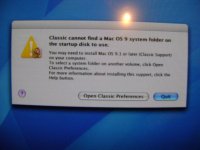
I have already tried to drag the System folder from the disc to the Classic folder on the "Libraries" section. No luck. In addition, I have also tried holding down the "C" key when restarting the iMac. The disc does not boot.
Any suggestions? (btw, I cannot install OS 9 from the desktop, as Tiger attempts to open the Classic Environment. I do not have the software reinstall discs for this iMac, and the ones for my iBook G4 do not work, as the computer states that these are the incorrect software discs).
Anyway, I did a clean install of Mac OS Tiger, and in the process, the Classic environment was removed. I do not own the original copy of 9.1 (I do, however have System 7, 7.5, 8 & 10.4 in their original boxes, and with the original discs/floppies), and as a result, I relied on a duplicate copy I made of 9.1 from a borrowed authentic disc.
AOL 4.0 requires Classic to load. Here is the result I am getting:
I have already tried to drag the System folder from the disc to the Classic folder on the "Libraries" section. No luck. In addition, I have also tried holding down the "C" key when restarting the iMac. The disc does not boot.
Any suggestions? (btw, I cannot install OS 9 from the desktop, as Tiger attempts to open the Classic Environment. I do not have the software reinstall discs for this iMac, and the ones for my iBook G4 do not work, as the computer states that these are the incorrect software discs).




