

• Hello MLAers! We've re-enabled auto-approval for accounts. If you are still waiting on account approval, please check this thread for more information.

changing multiplier on G4 CPU card

feltel

6502
I want to downgrade my new G4 Cube from a active cooled 1.2 GHz CPU to a stock configuration to make it fanless. I got myself a 466 MHz CPU card from an later Sawtooth I believe. To make it Cube-"compatible" I have to raise the CPUs multiplier from 3.5 (466 MHz = 133MHz bus * 3.5) to 4.5 or 5. I want to give the machine a slight performance boost.
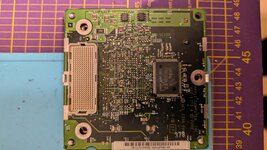
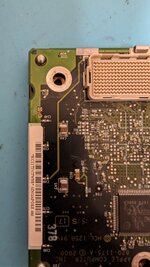
PXL_20241011_041017708.MP.jpg PXL_20241011_041043148.MP.jpg

According to https://www.macinfo.de/tuning/tuning-g4saw.html I had to move the resistor from R13 to R9. I did this but the machine does not chime. I wonder if the resistor values do matter. On my CPU there was a 1k resistor on R13. On most of the photos in the net there are 81 Ohm resistors used in the "coding jumpers". Some speak of using conductive paint. Do resistor values matter or may I use whatever I found to connect the two solder pads?

Maybe slightly overclocking the CPU from 466 MHz to 500 Mhz was to much for this specific CPU or maybe the CPU was dead from the beginning. I dont know. To bad I did not try the CPU before modifying it.
 
I reconfigured the CPU at 4.5 multiplier. But even then the Cube does nothing. The CPU is probably bad. Bummer.
 
Small but important update: It's not the CPU that is faulty. It must be the power switch. As soon as the power switch of the cube is connected to the logic board it powers on instantly, then flashes a few times and then power cycles. If I disconnect the power button module this does not happen. And I can successfully power on the logic board by the keyboard. And after some secondy the flashing folder icon appears as expected. So I think I'm heading over to the G3/G4 section of the board to try diagnose (and fix) the power board issue.
 
It's probably the power switch itself, see if you can use the Wayback Archive and trawl through CubeOwner with what used to be various simple fixes for the touch sensitive switch.

Are you overclocking to a 133Mhz bus? I'd not, it was not reliable on any G4 keep at 100Mhz bus and try for 500, 550 on this CPU. Any Cube upgrade (CPU, GPU, even a better HD) does increase heat so a slow slimline fan is recommended for any upgrade. Also it's vintage and anything you can do to keep it cooler will make it last longer without fear or overheating and killing components. There are much better quieter slimline fans nowadays or you can fit a full size 80mm in there too with some case adjustments.
 
As @Byrd stated, there are some fixes posted on Cubeowner. My button was a little sensitive, so I put Kapton tape around the circumference around the button help with that.
 
Re: power button issues, my understanding is that there is a foam gasket that couples the indent on the case to the actual sensor switch, and weird behavior like this can happen when that foam gasket deteriorates, which is inevitable given its age.

The definitive fix, therefore, is to somehow restore or replace that gasket. I don't remember if anyone said that simply using it without a gasket works, but you could try? The worst that'll happen is that it will behave the same.

c
 
In the end it was a grounding issue I believe. The upper part including the button was mechanical not connected to the base. Just plugged into the LB for testing. As soon as the metal touched the base it all worked as expected. So the metal top must be connected to the base in some ways to have proper grounding.
 
Thanks for posting the outcome of your troubleshooting. For others who may be testing a Cube in various states of assembly: the logic board can run without the power button connected. You can momentarily short a couple of the pins (as on most types of soft-power computers) or use one of the USB power buttons, open firmware settings, etc.

For a fanless Cube, the 7410 G4 chip is a good option. For even lower power you could reduce its speed/voltage settings (vs the default apple "turn it to eleven" approach).
 
Back
Top

