

• Hello MLAers! We've re-enabled auto-approval for accounts. If you are still waiting on account approval, please check this thread for more information.

BlueSCSI on SE/30 problem

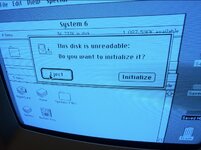
Hello. I just installed a BlueSCSI in my SE/30, and it's booting and recognizing the drives fine, but on booting I get this error message (see attached image). If I click "Eject" it just pops up another identical message. If I click "Format" it says the disk is write protected. I tried disconnecting the floppy drive, leaving only the BlueSCSI but I get the same thing. Not sure what to try now.

Here's a link to the log file: https://www.dropbox.com/scl/fi/gvm60ouawuq63gwc7x4tf/log.txt?rlkey=wgjfwlja5y0vpf9xmjma8nufm&dl=0

Thanks for any help!
 

Attachments

  • IMG_8262.jpg
    IMG_8262.jpg
    382.4 KB · Views: 16
The icon in that error message appears to be representing an external floppy disk drive, do you have one of those connected? If not something is making your Mac think that you do? ...or maybe that dialog icon is used for external removable SCSI drives, I take it you don;t have one of those connected?

If you disconnect the BlueSCSI and boot from a floppy disk do you get that error too?

Not sure how the BlueSCSI might be involved though, are all disk image files on the BlueSCSI SD card "HD..." files? Do you have a BlueSCSI ROM drive configured?

...Has your SE/30 been recapped?
 
Hey, thanks so much for the reply!

So...poo. I booted it with only the floppy drive connected and I get the exact same message and icon once it gets to the desktop. That sucks. I guess it's something that went wrong with the motherboard. :-/

It has been recapped, so I'm stumped. I might need to find someone to fix it for me since that kind of problem is beyond me. Ugh...
 
I messed with it more and removing RC10 (filter network) fixed the error messages. The external floppy won't work until I replace it but I don't have an external drive anyway. Yay! Thanks again for all the help!
 
Back
Top
