Beige G3 Dual Monitors?

Nepnep

6502
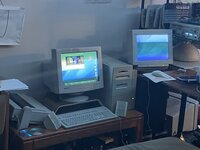
Hello all, and happy new year! I’ve decided to start messing with my Beige G3, which is quite an upgraded model with a sonnet 500mhz G4, ATi Rage 128 with a DVD decoder, and running MacOS 10.4 Tiger thanks to XPostFacto.

But that’s decides the point. I’ve had a spare Multiple Scan 14” display laying around that has the old DB-15 Macintosh Video connector, and I was going to see if I can use it as a second monitor alongside my main monitor on the PCI graphics card. The only problem is that it doesn’t seem to display an image? I know the monitor works, and have heard of people using a setup like this, but has anyone else tried it under an unsupported OS and had any success?

Edit: turns out it does work, you just can’t hot plug the old DB-15 monitors
 
Last edited:
Strange - I don't see why it wouldn't work. Does it work OK if you boot into OS 8 or 9? Shove a boot CD in if you don't have 8 or 9 installed and see what happens.

If you still have trouble in Mac OS 9 I can reproduce your setup if I dig out a monitor (not the same monitor, but I have a G3 and a Rage 128). If it works for me we know something isn't right your side.
 
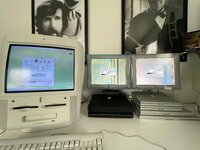
Yep, it works indeed. Here's a G3 AIO driving its internal display with its built-in Rage Pro plus two Studio Displays (VGA & DVI) thanks to a Radeon 9200 PCI card.

IMG_6257.jpeg
 
Strange - I don't see why it wouldn't work. Does it work OK if you boot into OS 8 or 9? Shove a boot CD in if you don't have 8 or 9 installed and see what happens.

If you still have trouble in Mac OS 9 I can reproduce your setup if I dig out a monitor (not the same monitor, but I have a G3 and a Rage 128). If it works for me we know something isn't right your side.
I did edit it to say that it does work. The way I tried it was hot plugging the monitor into the DB-15 connector which I’m guessing is why it didn’t work the first time. But it works now after rebooting.
 

Attachments

  • 126C4D68-8AA9-45F6-A579-A5652F5F9CB2.jpeg
    126C4D68-8AA9-45F6-A579-A5652F5F9CB2.jpeg
    1.9 MB · Views: 23
No you can't and shouldn't with VGA either, they're not electrically designed for it and you could damage the computer.
Yeah, I learned my lesson. I’ve hot plugged vga monitors in before in other computers but that was mostly due to the connection being loose.
 
I did edit it to say that it does work. The way I tried it was hot plugging the monitor into the DB-15 connector which I’m guessing is why it didn’t work the first time. But it works now after rebooting.
Is that a 6360 growing out of a G4 iMac?
 
You can make an adapter that lets you drive the internal monitor using the PCI graphics card to get a bit of a boost on these machines. I have one laying around here some place in fact.
 
Back
Top