• Hello MLAers! We've re-enabled auto-approval for accounts. If you are still waiting on account approval, please check this thread for more information.

Animation - mock game company intro logo made in C

Mu0n

6502
Here's a mock company animated logo intro I made back in 2005 when I had goals of making full fledged games targeting System 6 Macs. It was programmed in C and used a cool little dissolve effect + fast blit non-flickering animation. It was not easy learning what was necessary for game programming in that era. It should be updated to 35 Years Ago Entertainment now, lol (or 40).


That’s nice!   I did fades for games in the Mac II era by messing with the gamma table, didn’t require any fancy bitmap work. How did you do the fast dissolve with a bitmap?

 
I'm fairly certain I found a tech note or a method in a book somewhere about it. Here's the method from my source code:

Code:
short DissolveBox(GrafPtr newImage, GrafPtr destGrafPtr, Rect *source, Rect *dest)
{
	long		offRowBytes, sizeOfOff;
	Ptr			myBits;
	Rect		bRect;
	GrafPort	myGrafPort;
	GrafPtr		myGrafPtr;
	RgnHandle	oldClipRgn;
	int			i, j;
	Pattern		thePattern;
	char		order[16];
	long		randtemp;
	char		ordertemp;
	
	/* the dissolve effect works by creating a random set of patterns which sum
	(OR) to a black pattern.  We make another offscreen bitmap and fill it with
	the pattern at each stage, and use it as a mask for the bitcopy.  Here, we
	create the offscreen bitmap. */
	
	SetPort(newImage);
	bRect = *source;
	myGrafPtr = &myGrafPort;
	OpenPort(myGrafPtr);
	offRowBytes = (((source->right - source->left) + 15) >> 4) << 1;
	sizeOfOff = (long)(source->bottom - source->top) * offRowBytes;
	OffsetRect(&bRect, -bRect.left, -bRect.top);
	myBits = NewPtr(sizeOfOff);
	if(myBits == 0L)
		return -1;		/* memory error */
	myGrafPort.portBits.baseAddr = myBits;
	myGrafPort.portBits.rowBytes = offRowBytes;
	myGrafPort.portBits.bounds = bRect;
	myGrafPort.portRect = bRect;
	oldClipRgn = myGrafPort.clipRgn;
	myGrafPort.clipRgn = destGrafPtr->visRgn;
	
	for(i = 0; i < 16; i++)
		order[i] = i;
	
	/* this randomly shuffles the order in which the pattern bits will appear */
	for(i = 15; i >= 0; i--) {
		randtemp = (((long)Random() + 32767) * (i + 1)) / 65535;
		ordertemp = order[randtemp];
		order[randtemp] = order[i];
		order[i] = ordertemp;
	}
	
	
	for(i = 0; i <= 16; i++)
	{
		StartTiming();
		SetPort(myGrafPtr);
		
		for(j = 0; j < 8; j++) thePattern[j] = 0;
		thePattern[order[i] >> 2] = 1 << (order[i] & 0x03);
		thePattern[order[i] >> 2] |= 16 << (order[i] & 0x03);
		thePattern[(order[i] >> 2) + 4] = 1 << (order[i] & 0x03);
		thePattern[(order[i] >> 2) + 4] |= 16 << (order[i] & 0x03);
        i++;

		thePattern[order[i] >> 2] = 1 << (order[i] & 0x03);
		thePattern[order[i] >> 2] |= 16 << (order[i] & 0x03);
		thePattern[(order[i] >> 2) + 4] = 1 << (order[i] & 0x03);
		thePattern[(order[i] >> 2) + 4] |= 16 << (order[i] & 0x03);
		
		
		FillRect(&bRect, thePattern);
		
		SetPort(destGrafPtr);
		
		CopyMask(&(newImage->portBits), &(myGrafPtr->portBits),
				&(destGrafPtr->portBits), source, &bRect, dest);
		TimeCorrection(CorrectTime);

	}


			StartTiming();
		SetPort(myGrafPtr);
		
		for(j = 0; j < 8; j++) thePattern[j] = 0xFF;
				FillRect(&bRect, thePattern);
		
		SetPort(destGrafPtr);
		
		CopyMask(&(newImage->portBits), &(myGrafPtr->portBits),
				&(destGrafPtr->portBits), source, &bRect, dest);
		TimeCorrection(CorrectTime);

		
	myGrafPort.clipRgn = oldClipRgn;
	ClosePort(myGrafPtr);
	DisposPtr(myBits);
	
	return 0;
}
 
Ahhh that makes sense.  I forgot about CopyMask().  That makes it easier.  Still this is clever.  Very nice thanks!

 
Very cool.  I wish I had the mental aptitude for programming.  I have a lot of ideas, but no way to realize them. :(

 
@Mu0n what do StartTiming() and TimeCorrection() do?  Do those somehow keep the CopyMask() calls in sync with vertical blanking interrupts or ... ?

 
Last edited by a moderator:
@Mu0n what do StartTiming() and TimeCorrection() do?  Do those somehow keep the CopyMask() calls in sync with vertical blanking interrupts or ... ?
Here's the full source code of a simpler project that only dissolves in the moon landscape into view.

Disclaimer:

-I was far less skilled in C back then

-I had too-long-method-syndrome

-Some of those self-made includes are generic and were used in a lot of various tests, so they are a bit on the beefy side

StartTiming just keeps track of the tick count (into a global) of an operation I want to do:

void StartTiming(void)
{
oldTicks=TickCount();
}


TimeCorrection forces a delay for that operation to last a predetermined time:

void TimeCorrection(int tickCount)
{
long newTicks;

newTicks=TickCount();
while (newTicks-oldTicks<tickCount)
Delay(1L, &newTicks);
}


View attachment afasterdissolve.c

View attachment Dissolve wipe.c

View attachment Misc.c

View attachment Misc.h

View attachment Offscreen.c

View attachment Offscreen.h

View attachment Sprites.c

View attachment Sprites.h

 
I made you an example video where CorrectTime is equal to 25 (ms) instead of 1. The effect is significantly slowed down:


Yeah, it forces a delay between each frame. I wouldn't bet much money on it being accurate under every machine, but it tries to.

As for the original question about avoiding vertical blanking interactions - I can't seem to easily find if that project does it. I seem to have made a sprite object and abundantly use my BlitSprite method in Sprites.c, dealing with 3 cases: where the sprite must clean after itself, where there's a mask, or where it doesn't care about what damage it does under itself (white backg). Ultimately, the main Macintosh method I'm using is CopyBits from an offscreen buffer. It seems quick enough to not create flickering. I remember I spent a LOT of time settling on that after a mountain of debugging, searching tech notes and testing many strategies.

Code:
void BlitSprite(SpriteHandle theSprite, short frameIndex){
	BitMap buffBM;
	BitMapHandle buffh = NULL;
	buffBM.baseAddr = NULL;
	
	if(IsSpriteCleaning(theSprite))
		{
		buffh = (**theSprite).buffer;
		if(NULL == (**buffh).baseAddr)
			{
			buffBM.bounds = (*((**theSprite).frames))[frameIndex].bounds;
			InitBitMap(&buffBM);
			(**buffh) = buffBM;
			(**theSprite).bufferRect = (**theSprite).theRect;
			GetSpriteBuffer(theSprite);
			}
			
		HLock((Handle)buffh);
		HLock((Handle)theSprite);
		CopyBits(&(**buffh),&qd.thePort->portBits,&(**buffh).bounds,
				 &(**theSprite).bufferRect,srcCopy, NULL);
		HUnlock((Handle)theSprite);
		HUnlock((Handle)buffh);
		(**theSprite).bufferRect = (**theSprite).theRect;
		GetSpriteBuffer(theSprite);
		}
	if(IsSpriteMasked(theSprite)) 
		{
		DrawMask(theSprite,frameIndex,srcBic);
		DrawSprite(theSprite,frameIndex,srcOr);
		}
	else DrawSprite(theSprite,frameIndex,srcCopy);
}
 
Last edited by a moderator:
@Mu0n Now that you are able to program for System 6, is there a place you would recommend starting for someone who can program in modern languages? Were there books that you remember being helpful? Would it better at this point to learn how to use Retro68?

Thanks!

 
@Mu0n Now that you are able to program for System 6, is there a place you would recommend starting for someone who can program in modern languages? Were there books that you remember being helpful? Would it better at this point to learn how to use Retro68?


The standard intro to Toolbox programming in the System 6 era was the Macintosh C Programming Primer by Dave Mark and Cartwright Reed, ca. 1992.  You will also want a copy of Inside Macintosh: I-III handy.

I have yet to try Retro68, personally, but am still quite happy playing around with Think C++ on my accelerated SE/30.

 
@Mu0n Now that you are able to program for System 6, is there a place you would recommend starting for someone who can program in modern languages? Were there books that you remember being helpful? Would it better at this point to learn how to use Retro68?

Thanks!
@Crutch has the right idea with Programming Primer. I own a physical copy of that book, but you can go check out @pcamen 's scanned collection (far, FAR surpassing my own) of programming books for pretty much every 68k sub-era you want here https://vintageapple.org/macprogramming/

The Mac Toolbox and especially all the Quickdraw functionality is the main objective to tackle with when you do Mac programming. Event Handling for Macs of that era was a nice, gentle in-between intro for me in 2005 before I moved on to Microsoft .NET C# for Windows in the following years. The toolbox will let you add the std mac functionality we all know and love: menu bar, windows (with scrolling or not), button events, mouse events, sound playback, etc.

However, my goal was to reach fluid arcade game level programming as much as I could (think Dark Castle) and the toolbox really shows its limits fast. You have to dive into the world of offscreen bitmaps, Mac Traps, CopyBits (to copy a prepared offscreen bitmap frame into the active screen memory ASAP) the Sound Driver. There's a compromise to be made: the more speed you want, the more close "to the metal" you must get, which involves specific memory addresses that will unfortunately not be compatible with later System versions or machines. I personally didn't care - I always had the Mac Plus or Mac SE in mind with System 6 as the latest. 

Goodies I wish I had for System 6 programming now in 2019:

-A simple way to use github (or any form of version control)

-An IDE which can jump around to variables or methods' definition by highlighting keywords and doing a keystroke

-Keystrokes to go back/forward with the previous item jumping feature

-Not have to shut down the emulator I use for dev, so I can switch to the other emulator for running the program (what a waste of time)

-Better exception error messages

-Autocomplete

Goodies that I'm leveraging in THINK C++

-A companion application called THINK Reference Library - can't do without it. It's like having Inside Macintosh in electronic form. All the Toolbox functions are very well documented in it

-A Popup Funcs add-on which creates this red bubble inside the THINK C++ coding window; it lets you jump to your functions in the code

I've been meaning to check out Retro68k - I think it's mainly targeting people with a modern mac machine - which I don't have. I've been a PC guy since 1993 ! :)

Here's my collection - they are ALL on @pcamen's website, except the Assembly programming one.

I'll try to restore my old website from 2004-2005 as well.
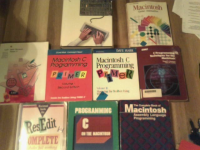
image.png

 
Great collection @Mu0n.  I also really liked Scott Knaster’s books, “How to Write Macintosh Software” and “Macintosh Programming Secrets”, which as I recall dived into some trips and tricks with MacsBug and various things generally only otherwise covered in the Technical Notes.

 
These look like some great resources! I just bought a copy of the Macintosh C Programming Primer for all of $2. @Mu0n: it sounds like I might want to learn the basics of this on original hardware, and then if I start a large project, I would want to use Retro68 to make my life easier. Let me know when your website is up and running!

Retro68 says that it is compatible with MacOS, Windows, and Linux.

 
Back
Top





